Workout Videos: Plays instructive workout animations for a strength, cardio, yoga, or Pilates activity.
Animations are available for pre-installed workouts and workouts downloaded from your Garmin Connect
account.
Activity Alerts
You can set alerts for each activity, which can help you to train toward specific goals, to increase your
awareness of your environment, and to navigate to your destination. Some alerts are available only for specific
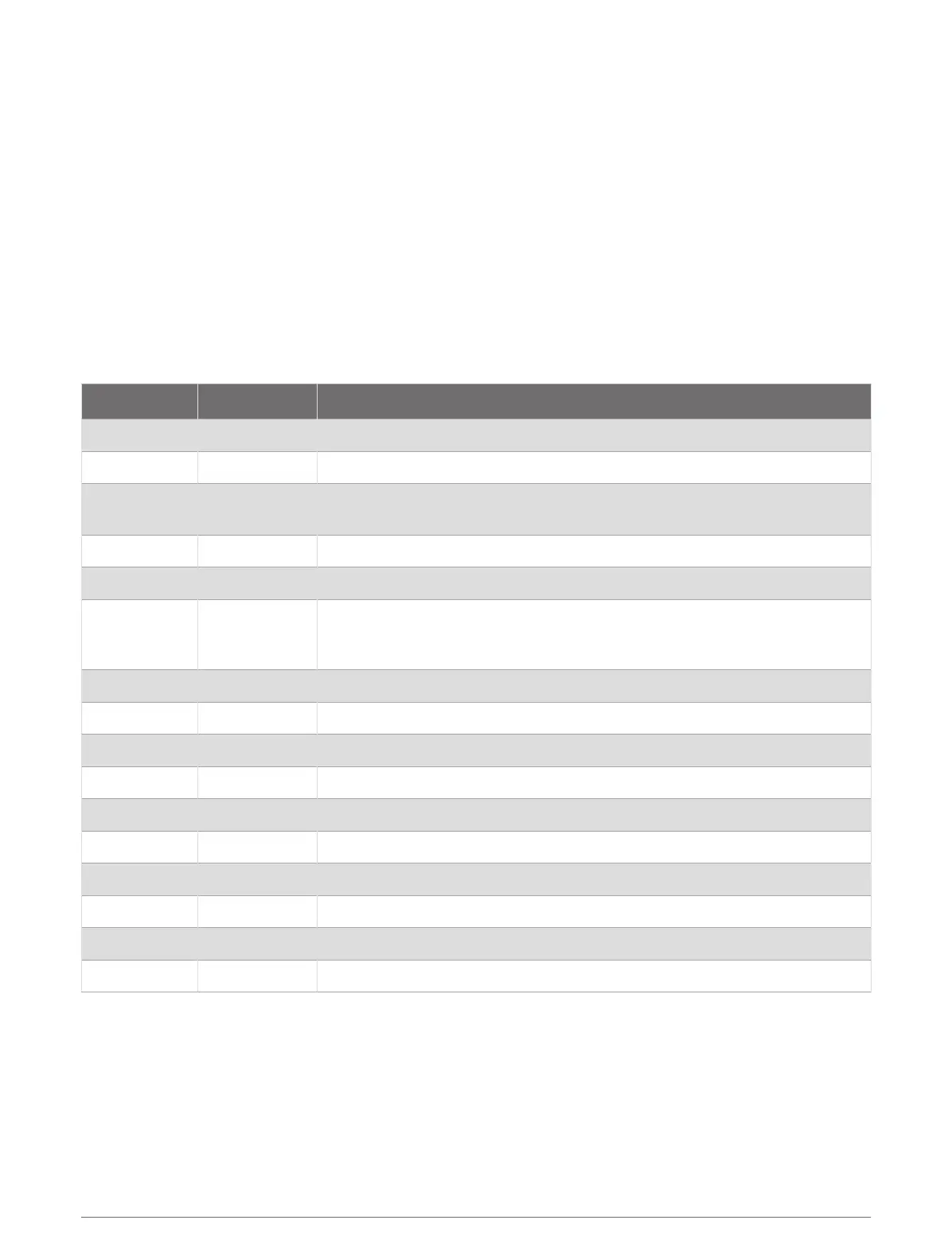
activities. There are three types of alerts: event alerts, range alerts, and recurring alerts.
Event alert: An event alert notifies you one time. The event is a specific value. For example, you can set the
watch to alert you when you burn a specified number of calories.
Range alert: A range alert notifies you each time the watch is above or below a specified range of values. For
example, you can set the watch to alert you when your heart rate is below 60beats per minute (bpm) and
over 210bpm.
Recurring alert: A recurring alert notifies you each time the watch records a specified value or interval. For
example, you can set the watch to alert you every 30minutes.
Alert Name Alert Type Description
Cadence Range You can set minimum and maximum cadence values.
Calories Event, recurring You can set the number of calories.
Custom Event, recurring
You can select an existing message or create a custom message and select
an alert type.
Distance Event, recurring You can set a distance interval.
Elevation Range You can set minimum and maximum elevation values.
Heart Rate Range
You can set minimum and maximum heart rate values or select zone
changes. See About Heart Rate Zones, page115 and Heart Rate Zone Calcu
lations, page117.
Pace Range You can set minimum and maximum pace values.
Pacing Recurring You can set a target swim pace.
Power Range You can set the high or low power level.
Proximity Event You can set a radius from a saved location.
Run/Walk Recurring You can set timed walking breaks at regular intervals.
Running Power Event, range You can set minimum and maximum power zone values.
Speed Range You can set minimum and maximum speed values.
Stroke Rate Range You can set high or low strokes per minute.
Time Event, recurring You can set a time interval.
Track Timer Recurring You can set a track time interval in seconds.
Apps and Activities 47















 To Next Page