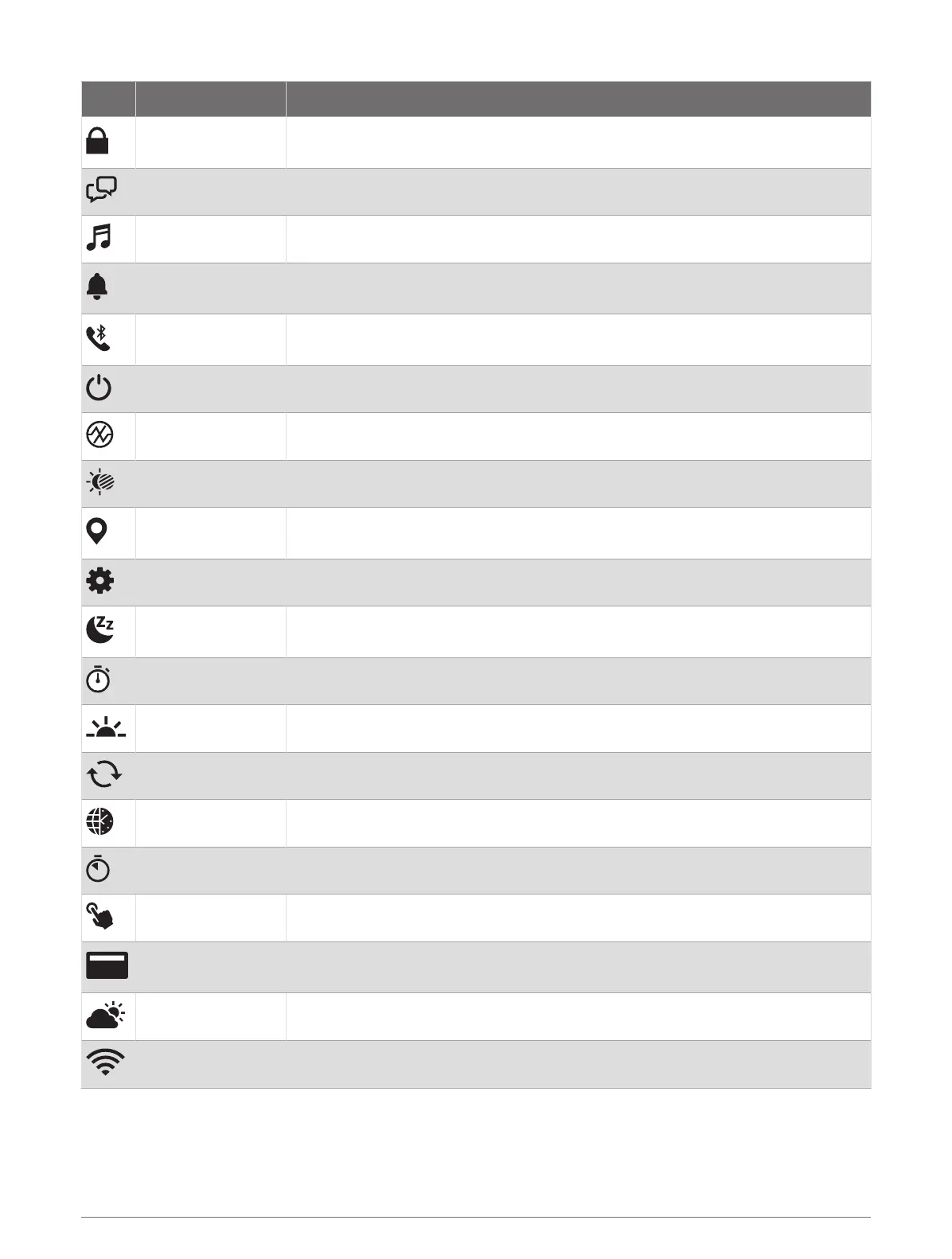
Icon Name Description
Lock Device
Select to lock the buttons and the touchscreen to prevent inadvertent presses
and swipes.
Messenger Select to open the Messenger app (Using the Messenger Feature, page94).
Music Select to control music playback on your watch or phone.
Notifications
Select to view calls, texts, social network updates, and more, based on your
phone notification settings (Enabling Phone Notifications, page87).
Phone
Select to enable or disable Bluetooth technology and your connection to your
paired phone.
Power Off Select to turn off the watch.
Pulse Oximeter Select to open the pulse oximeter app (Pulse Oximeter, page98).
Red Shift Select to turn the screen to shades of red to use the watch in low light conditions.
Save Location
Select to save your current location to navigate back to it later (Using the Saved
App, page12).
Settings Select to open the settings menu.
Sleep Mode
Select to enable or disable Sleep Mode (Customizing the Sleep Focus Mode,
page95).
Stopwatch Select to start the stopwatch (Using the Stopwatch, page75).
Sunrise & Sunset Select to view sunrise, sunset, and twilight times.
Sync Select to sync your watch with your paired phone.
Time Sync Select to sync your watch with the time on your phone or using satellites.
Timer Select to set a countdown timer (Using the Countdown Timer, page74).
Touch Select to enable or disable touchscreen controls.
Wallet
Select to open your GarminPay wallet and pay for purchases with your watch
(GarminPay, page12).
Weather Select to view the current weather forecast and current conditions.
Wi-Fi Select to enable or disable Wi‑Fi
®
communications.
Controls 53















 To Next Page