Reference
30
Arranging Via Points
If you add more than one via point, you may want to arrange the order of the stops (or points) on the
route to minimize route length. Choose from one of the following methods to arrange your via points.
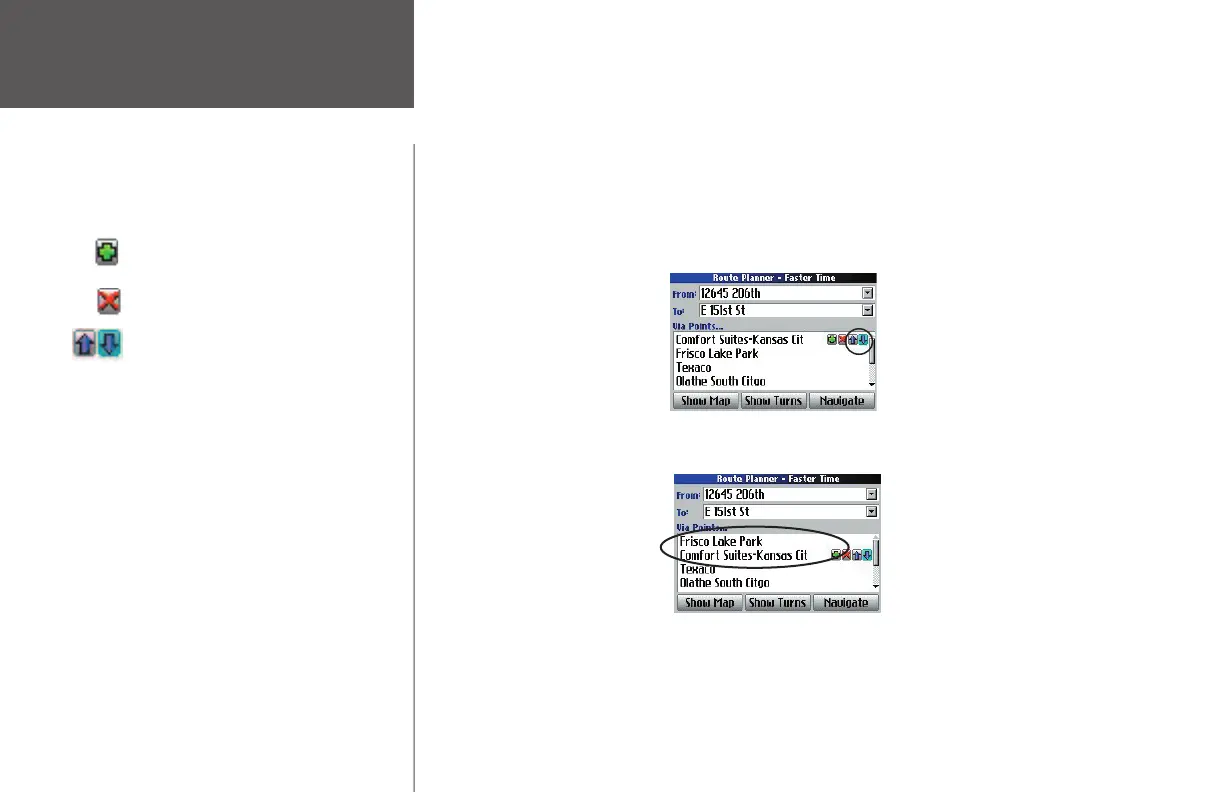
• If you have a defi nite order for the places you would like to visit, you can arrange the order by select-
ing a via point and then using the rocker pad to move to the up/down arrows that appear to the right
of the via point.
In the example below, “Comfort Suite-Kansas City” can be moved from the fi rst position to the second
position by selecting the down arrow and then pressing OK.
“Comfort Suites” moves to the second stop and “Frisco Lake Park” moves to the fi rst stop, as shown
below. Continue using the up/down arrows to place the via points in your desired order.
• To create a route through all via points that is optimized for your route preference (Faster Time,
Shorter Distance, or Off Road), press your Quest’s MENU key and then select Optimal Via Order from
the Menu window that appears. The unit rearranges all of your via points. See page 37 for more infor-
mation on route preferences.
Creating Routes
Adds a via point (extra stops) and places
it ahead of the existing point.
Deletes a via point.
Moves a via point up or down one space.
190-00323-00_0B.indd 30 8/20/2004, 11:08:25 AM



 To Next Page