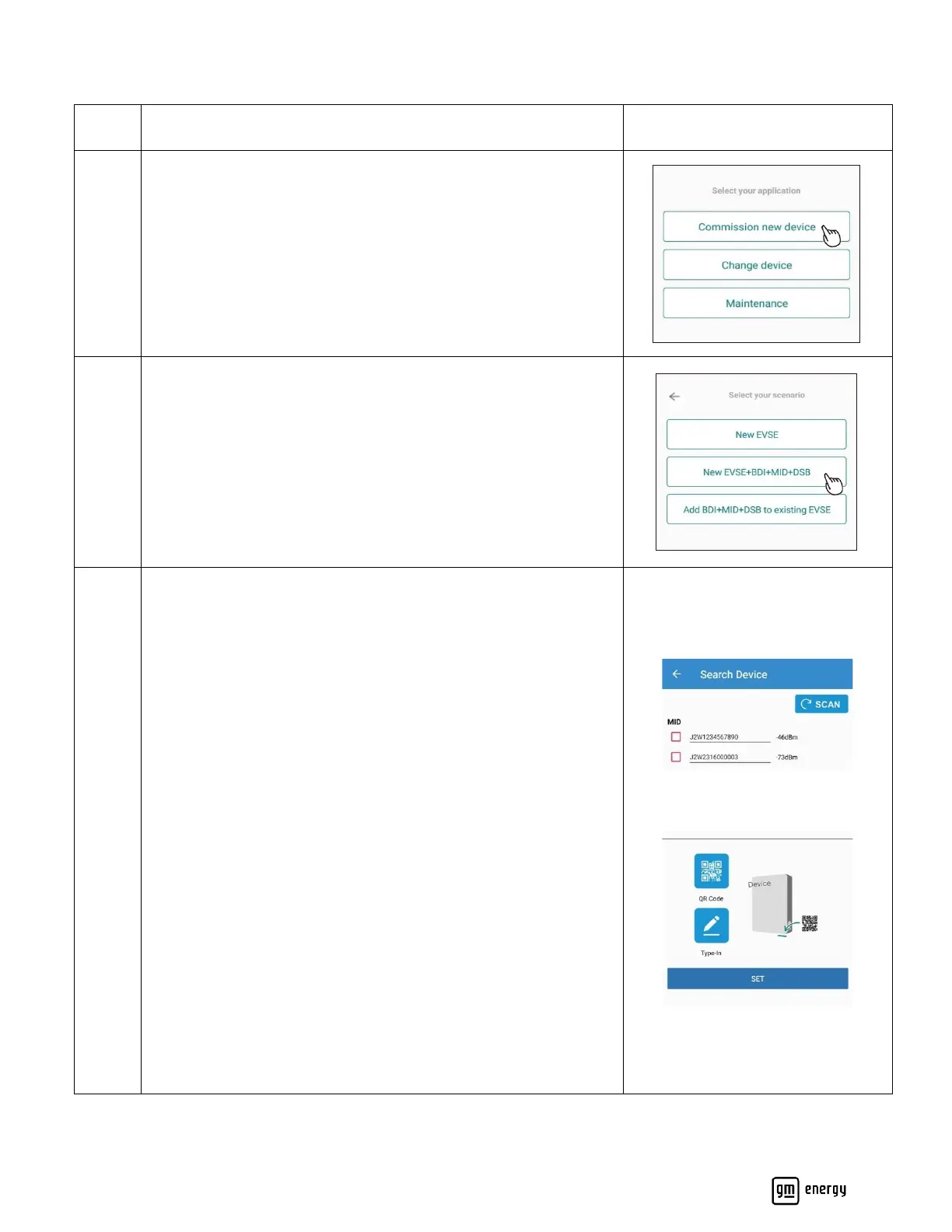
Select “New EVSE” if installing a new Charger without the GM
Energy V2H Bundle
Select “New EVSE+BDI+MID+DSB” if installing the GM Energy
V2H Bundle
Select “Add BDI+MID+DSB” if installing the GM Energy V2H
Enablement Kit with an existing GM Energy PowerShift Charger
already previously installed and commissioned.
Search for the target device as prompted.
Target Device = MID for GM Energy V2H Bundle Commissioning
Target Device = EVSE for GM Energy PowerShift Charger Only
installs
Ensure the serial number matches the physical serial number on
the product (found on the bottom of each hardware).
This process automatically connects the App to the Wireless signal
generated by the target device.
If the target device does not populate automatically (only an
option for Android devices), then the user will need to add the
device manually. The device serial number can be found at the
bottom of the EVSE and MID.
Input the MID Serial number if commissioning a V2H Bundle
Input EVSE Serial Number if commissioning EVSE only.
Both EVSE and MID have QR codes that can be scanned at the
bottom of each hardware. This QR code is also available on the
Quick Installation Guide for the EVSE and MID that comes
packaged with the hardware.



 To Next Page