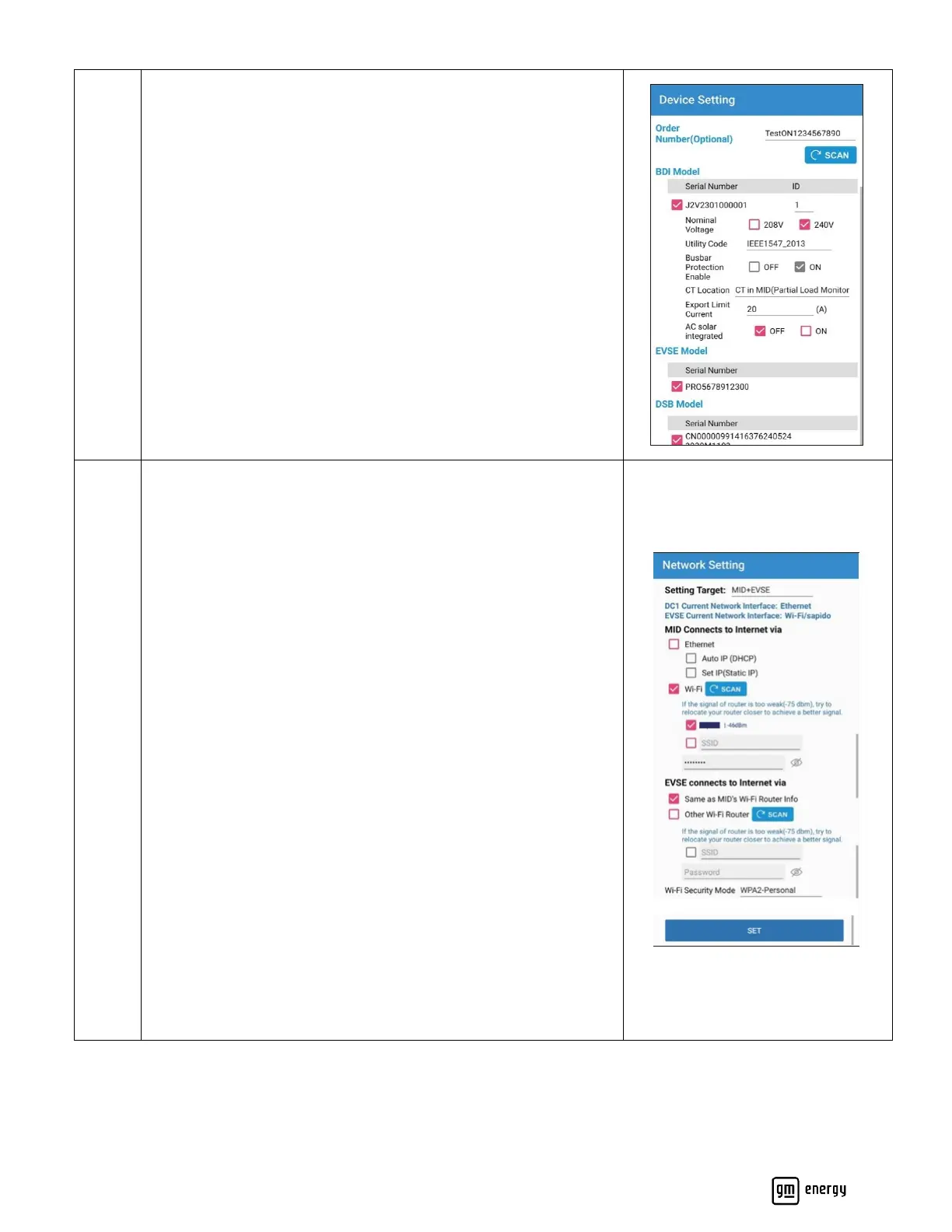
If available, please enter the order number associated with this
hardware. Doing so is beneficial to facilitate an easier setup for the
customer in their vehicle’s mobile app post commissioning.
Note: Customers will have received the order number as part of
the receipt of their purchase.
Set up the BDI Device Settings. Refer to Appendix J:
Commissioning App Settings for further details on each BDI
setting. BDI settings are specific to each install, only an example of
settings is shown to the left.
Confirm EVSE Model
Confirm DSB Model
Connect to Wi-Fi.
Select Target MID+EVSE at the top if not already pre-populated
Scan for the desired Wi-Fi network, and use the appropriate Wi-Fi
credentials.
If end user Wi-Fi credentials are not available, a personal hot-spot
may be used for commissioning purposes. After the installer leaves
the site, please inform the user the hardware will lose internet and
the user can later use their vehicle’s mobile app (myChevrolet,
myBuick, myGMC or myCadillac) to connect their hardware to their
home Wi-Fi router to regain internet connectivity to their
hardware.
If EVSE is within range of the same Wi-Fi network, then select
“Same as MID’s Wi-Fi Router info”, if not, scan for other network
and input separate credentials for that secondary network.
Click SET to proceed to the next step



 To Next Page