Getting Started
Aerial Input
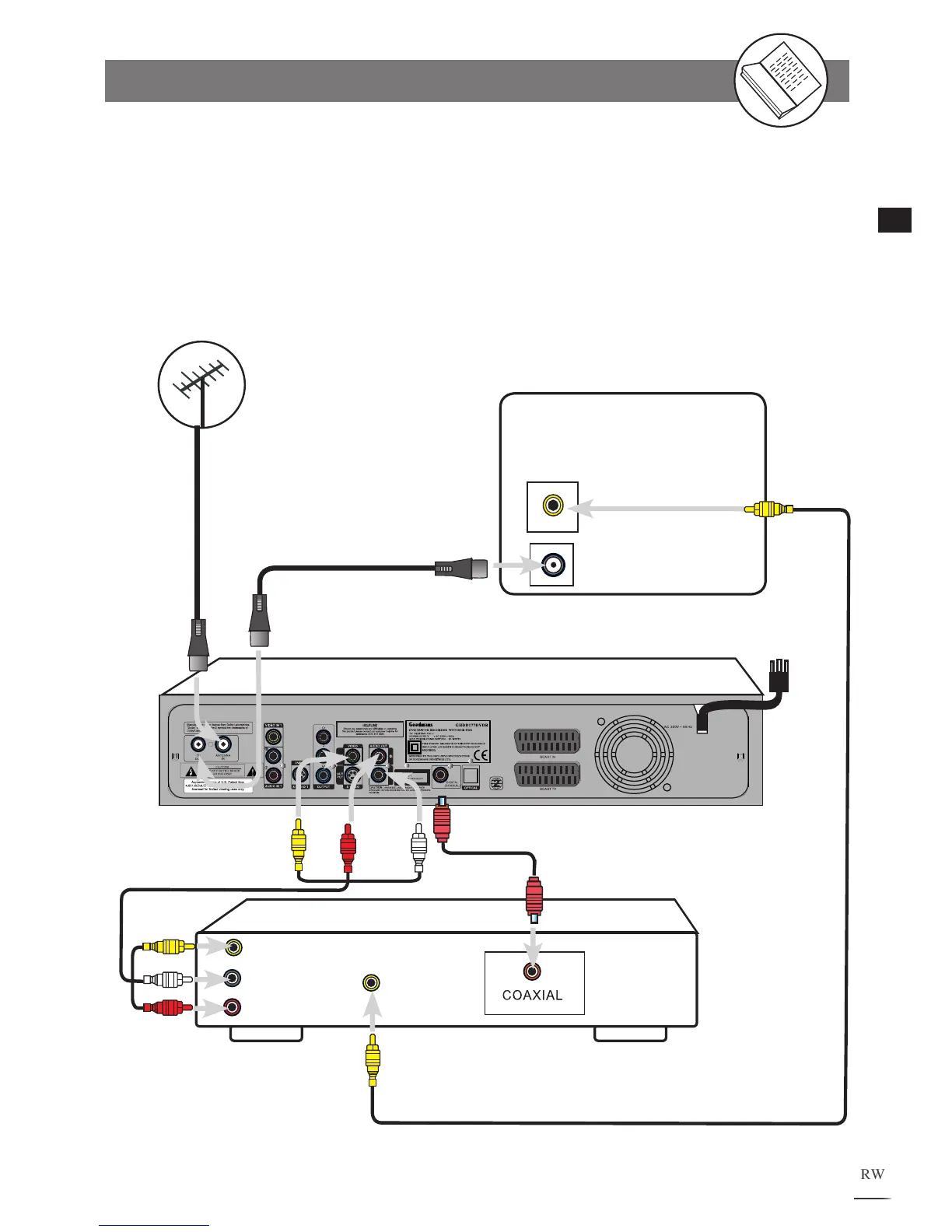
Connecting to an AV Amplifier
When you’re playing a DVD with digital surround sound tracks, you can either connect this player
to a compatible digital sound decoder or an AV amplifier (for models that support built-in decoding)
if the disc was recorded in Dolby Digital format.
Connecting External Equipment
RF Loop through
Aerial cable
(supplied)
VIDEO
INPUT
Existing
Outdoor Aerial
TV
Coaxial digital output to
coaxial digital input
(supplied)
L
R
AUDIO
INPUT
VIDEO
OUTPUT
AV
AMPLIFIER
VIDEO
INPUT
RCA Audio
Video cable
(supplied)
RCA
Video cable
(not supplied)
Red
Y
ellow
White
Yellow
Red
White
Yellow
Yellow
GHDD177DVDR



 To Next Page