5-5
TIMER Setup
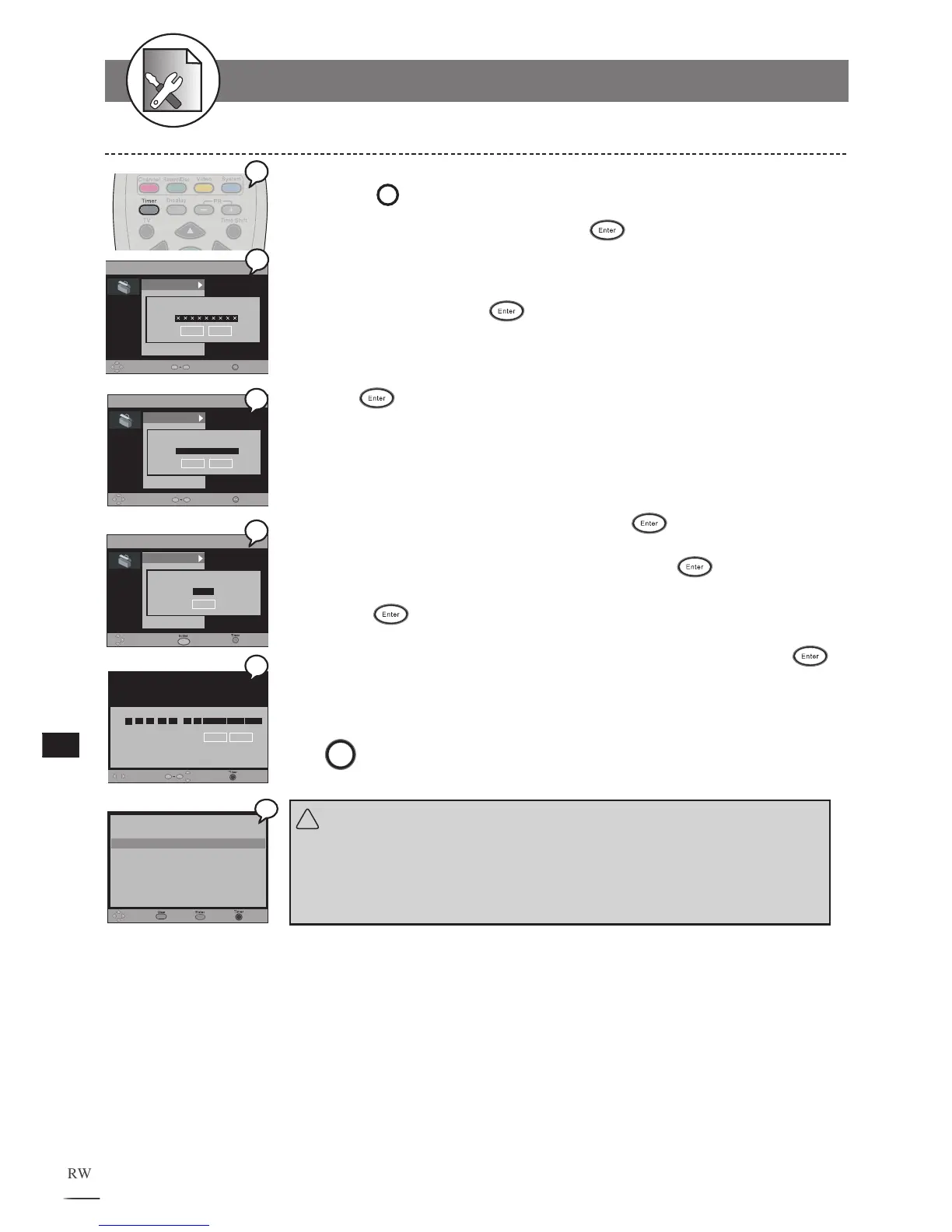
Video Plus+ Recording
1
Press
Timer
Timer at stop mode to display the menu.
2
S
elect “Video Plus+” and press
Enter
.
Nine boxes appear.
3 Input the Video Plus + code number using the remote
control, then press
Enter
.
Check your local newspaper or TV programme guide for Video Plus+ code
corresponding to the programme you want to record. If you want to correct
the number. Press button to go back to the previous number. Select OK
and press
(ENTER)
to confirm.
4 Input the Mapping to channel number .
You can find the this number next to the Video Plus+ code in your TV
programme guide.
5 Press to select Save then press
Enter
.
The programme summary appears. You can use /buttons on the remote
control to highlight and change the options, then press
(ENTER)
.
6 Press
Enter
again.
A programme list with 8 entries information appears. You can move or
buttons on the remote control to select each entry for editing, then press
(ENTER)
.
To finish the setup operation
Press
Timer
to exit from Timer setup screen.
!
Important:
After the recording schedule has been set up, a message will appear re-
minding the recording time and storage location. Press the POWER button
to switch to standby mode.
Move
ExitEdit
ID Date Start End Source Mode Freq
1 16 / 11 / 05 21 : 30 22 : 20 SCART SP Once
3 -- / -- / -- -- : -- -- : -- --- -- ---------
4 -- / -- / -- -- : -- -- : -- --- -- ---------
5 -- / -- / -- -- : -- -- : -- --- -- ---------
6 -- / -- / -- -- : -- -- : -- --- -- ---------
7 -- / -- / -- -- : -- -- : -- --- -- ---------
8 -- / -- / -- -- : -- -- : -- --- -- ---------
Delete
2 18 / 04 / 05 08 : 30 11 : 00 PR 123 HQ Once
Move Select
Save
Exit
ID Date Start End Source Mode Freq
Recordable time: 040:48:33
Cancel
2 18 / 04 / 05 08 : 30 11 : 00 PR 123 HQ Once
0
9



 To Next Page