5-2
RECORD / DISC Setup
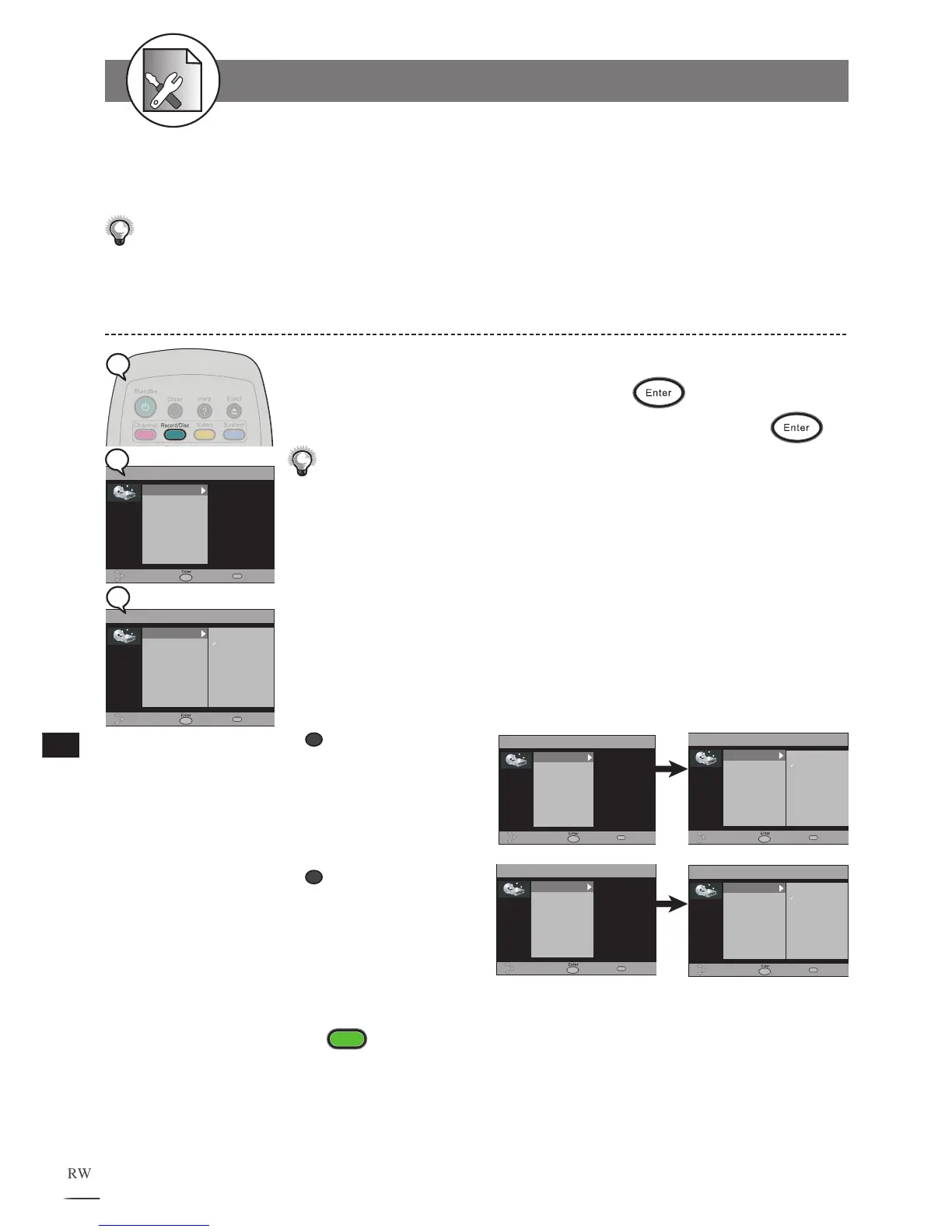
1 Press Record/Disc in the stop mode to display the menu.
2 Select “Record Quality” and press .
3
Use
/
to select the preferred record quality and press
.
You can also press Rec. Quality button on the remote control to call out this OSD
setting.
HQ (High Quality): to record about one hour for DVD
SP (Standard Play): to record about two hours for DVD
LP
(Long Play): to record about three hours for DVD
EP
(Extended Play): to record about four hours for DVD
SLP
(Standard Long Play): to record about six hours for DVD
The OSD Example in the left is when No Disc is placed. If you insert a DVD+R or DVD+RW disc,
the OSD will be shown as follows :
To finish the setup operation
Press
Record/Disc
to exit from Record/Disc setup screen.
Record Quality Setting
The RECORD/DISC Setting OSD will vary according to inserted disc type. Please refer to the OSD menu
accordingly.
a
When a DVD+R disc is
inserted:
b
When a DVD+RW disc is
inserted:
If you place a blank DVD+R or DVD+RW disc, it will be formmatted automatically.



 To Next Page