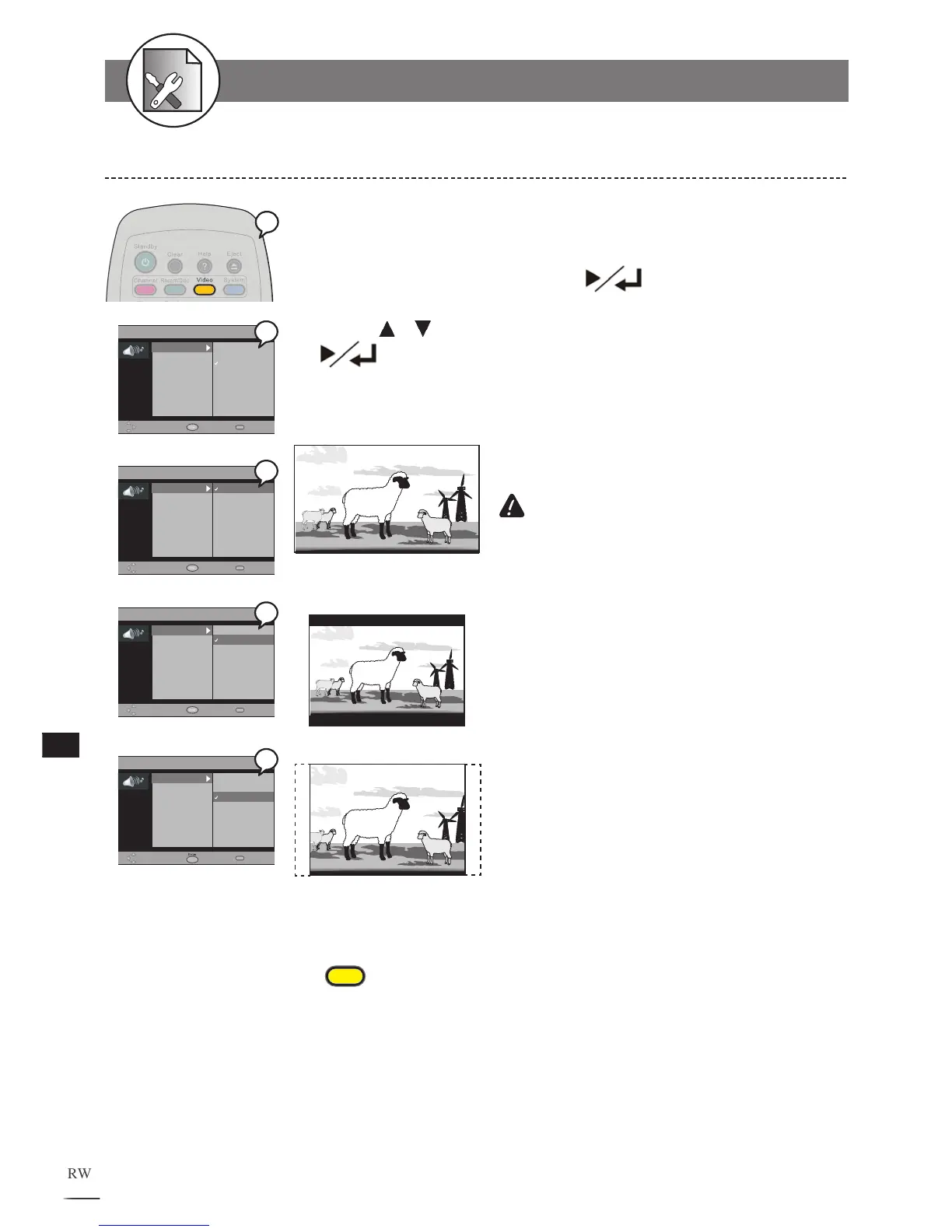
The kind of TV set (4:3 or 16:9) connected to this DVD Recorder can be selected.
1 Press Video at stop mode to display the menu.
2 Select “TV type” by pressing .
3 Press / to select a preferred TV display, then press
There are 16:9 Widescreen, 4:3 Letterbox, and 4:3 Full screen that can
be used to display DVD movies on your TV.
3a. 16:9 Widescreen
Select 16:9 Widescreen If your
recorder connect to a wide screen TV to
play the movie in “FULL” size.
IMPORTANT
If you select this setting for a
conventional size TV, this might result a
distorted screen.
3b. 4:3 Letter Box
Select 4:3 Letter Box if you want to
play the movie in its original aspect ratio
on a conventional size TV. The entire
frame will appear on the screen, but you
will see the black bars appear at the top
and bottom of the screen.
3c. 4:3 PanScan
Select 4:3 PanScan (Pan and Scan)
if you want the movie to fill the entire
screen of your TV. This may result the
left and right edges of picture won’t be
seen.
To finish the setup operation
Press
Video
to exit from Video setup screen.
TV Type Setting
5-3
VIDEO Setup



 To Next Page