EasyManua.ls Logo

Goodmans GHDD177DVDR - Disc Info. Setting; Format HDD Setting

Goodmans GHDD177DVDR
76 pages
Print Icon
To Next Page IconTo Next Page
To Previous Page IconTo Previous Page
Loading...
60
D
V
D
+
R
/
R
W
R
e
c
o
r
d
e
r
RW
Initial Settings
5
5-2
RECORD / DISC Setup-continued
Disc Info. Setting
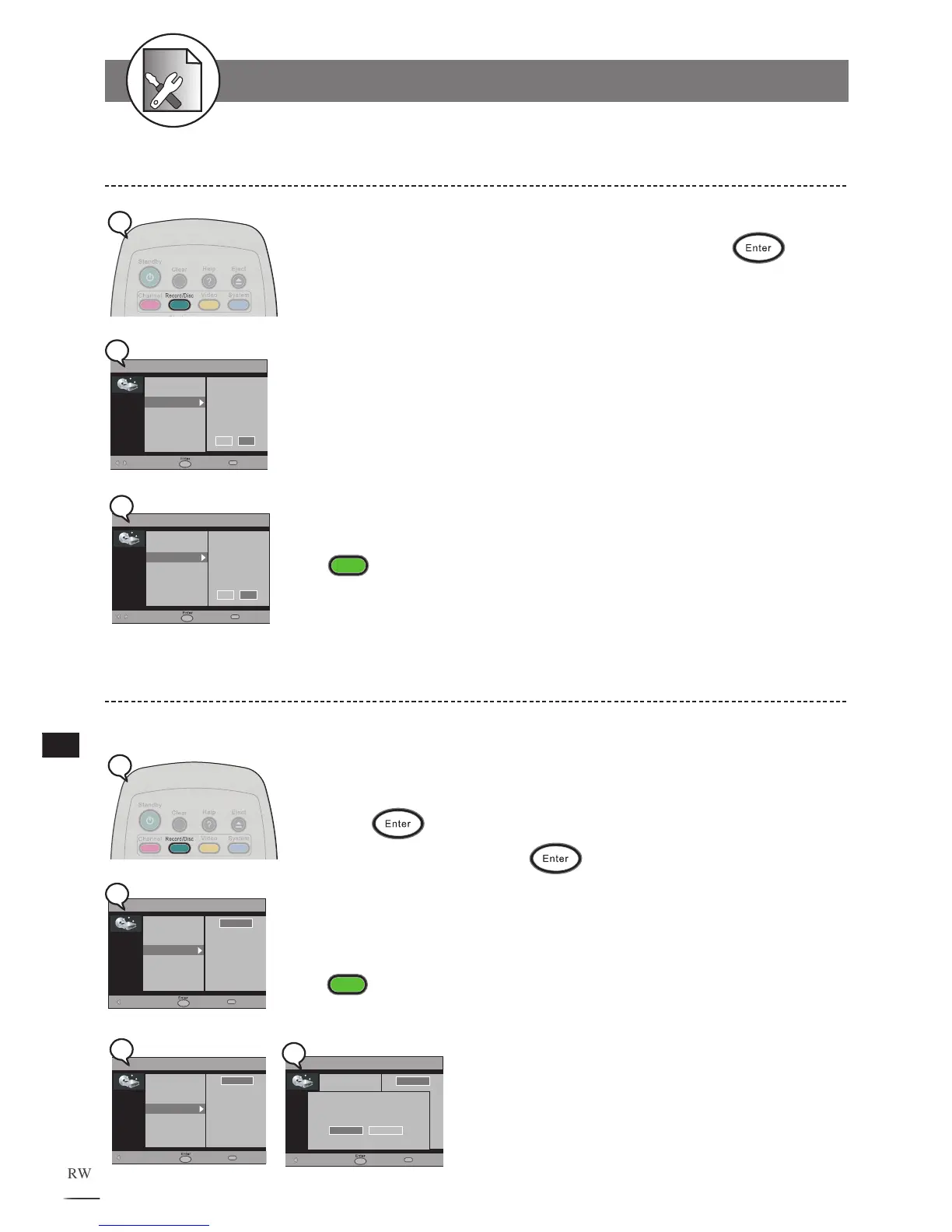
1 Press Record/Disc in the stop mode to display the menu.
2 Press to select “Disc Info.” and then press .
3 Use / to select to view the HDD or DVD information
2a When a DVD+R disc is inserted
2b When a DVD+RW disc is inserted
4 The related information about your disc will display on
the screen, including Disc type, Total recorded title, Pro-
tected title, and T
otal recorded time.
To finish the setup operation
Press
Record/Disc
to exit from Record/Disc setup screen.
RECORD/DISC
Record Quality
Auto Chapter
Disc Info
Format HDD
Scandisk HDD
Make Finalize
Move Select Exit
DVD Info.
DVD + R
4,236 / 4,460 MB
HQ: 00:57:56
SP: 01:55:52
LP: 02:53:48
EP: 03:51:44
SLP: 05:47:37
HDD
DVD
RECORD/DISC
Record Quality
Auto Chapter
Disc Info
Format HDD
Scandisk HDD
Make Compatible
Erase/Format
Protect Disc
Move Select Exit
DVD Info.
DVD + RW
4,236 / 4,460 MB
HQ: 00:57:56
SP: 01:55:52
LP: 02:53:48
EP: 03:51:44
SLP: 05:47:37
HDD DVD
2b
1
2a
Format HDD Setting
1 Press Record/Disc in the stop mode to display the menu.
2 Press to select “Format HDD”.
3 Press to select “Start”.
4 Press .
5 Select “Yes” and press to confirm.
To finish the setup operation
Press
Record/Disc
to exit from Record/Disc setup screen.

RECORD/DISC
Record Quality
Auto Chapter
Disc Info
Format HDD
Scandisk HDD
Make Finalize
Move Select Exit
Start
Yes
Format HDD?
No
RECORD/DISC
Record Quality
Auto Chapter
Disc Info
Format HDD
Scandisk HDD
Make Compatible
Erase/Format
Protect Disc
Move Select Exit
Start
2b
1
RECORD/DISC
Record Quality
Auto Chapter
Disc Info
Format HDD
Scandisk HDD
Make Finalize
Move Select Exit
Start
2a
5

Table of Contents