Page 73
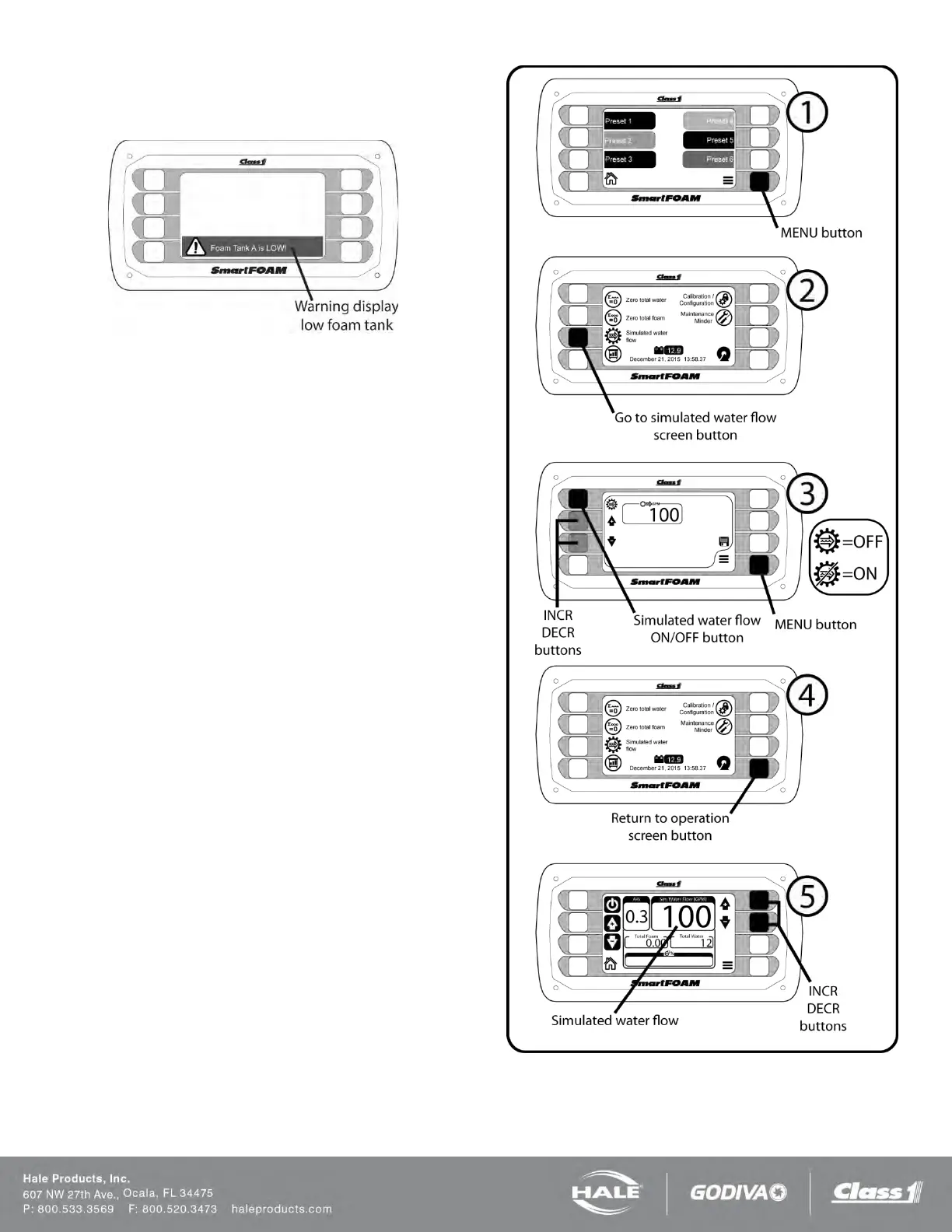
Upon initial power-up with the foam tanks empty,
the dis-
play on the controller unit will display a warning bar indi-
cating that the foam tank is low.
Figure 58: Low Foam Tank Warning
1. Fill the foam concentrate tank with WATER. The
“low foam tank” warning indication clears from
the display indicating the low tank level sensor is
operating properly.
2. Place the bypass valves handle to the BYPASS
position to check the foam pump operation.
Place a calibrated five gallon container at the
discharge end of the bypass hose.
3. Place the system in simulated flow mode:
a. Press the MENU button.
b. In the menu select the “simulated water
flow” button.
c. In the simulated water flow screen press
the ON/OFF button to toggle simulated
water flow. The icon indicates the cur-
rent state.
d. Set the simulated flow to 100 GPM by
using the INCR/DECR buttons.
e. Press the MENU button to return to the
menu.
f. Press the RETURN button to return to
the operation screen.
Figure 59: Setting Simulated Water Flow



 To Next Page