Page 74
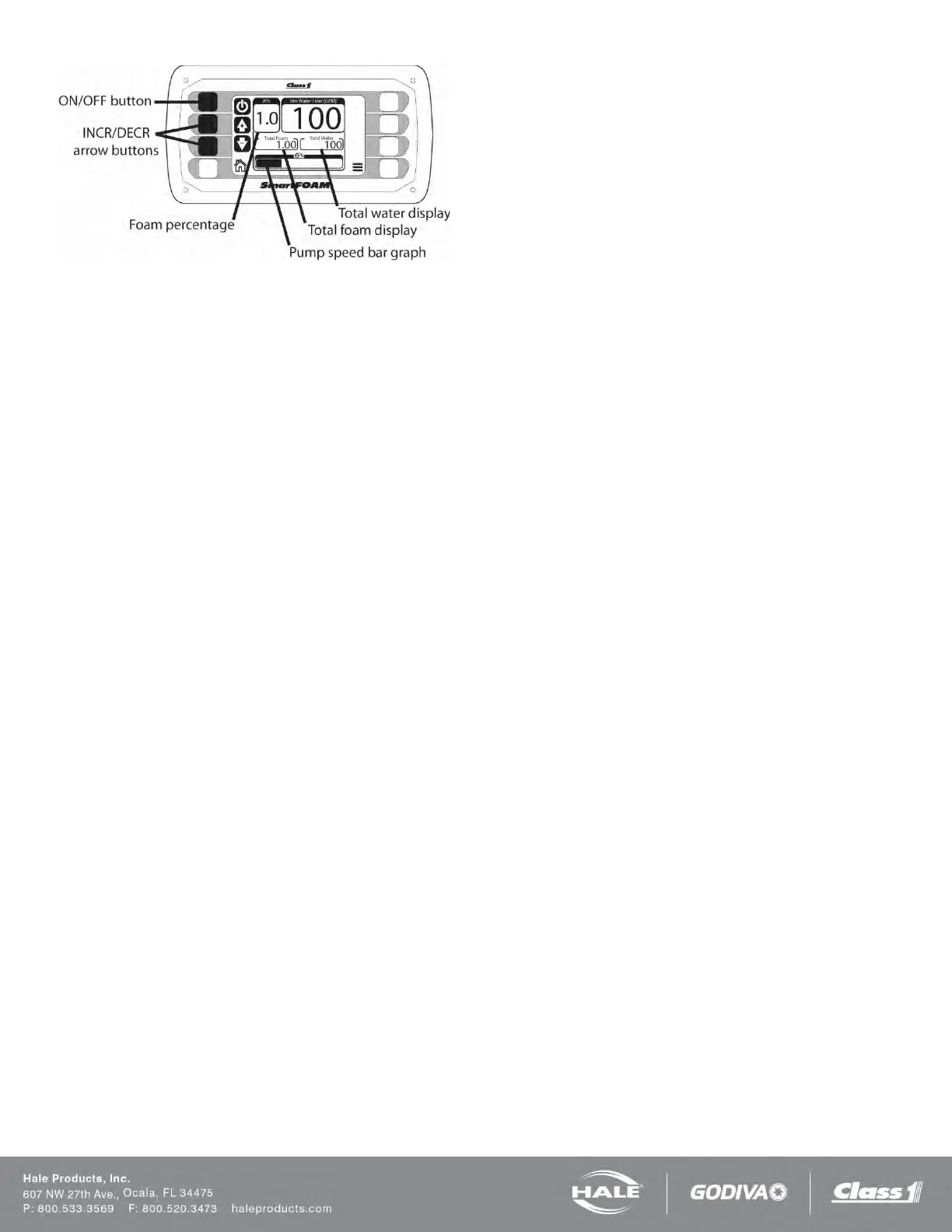
Figure 60: SmartFOAM Buttons and Indicators
4. Set the foam injection rate to 1.0% by pressing
the INCR or DECR arrow buttons.
5. Press the ON/OFF button to energize the Hale
SmartFOAM system.
a. The Pump Speed bar graph will in-
crease to indicate the motor is running.
b. Observe the discharge at the bypass
hose to make sure the foam pump is op-
erating.
6. After one minute press the ON/OFF button again
to stop the foam pump. Approximately one gal-
lon (3.8 liters) of water should discharges into
the container. The TOTAL FOAM display reads
approximately 1.00.
7. Exit simulated water flow. Use the steps de-
scribed in step 3 and Figure 59.
8. Drain water from the foam tank and concentrate
lines and return the bypass valves handle to the
INJECT position.
9. Verify operation of the flow sensor. Also cali-
brate the flow sensor using the calibration proce-
dures. See “User Calibration”.
This completes the Hale SmartFOAM system operation
checks accomplished at the system installer facility.
Foam pump feedback calibration along with setting of
user specified default simulated flow and concentrate in-
jection rates should be accomplished upon delivery to
the end user using actual end user specified foam con-
centrates and default values.



 To Next Page