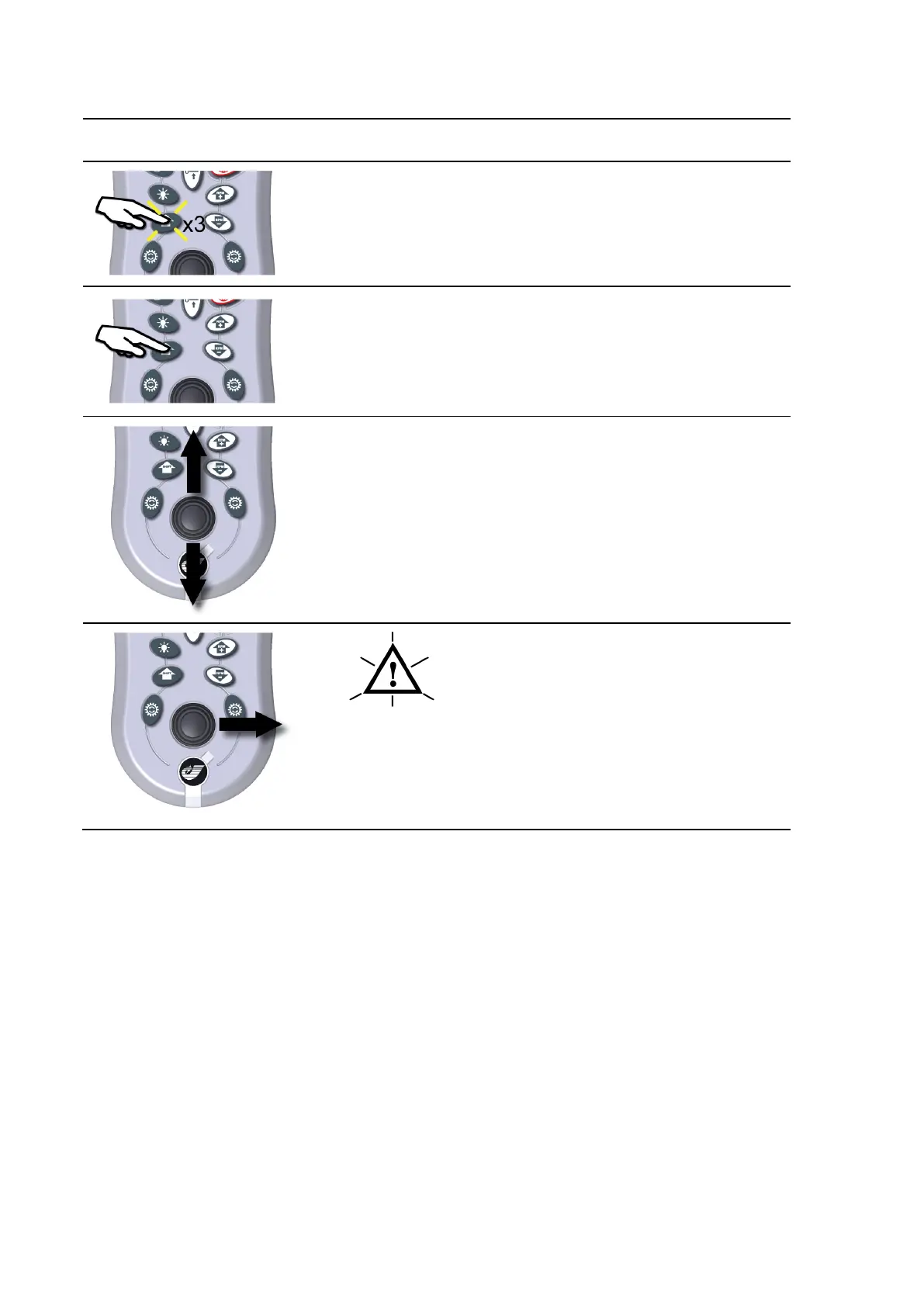
blue ARROW setup menu
Press the shift button twice, then on the
third press hold the button down.
Button presses should be in quick
succession.
SETUP
Continue to hold the shift button until
setup appears on the menu display.
Enter the setup pass code provided by
your distributor.
If no pass code has been supplied, then
use the default code 113.
Jogstick up, increases pass code value.
Jogstick down, decreases pass code
value.
Holding jogstick up or down increases
value faster.
WAIT
Jogstick right to confirm pass code value.
Setup menu active.
Move jogstick up or down to navigate through the list of configurable modules.
Move jogstick right to select an option or confirm a new setting.
Move jogstick left to go back or cancel a new setting.
To exit setup mode move jogstick left.
Moving the jogstick left while setting up a jet interface module, will immediately stop the jet movement.



 To Next Page