Start JETanchor autotune
To start JETanchor Autotune:
Ensure all prerequisites from the previous section have been completed
Ensure that the vessel is in an area where automated vessel movement can occur safely. The
recommended minimum safe area for each autotune test is specified in following sections where each
test is described in more detail (► page 5-34)
Confirm with the vessel master that it is safe to take control of the vessel and begin the auto tune
procedure
Ensure that the vessel master knows how to abort an autotune test and regain manual control of the
vessel, should unsafe conditions develop while a test is running
Take control at the JETanchor Mouseboat
Start the blue ARROW Support Tool (► page 5-1)
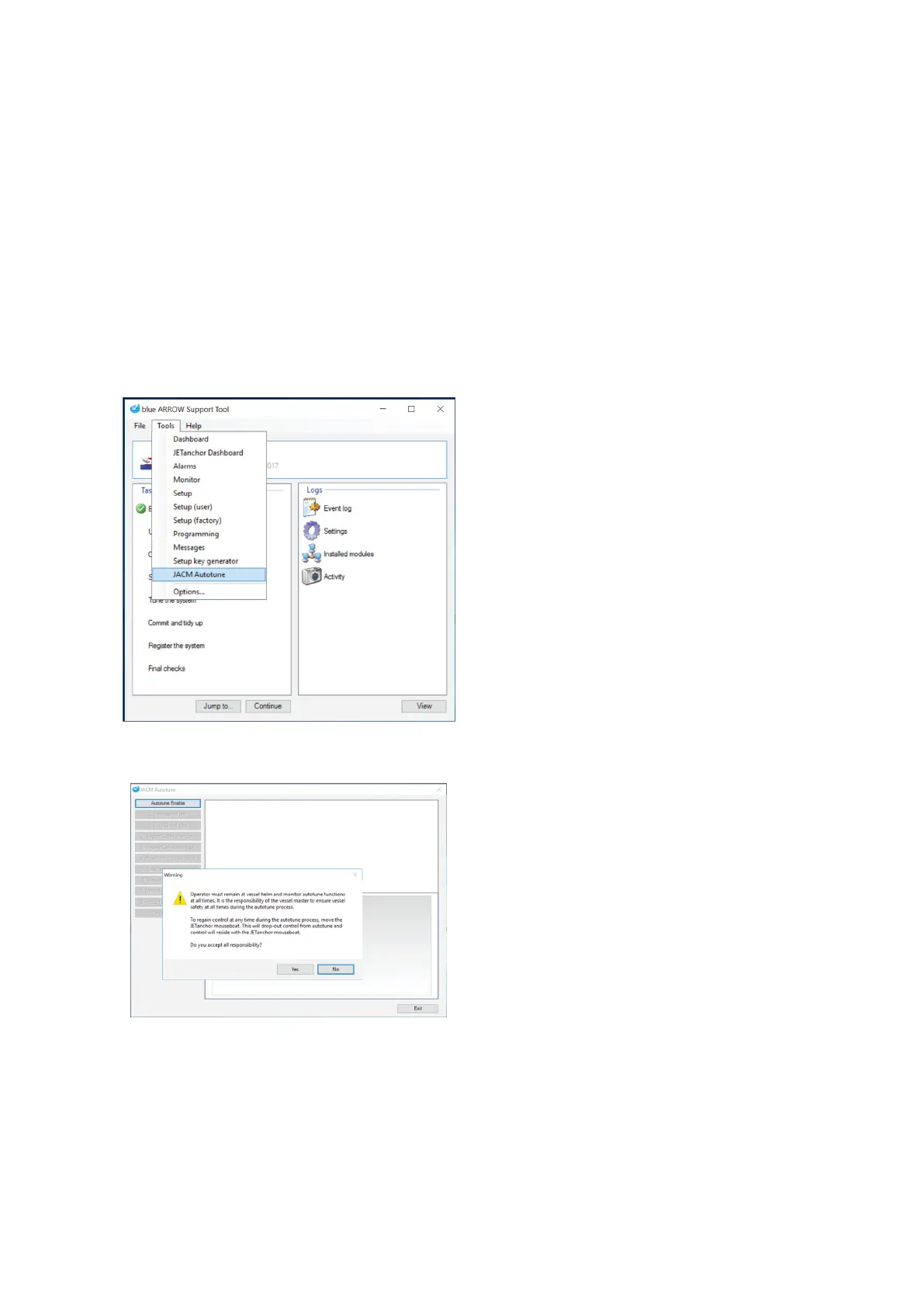
On the Support Tool's Tools Menu, select JACM Autotune
Select JACM Autotune from the Support Tool's "Tools"
menu.
Read the responsibility notification and click Yes to acknowledge the terms and proceed to Autotune
The Enable Autotune button remains disabled until the
responsibility notification has been acknowledged.
Click Autotune Enable to engage Autotune
JETanchor Mouseboat buttons flash to indicate that Autotune is enabled.



 To Next Page