Overview
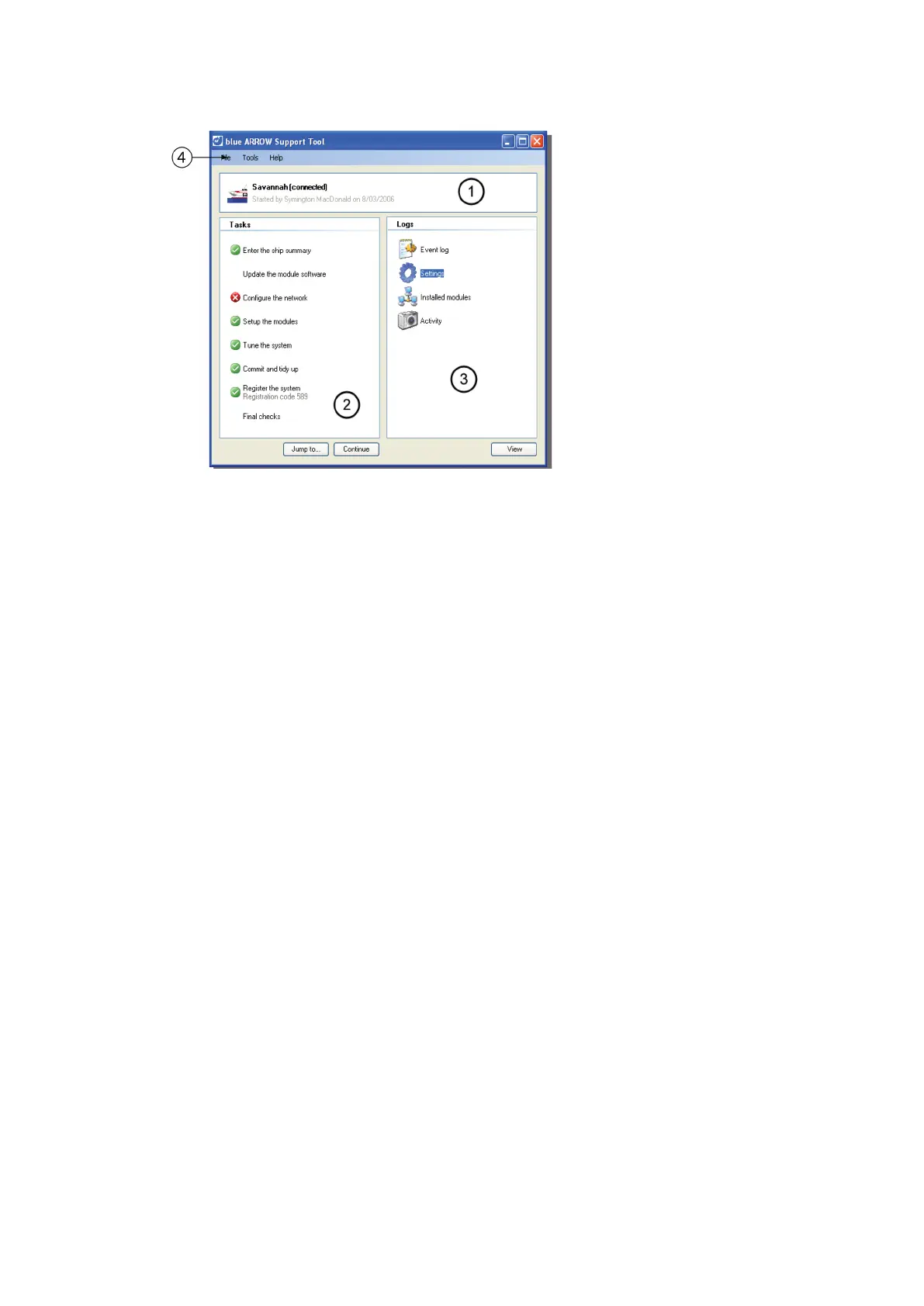
Figure 17: Main application window
The title of the current commissioning and the name of the person commissioning.
Tasks that can be done or have been completed. Double-click to activate a task.
A list of logs and information.
Other tools, file, update and licensing options.
Tasks
The tasks area of the main application window (2), can contain the following items.
Unresolved
Tasks which were completed, but have errors. These tasks may need to be done again to correct the
errors.
To do
Tasks still to be completed. These tasks need to be done before the commissioning process is complete.
Done
Tasks which have been successfully completed.
Start a new commissioning
To commission the vessel, proceed in the order shown in the following sections.
Start the blue ARROW Support Tool and check for updates. Click on Help>Check for updates. and follow the
on-screen instructions (Internet connection required).
If during commissioning the process fails or is cancelled, restart the Support Tool and click Next from the
main application screen.
Click Next to save the current settings and go to the next step.
Click Save Now to save the current settings without going to the next step. (This can be useful if you need to
test a new setting before continuing.)



 To Next Page