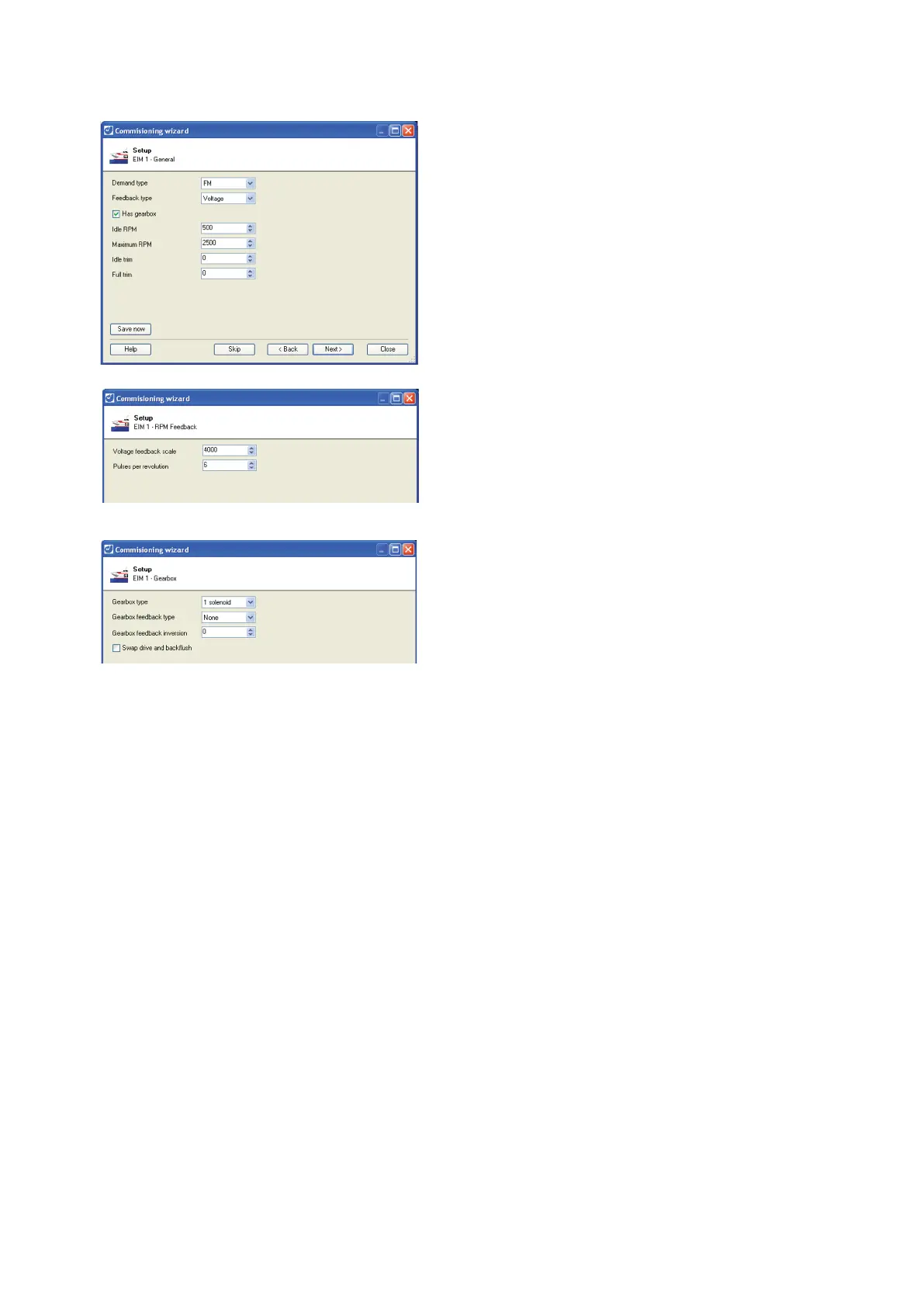
Engine interface module set up
Set the following:
Demand type (depends on the engine type).
Feedback type (depends on the engine type).
Select the Has gearbox check box if a gearbox is
fitted.
Idle RPM.
Maximum RPM.
Idle trim.
Full trim.
Click Next to save the settings and continue.
If the RPM feedback is voltage, set the voltage
feedback scale.
If the RPM feedback is pulse, set the pulses per
revolution.
For all other feedback types, click Skip to continue
to the next step.
If the vessel has a gearbox:
Set the gearbox type (depends on gearbox).
Feedback type (depends on gearbox).
Feedback inversion (inverts the feedback signal).
1 = Inverts the signal when the gearbox is in
drive.
2 = Inverts the feedback when the gearbox is in
backflush.
3 = Inverts the feedback in both cases.
Select swap drive and backflush check box (Swaps
the demand sent to the gearbox when using the
buttons on the control panel).
Click Next once the gearbox has been set up.



 To Next Page