78
GB
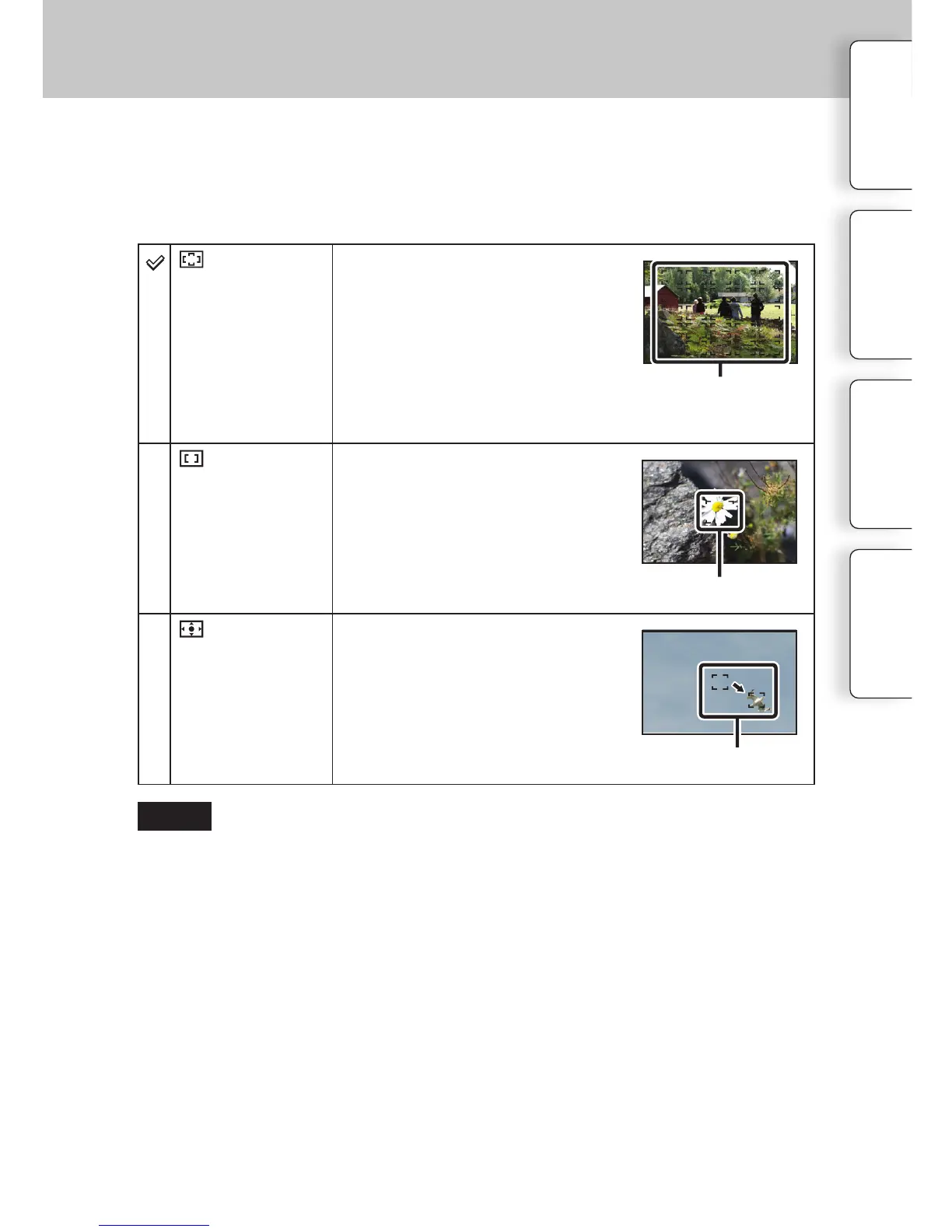
Autofocus Area
(Multi)
e camera determines which of the
25 AF areas is used for focusing.
When you press the shutter button
halfway down in still image shooting
mode, a green frame is displayed
around the area that is in focus.
• When the Face Detection function is
active, AF operates with priority on
faces.
AF range finder frame
(Center)
e camera uses the AF area located in
the center area exclusively.
AF range finder frame
(Flexible
Spot)
Moves the focusing area to focus on a
small subject or narrow area by press-
ing the top/bottom/right/le of the
control wheel.
AF range finder frame
Selects the focusing area. Use this function when it is dicult to get the proper focus in auto
focus mode.
1 MENU
[Camera]
[Autofocus Area]
desired mode.
• When this function is set to other than [Multi], you cannot use the [Face Detection] function.
• [Multi] is selected when using the following functions:
–[Intelligent Auto]
– [Scene Selection]
– [Anti Motion Blur]
– [Sweep Panorama]
– [Smile Shutter]
• [Multi] is selected during movie recording. But, if you use an E-mount lens and press the shutter
button half way down during recording, the autofocus area you set before you started recording is
used for focusing.
• When the AF illuminator is used, the setting of [Autofocus Area] is invalid and the AF area is
indicated with a dotted line. AF operates with priority on and around the center area.
Table of
contents
Sample photo
Menu Index
Notes



 To Next Page
 Loading...










