25
MP60, MP60DP
CONNECTION
6.6 PROFIBUS interface
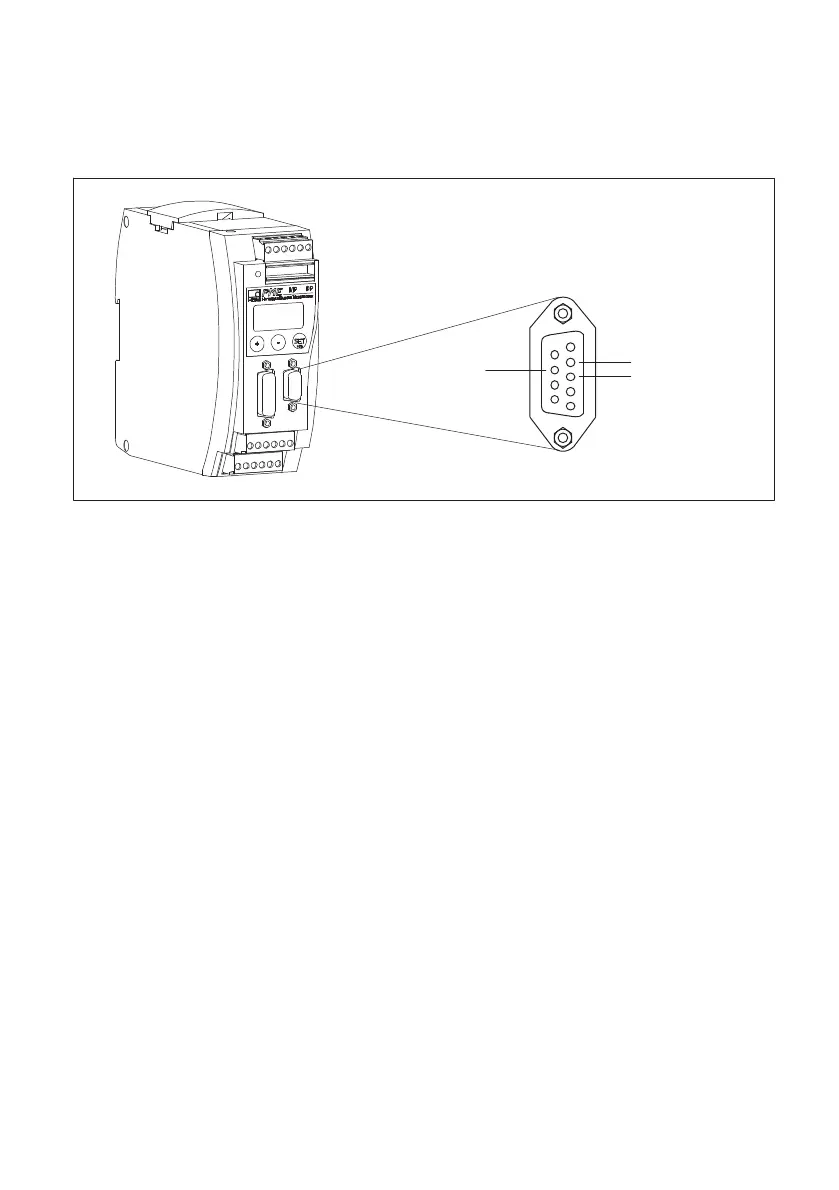
On the front of the MP60DP is an additional 9-pin D-Sub connector socket for the
PROFIBUS connection.
PROFIBUS connector socket
1
5
6
9
GND
RS485‐RTS
RS485‐B
RS485‐A
Vcc (5 V)
6
0
Fig. 6.8 PROFIBUS connection as per standard
6.6.1 Installing
u Connect the MP60DP module to a 24 V supply voltage, and use the keyboard or the
Setup program to set the required PROFIBUS address.
u Connect the PROFIBUS cable to the MP60DP module. Make sure that a termination
resistor is connected to the first and last PROFIBUS device (there is usually a slide
switch on the housing of the PROFIBUS connector for the purpose).


 To Next Page