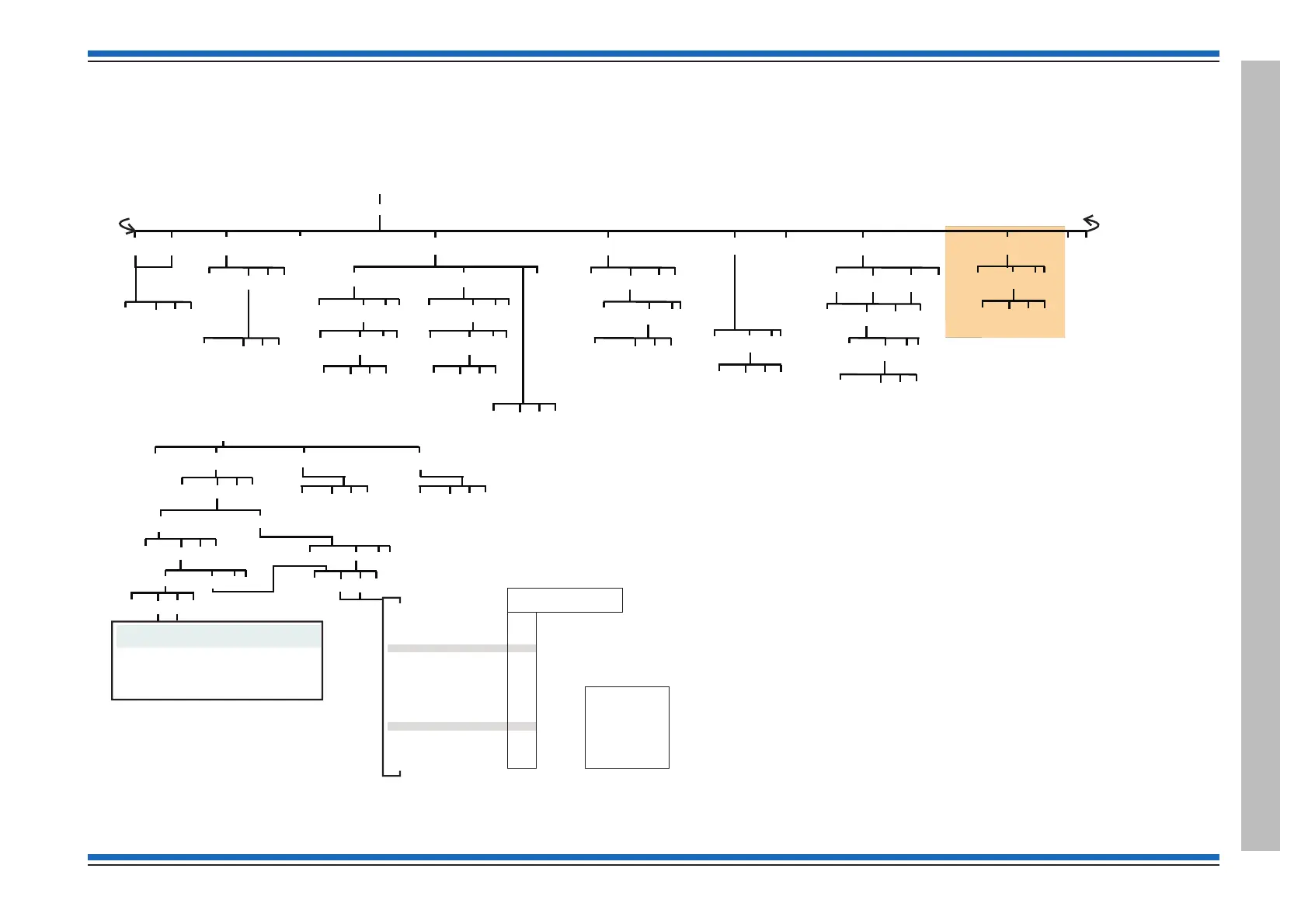
[Loop]
[Allocate]
{}
Params
1-8
[C] [Q]
[E]
[FindDev]
{}
Params
1-8
[Start]
{}
Params
1-207
[C] [Q]
[E]
[Gain]
[Loop]
{}
Params
1-207
[Device]
{}
Params
0-7
{}
Params
1-8
[C] [Q]
[E]
[Loop]
{}
Params
1-207
[Device]
{}
Params
0-63
{}
Params
1-8
[C] [Q]
[E]
[Flame]
[Beam]
[AutoGain]
[Loop]
{}
Params
1-207
{}
Params
1-8
[C] [Q]
[E]
[Align]
{}
Params
1-207
[Device]
{}
Params
1-207
[Loop]
{}
Params
1-8
[C] [Q]
[E]
<etc>
<etc>
[Repair]
[Loop]
{}
Params
1-8
[C] [Q]
[E]
<etc> <etc>
BS Vigilon with M V3.97 or higher
[ ] Menu map 2
Control panel
Test/Eng
CC at
[Simulate]
{}
Params
0-6
[Device]
{}
Params
1-207
[Loop]
{}
Params
1-8
[C] [Q]
[E]
[Fire][PreFire] [SupFire]
Test/Eng
menu map 2-2
[Comms]
[Address] [Domain]
{}
Params
1-255
[C] [Q]
[E]
[Card]
[C] [Q]
[E]
{}
Params
0-15
for other cards
Card 0 (MCC/MCB)
[C] [Q]
[E]
{}
Params
0-3
PORT
[P] [E]
[N]
[Mode]
[Baud]
[P] [E]
[N]
As Switches
50
!
600
1800
2400
3600
4800
7200
9600
19200
57600
115200
230400
460800
1200
38400
Test/Eng
menu map 2-1
[Stop]
[Baud]
{}
Params
0-255
[C] [Q]
[E]
Access level 2b
Menus accessible with panel door open and AL2 password
Access level 2b
Menus accessible with panel door open and AL3 password
Access level 3
No menus are accessible at AL1
Access level 1
Menus accessible with panel door open
Access level 2a
Access level 3
MCC
Port 1
Factory default Port settings
with Control Panel having:
Port 0
Access level 3
Key
[E] = [Enter]
[C] = [Cancel]
[Q] = [Quit]
[P] = [Previous]
[N] = [Next]
[P] [E]
[N]
Gain clock period 50008
RS232 Port 0 - Off - Std - Printer - Flt/Fire -
Universal Ascom
RS485 Port 1 - Std - Off
USB Port 3 - Std
MCC
Note: Port 0 and Port 1 are associated with IO Card
fitted in slot P2, settings viewed via MCC status.


 To Next Page
 Loading...