+$%&
2
HP
PrecisionScan Pro
User’s Guide
18
A tour of the scanning
software
Book Contents
Index
➮
➮
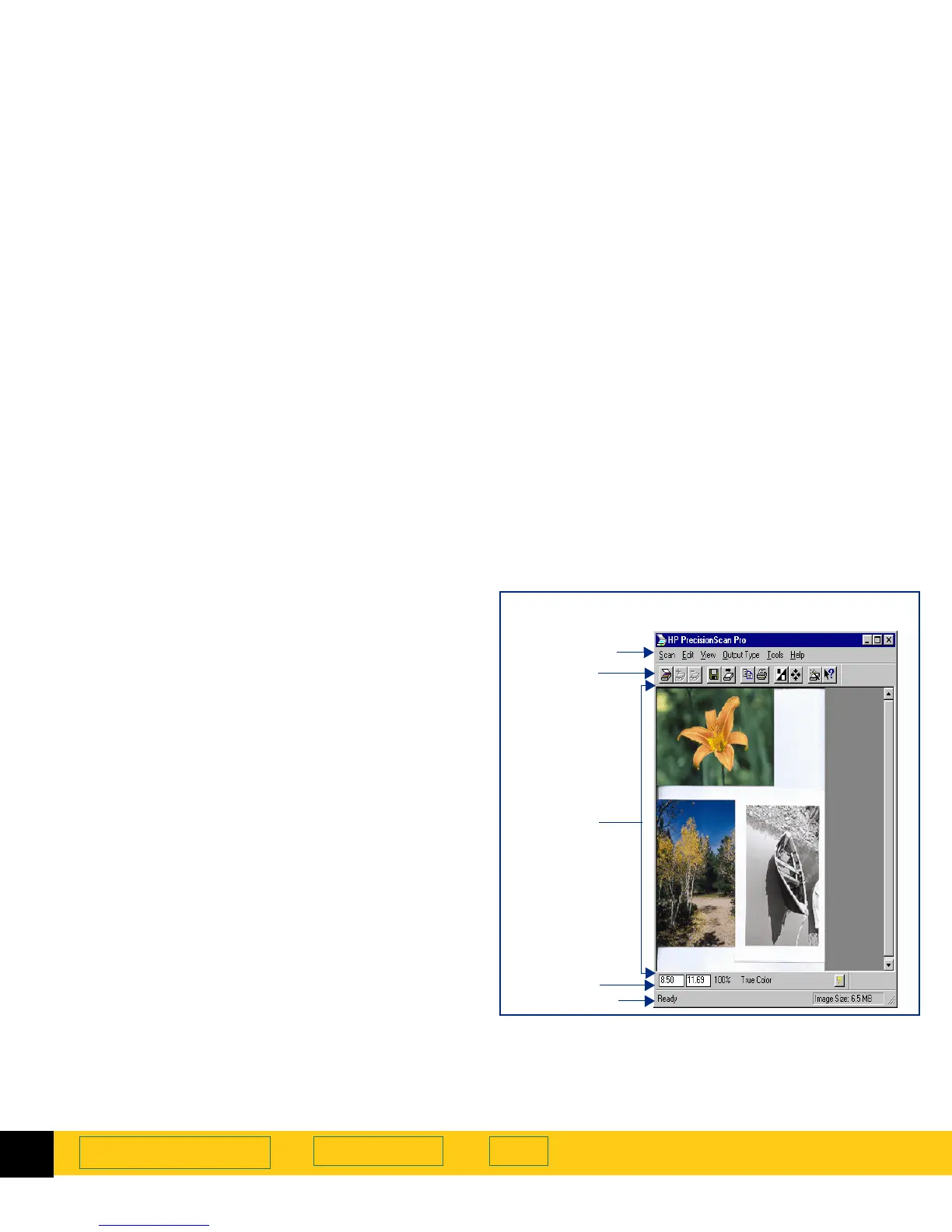
Scanning software window
This chapter describes the scanning software.
➊
Menus —
The commands in the menus are
summarized beginning on page
19
.
➋
Toolbar —
The toolbar has buttons for the most
commonly used commands (see page
24
).
➌
Preview area —
The scanned image appears in the
preview area of the scanning software window (see
page
25
).
➍
Info bar —
Displays width and height of the output
image, scale percentage, the
Output Type
currently
selected, and
Help
button (see page
26
).
➎
Status bar —
Displays messages and approximate
size of the selection area (
Image Size
) (see page
27
).
Image adjustment tools —
The scanning software has six
tools for making adjustments to the image. These
tools can be placed anywhere on the Windows
desktop (see page
30
).
Online Help — Help
includes topics, What’s This, more
online manuals, and videos (see page
41
).
➊
Menu bar
➋
Toolbar
➌
Preview
➎
Status bar
area
Scanning software window showing a
Preview
scan
➍
Info bar








 To Next Page