+$%&
2
HP
PrecisionScan Pro
User’s Guide
36
A tour of the scanning
software
Book Contents
Index
➮
➮
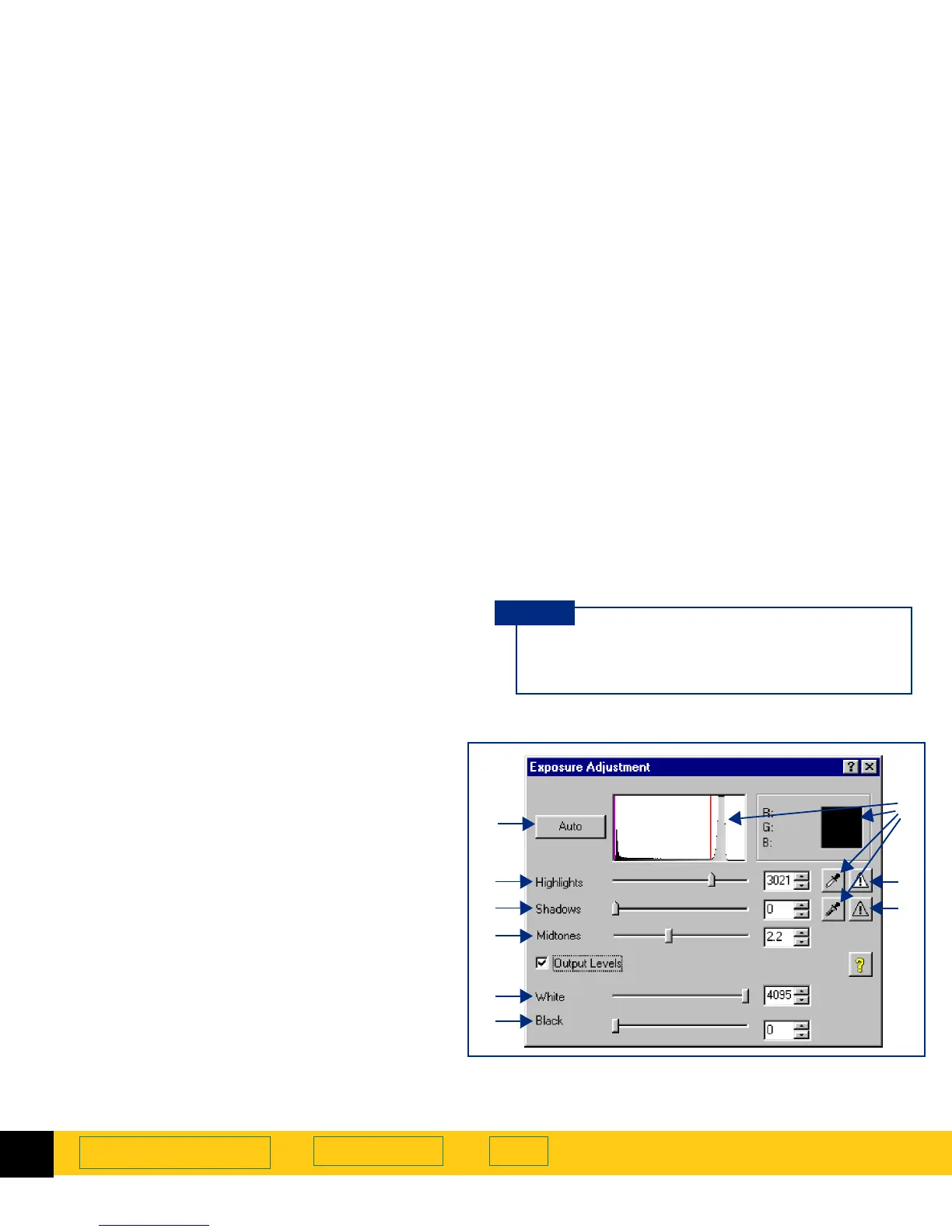
Exposure Adjustment tool
The
Exposure Adjustment
tool lets you make fine
adjustments to highlights, shadows, and midtones, or
set the output level of black and white pixels in a color
or grayscale image of a picture. See
Adjust exposure
on
page
77
for more about how to use the
Exposure
Adjustment
tool.
After you change exposure settings in the
Exposure Adjustment
tool, the results of the
changes can be seen in the preview area.
TIP
After you have drawn a selection area, use this tool
to:
➊
adjust highlights in the image
➋
adjust shadows in the image
➌
adjust midtones in the image
➍
adjust output level of white pixels
➎
adjust output level of black pixels
➏
view black pixels that will be clipped in the final
scan
➐
view white pixels that will be clipped in the final
scan
➑
view RGB values and pixel distribution for any
light or dark area of the image
➒
reset all the exposure controls to the values
determined by the scanning software
➊
➋
➌
➍
➎
➑
➏
➒








 To Next Page