+$%&
2
HP
PrecisionScan Pro
User’s Guide
47
A tour of the scanning
software
Book Contents
Index
➮
➮
Set preferences
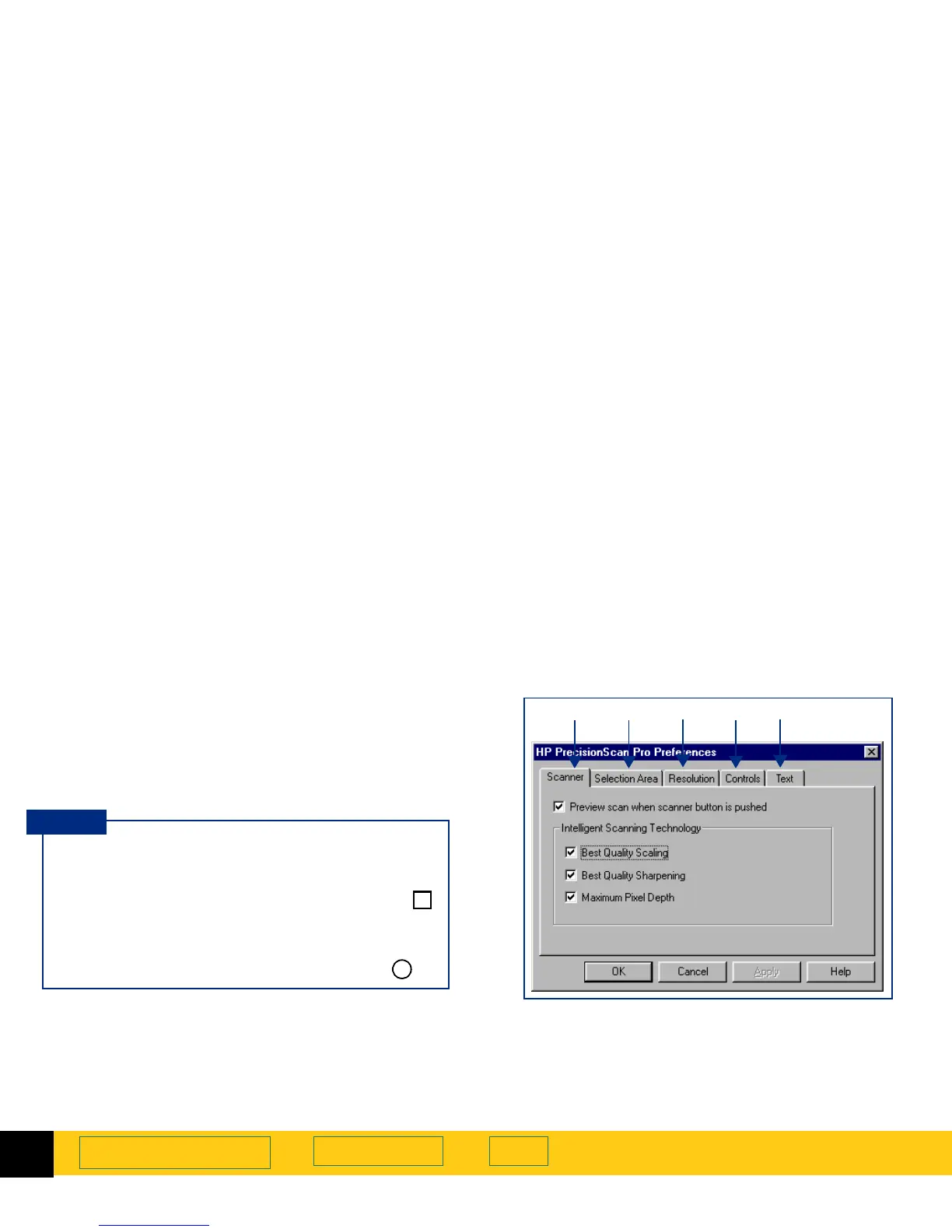
Preferences for the scanner and the scanning software
can be set in the
HP PrecisionScan Pro Preferences
dialog
box.
The
HP PrecisionScan Pro
Preferences
dialog box has
several tabs. These tabs are:
➊
Scanner
(see page
48
)
➋
Selection Area
(see page
50
)
➌
Resolution
(see page
52
)
➍
Controls
(see page
53
)
➎
Text
(see page
54
)
Opening the HP PrecisionScan Pro Preferences
dialog box
■
From the
Scan
menu, select
Preferences...
The
HP PrecisionScan Pro
Preferences
dialog box
appears.
To activate a checkbox choice in the
HP PrecisionScan Pro
Preferences
dialog box:
■
Click the checkbox to place a checkmark in it .
To activate an option button choice in the
HP PrecisionScan Pro
Preferences
dialog box:
■
Click the option button to place a dot in it .
✔
●
TIP
➊➋
➌
➍
➎








 To Next Page