+$%&
2
HP
PrecisionScan Pro
User’s Guide
37
A tour of the scanning
software
Book Contents
Index
➮
➮
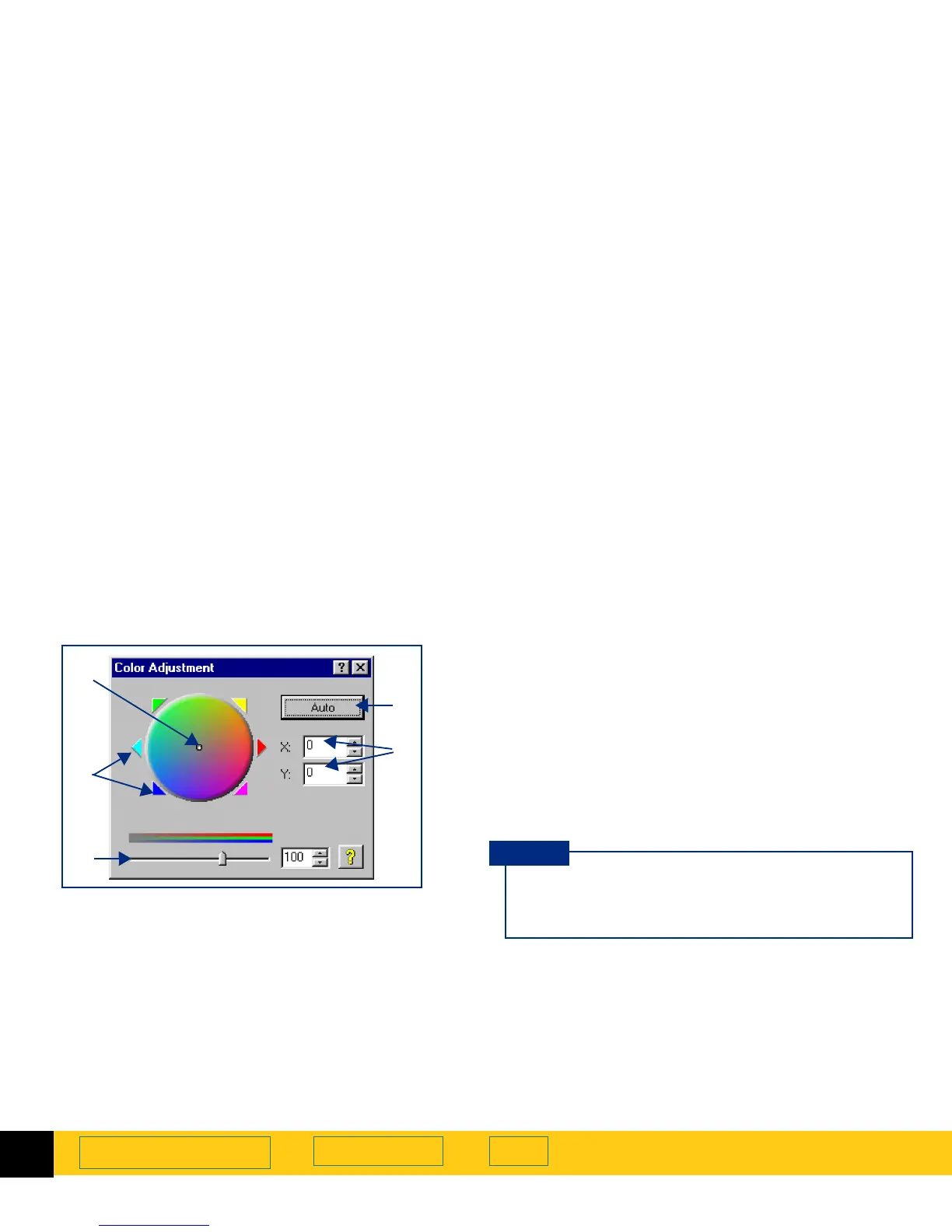
Color Adjustment tool
The
Color Adjustment
tool lets you change the hue and
make colors brighter in a color image.
See
Adjust color
on page
87
for more about how to use
the
Color Adjustment
tool.
After you have drawn a selection area, use this tool to:
➊
change the hue by dragging the indicator circle in
the
Color Wheel
with the mouse
➋
change the hue by clicking a color’s triangle on the
Color Wheel
to move the indicator circle
➌
set color saturation between 0 and 150; the higher
the saturation value, the brighter the colors
➍
change the hue by typing X and Y values for the
Color Wheel
.
➎
reset the color controls to the values determined by
the scanning software
➊
➌
➎
➋
➍
After you change settings in the
Color Adjustment
tool, the results of the new settings can be seen in
the preview area.
TIP








 To Next Page