+$%&
2
HP
PrecisionScan Pro
User’s Guide
50
A tour of the scanning
software
Book Contents
Index
➮
➮
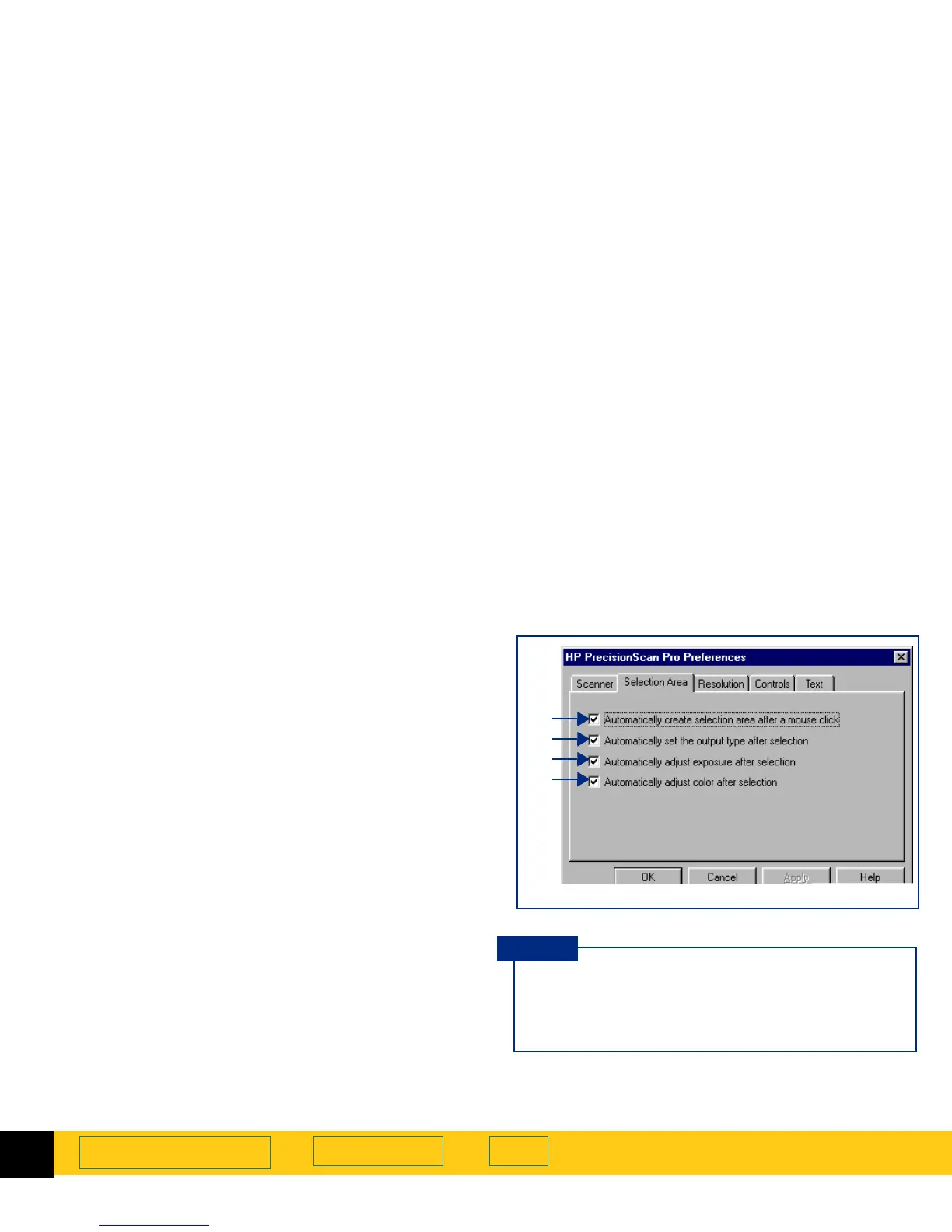
Selection Area tab
The
Selection Area
tab of the
HP PrecisionScan Pro
Preferences
dialog box has checkboxes for controlling
whether the scanning software should automatically:
➊
create a selection area when the mouse is clicked
(page
51
)
➋
determine the best
Output Type
for the selection area
(page
51
)
➌
determine the optimal exposure level for the
selection area (page
51
)
➍
determine the optimal color balance and saturation
for the selection area (page
51
)
To change settings:
1
Select the checkboxes you want to turn on or off.
2
Click
Apply
.
3
Click another tab, or click
OK
to close the
HP PrecisionScan Pro
Preferences
dialog box.
➊
➋
➌
➍
By default, when
HP PrecisionScan Pro
is installed,
all the checkboxes are checked in the
Selection Area
tab of the
HP PrecisionScan Pro
Preferences
dialog
box.
TIP








 To Next Page