B222s User’s Guide 117
CHAPTER 14
Parental Control
14.1 Overview
Parental control allows you to block web sites with the specific URL. You can also define time
periods and days during which the LTE Device performs parental control on a specific user.
14.2 The Parental Control Screen
Use this screen to enable parental control, view the parental control rules and schedules.
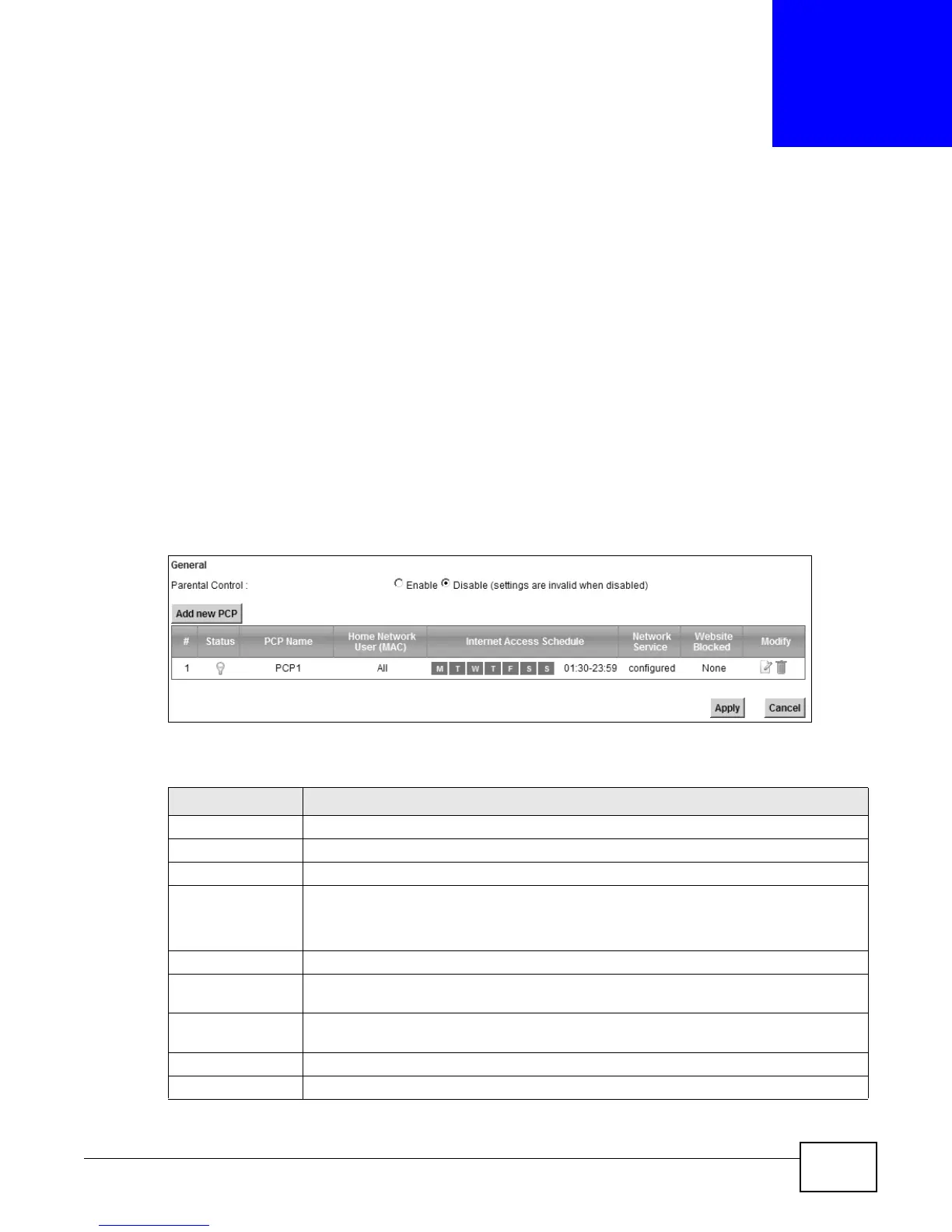
Click Security > Parental Control to open the following screen.
Figure 67 Security > Parental Control
The following table describes the fields in this screen.
Table 47 Parental Control > Parental Control
LABEL DESCRIPTION
Parental Control Select Enable to activate parental control.
Add new PCP Click this if you want to configure a new parental control rule.
# This shows the index number of the rule.
Status This indicates whether the rule is active or not.
A yellow bulb signifies that this rule is active. A gray bulb signifies that this rule is not
active.
PCP Name This shows the name of the rule.
Home Network
User (MAC)
This shows the MAC address of the LAN user’s computer to which this rule applies.
Internet Access
Schedule
This shows the day(s) and time on which parental control is enabled.
Network Service This shows whether the network service is configured. If not, None will be shown.
Website Block This shows whether the website block is configured. If not, None will be shown.











 To Next Page