Chapter 14 Parental Control
B222s User’s Guide
118
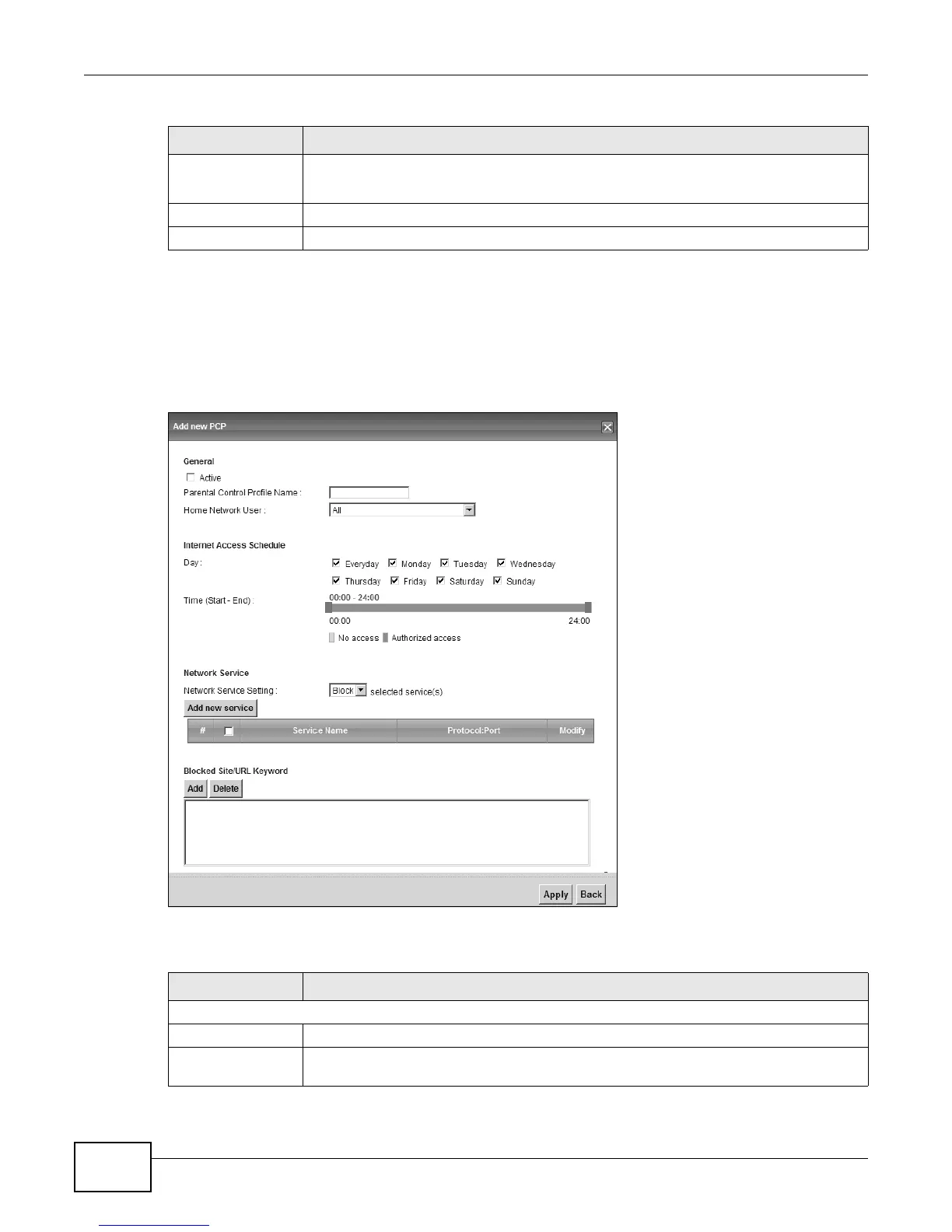
14.2.1 Add/Edit a Parental Control Rule
Click Add new PCP in the Parental Control screen to add a new rule or click the Edit icon next to
an existing rule to edit it. Use this screen to configure a restricted access schedule and/or URL
filtering settings to block the users on your network from accessing certain web sites.
Figure 68 Add/Edit Parental Control Rule
The following table describes the fields in this screen.
Modify Click the Edit icon to go to the screen where you can edit the rule.
Click the Delete icon to delete an existing rule.
Add Click Add to create a new schedule.
Apply Click Apply to save your changes back to the LTE Device.
Table 47 Parental Control > Parental Control (continued)
LABEL DESCRIPTION
Table 48 Add/Edit Parental Control Rule
LABEL DESCRIPTION
General
Active Select the checkbox to activate this parental control rule.
Parental Control
Profile Name
Enter a descriptive name for the rule.






 To Next Page