Chapter 5 Wireless
B222s User’s Guide
52
The following table describes the labels in this screen.
5.3.1 Edit More AP
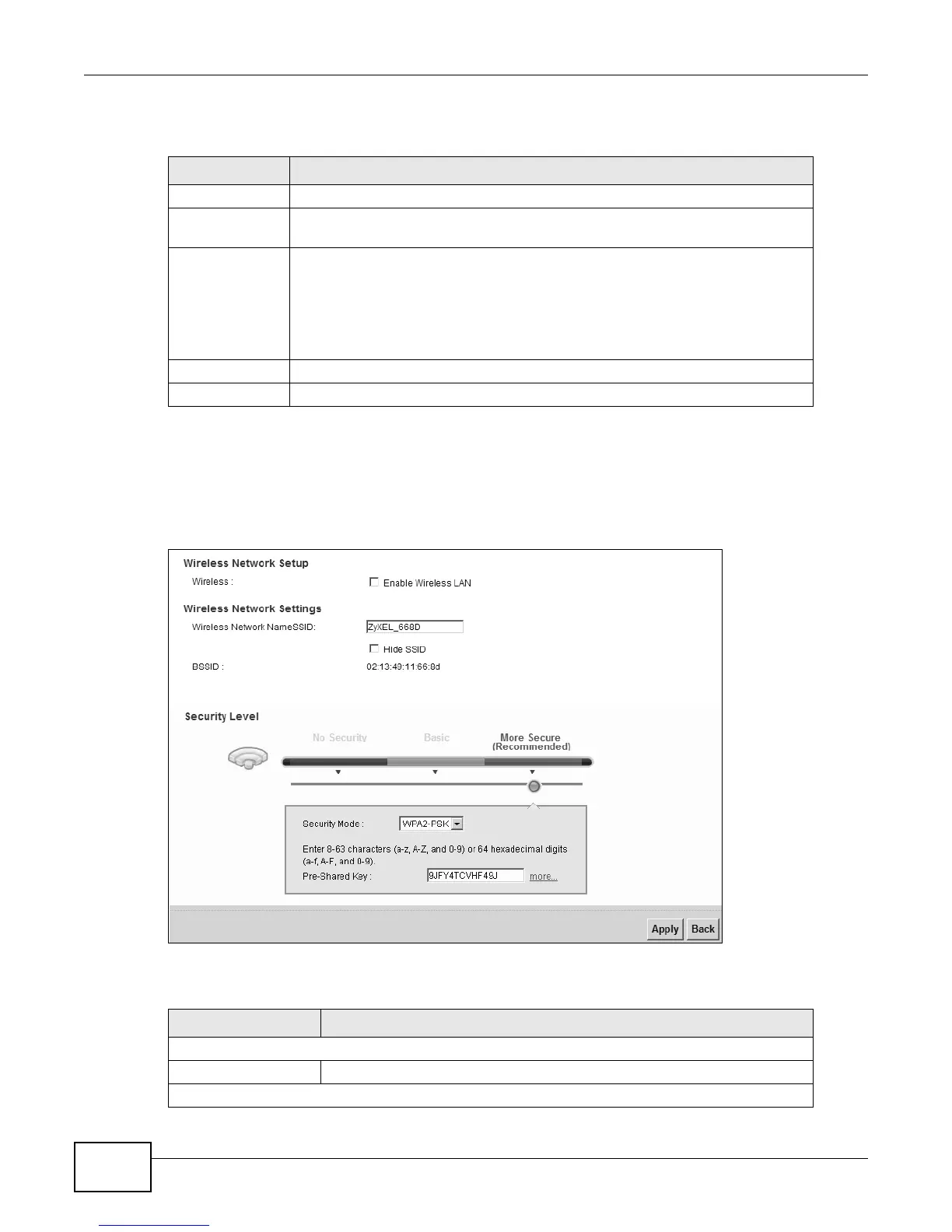
Use this screen to edit an SSID profile. Click the Edit icon next to an SSID in the More AP screen.
The following screen displays.
Figure 26 Wireless > More AP: Edit
The following table describes the fields in this screen.
Table 12 Network Settings > Wireless > More AP
LABEL DESCRIPTION
# This is the index number of the entry.
Active This field indicates whether this SSID is active. A yellow bulb signifies that this
SSID is active. A gray bulb signifies that this SSID is not active.
SSID An SSID profile is the set of parameters relating to one of the LTE Device’s BSSs.
The SSID (Service Set IDentifier) identifies the Service Set with which a wireless
device is associated.
This field displays the name of the wireless profile on the network. When a
wireless client scans for an AP to associate with, this is the name that is broadcast
and seen in the wireless client utility.
Security This field indicates the security mode of the SSID profile.
Modify Click the Edit icon to configure the SSID profile.
Table 13 Wireless > More AP: Edit
LABEL DESCRIPTION
Wireless Network Setup
Wireless Select the Enable Wireless LAN check box to activate the wireless LAN.
Wireless Network Settings











 To Next Page