Chapter 5 Wireless
B222s User’s Guide
57
5.6 Scheduling Screen
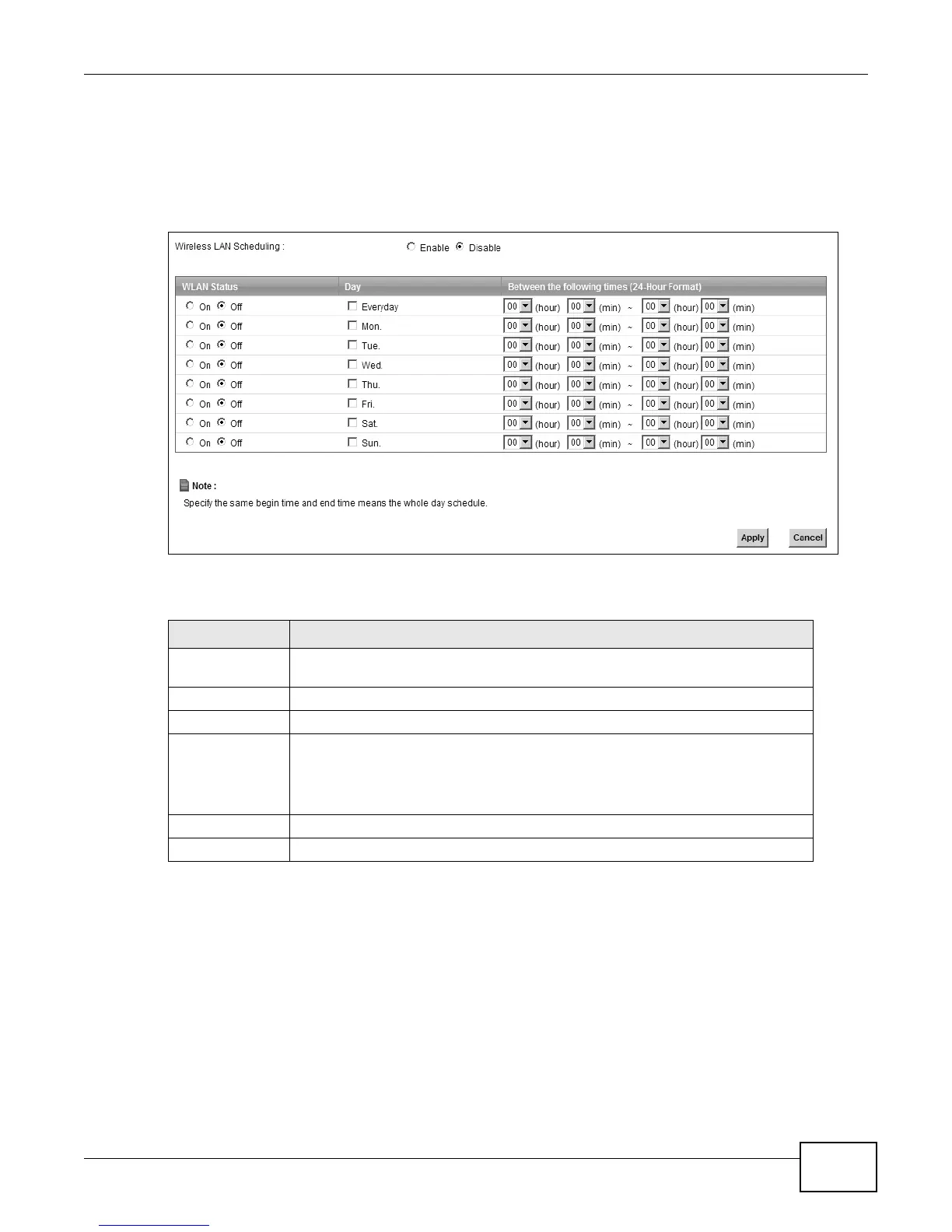
Click Network Setting > Wireless > Scheduling to open the Wireless LAN Scheduling screen.
Use this screen to configure when the LTE Device enables or disables the wireless LAN.
Figure 29 Network Setting > Wireless > Scheduling
The following table describes the labels in this screen.
5.7 Technical Reference
This section discusses wireless LANs in depth. For more information, see the appendix.
Table 16 Network Setting > Wireless > Scheduling
LABEL DESCRIPTION
Wireless LAN
Scheduling
Select Enable to activate wireless LAN scheduling on your LTE Device.
WLAN status Select On or Off to enable or disable the wireless LAN.
Day Select the day(s) you want to turn the wireless LAN on or off.
Between the
following times
Specify the time period during which to apply the schedule.
For example, you want the wireless network to be only available during work
hours. Check Mon ~ Fri in the day column, and specify 8:00 ~ 18:00 in the time
table.
Apply Click Apply to save your changes.
Cancel Click Cancel to restore your previously saved settings.











 To Next Page