Chapter 15 VoIP
B222s User’s Guide
131
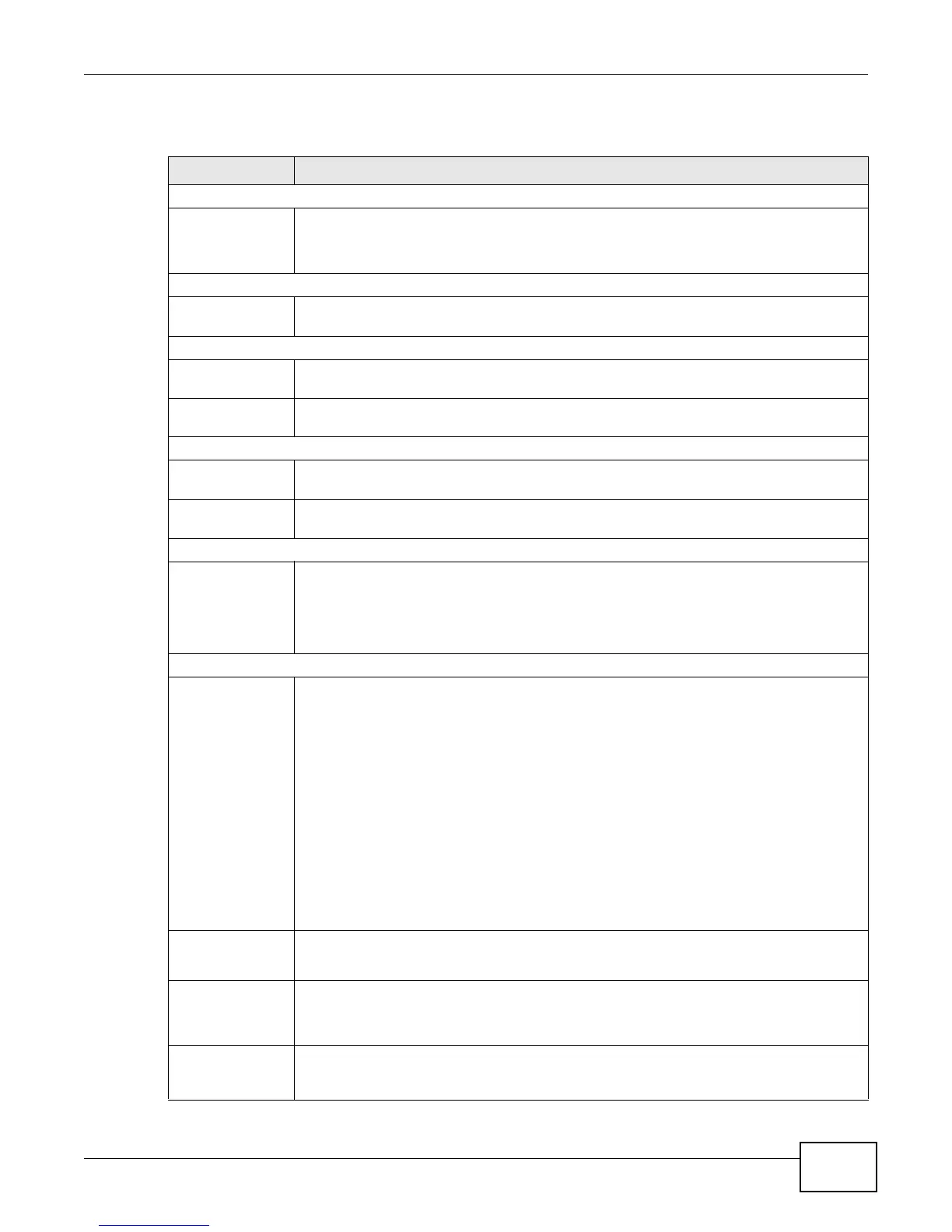
Each field is described in the following table.
Table 51 SIP Account: Edit
LABEL DESCRIPTION
SIP Service Provider Selection
Service Provider
Selection
Select the SIP service provider profile you want to use for the SIP account you configure
in this screen.
This field is view-only if you are editing the SIP account.
SIP Account Selection
SIP Account
Selection
This shows the SIP account you are configuring.
General
SIP Account Select the Active SIP Account check box if you want to use this account. Clear it if you
do not want to use this account.
SIP Account
Number
Enter your SIP number. In the full SIP URI, this is the part before the @ symbol. You can
use up to 127 printable ASCII characters.
Authentication
Username Enter the user name for registering this SIP account, exactly as it was given to you. You
can use up to 95 printable ASCII characters.
Password Enter the password for registering this SIP account, exactly as it was given to you. You
can use up to 95 printable ASCII characters.
URL Type
URL Type Select whether or not to include the SIP service domain name when the LTE Device sends
the SIP number.
SIP - include the SIP service domain name.
TEL - do not include the SIP service domain name.
Voice Features
Primary
Compression Type
Secondary
Compression Type
Third
Compression Type
Select the type of voice coder/decoder (codec) that you want the LTE Device to use.
G.711 provides higher voice quality but requires more bandwidth (64 kbps).
• G.711MuLaw is typically used in North America and Japan.
• G.711ALaw is typically used in Europe.
• G.729 only requires 8 kbps.
• G.726-32 operates at 16, 24, 32 or 40 kbps.
• G.722 operates at 48, 56 and 64 kbps.The LTE Device must use the same codec as
the peer. When two SIP devices start a SIP session, they must agree on a codec.
Select the LTE Device’s first choice for voice coder/decoder.
Select the LTE Device’s second choice for voice coder/decoder. Select None if you only
want the LTE Device to accept the first choice.
Select the LTE Device’s third choice for voice coder/decoder. Select None if you only want
the LTE Device to accept the first or second choice.
Speaking
Volume
Control
Enter the loudness that the LTE Device uses for speech that it sends to the peer device.
Minimum is the quietest, and Maximum is the loudest.
Listening
Volume
Control
Enter the loudness that the LTE Device uses for speech that it receives from the peer
device.
Minimum is the quietest, and Maximum is the loudest.
Active G.168
(Echo
Cancellation)
Select this if you want to eliminate the echo caused by the sound of your voice
reverberating in the telephone receiver while you talk.











 To Next Page