Chapter 17 Traffic Status
B222s User’s Guide
153
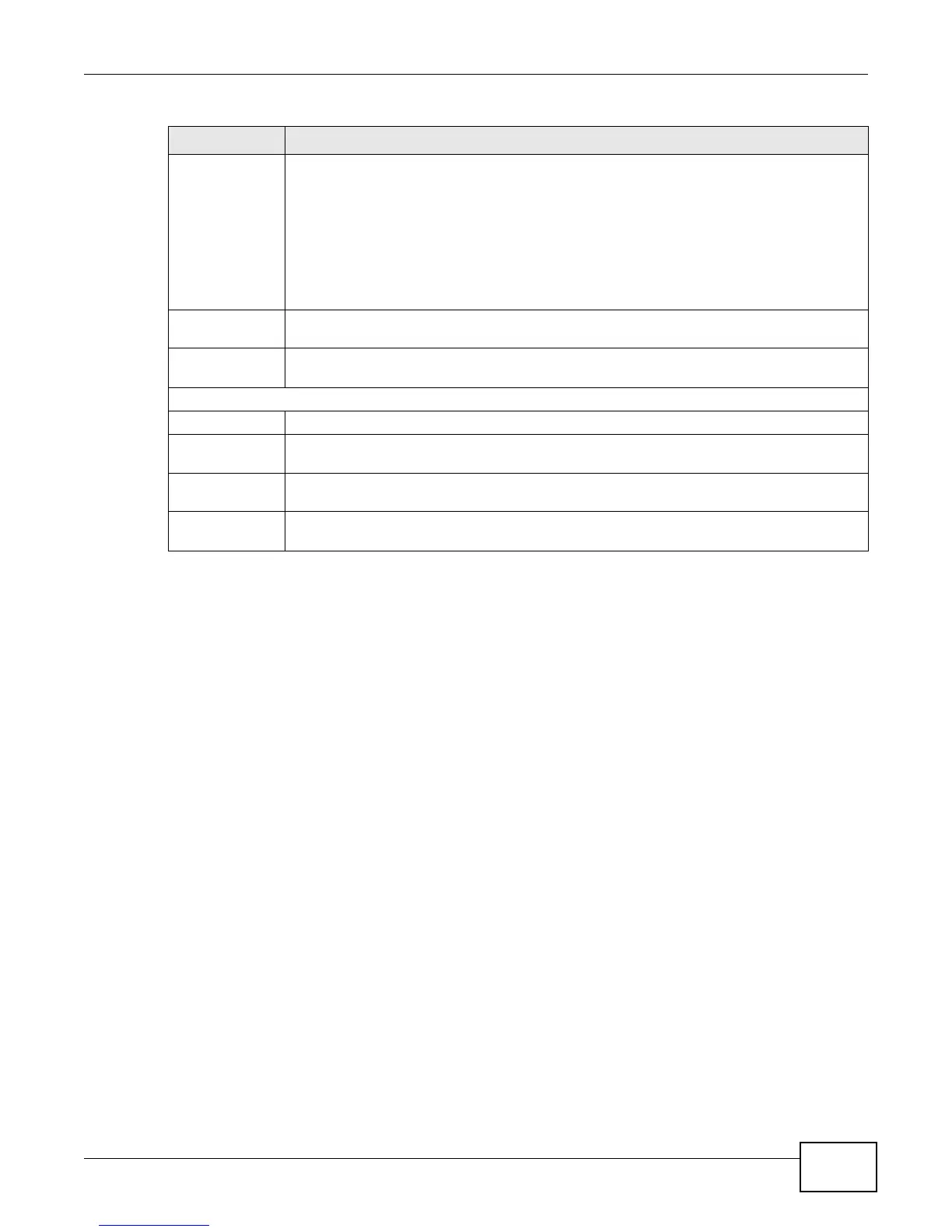
Status This field displays the current state of the phone call.
Idle - There are no current VoIP calls, incoming calls or outgoing calls being made.
Dial - The callee’s phone is ringing.
Ring - The phone is ringing for an incoming VoIP call.
Process - There is a VoIP call in progress.
DISC - The callee’s line is busy, the callee hung up or your phone was left off the hook.
Codec This field displays what voice codec is being used for a current VoIP call through a phone
port.
Peer Number This field displays the SIP number of the party that is currently engaged in a VoIP call
through a phone port.
Phone Status
Account This field displays the phone accounts of the LTE Device.
Outgoing
Number
This field displays the SIP number that you use to make calls on this phone port.
Incoming
Number
This field displays the SIP number that you use to receive calls on this phone port.
Phone State This field shows whether or the phone connected to the subscriber port is on-hook
ONHOOK) or off-hook (OFFHOOK).
Table 65 System Monitor > VoIP Status (continued)
LABEL DESCRIPTION











 To Next Page