NetCol5000-A 42 kW Air Cooled In-row Precision Air
Conditioner
User Manual
Huawei Proprietary and Confidential
Copyright © Huawei Technologies Co., Ltd.
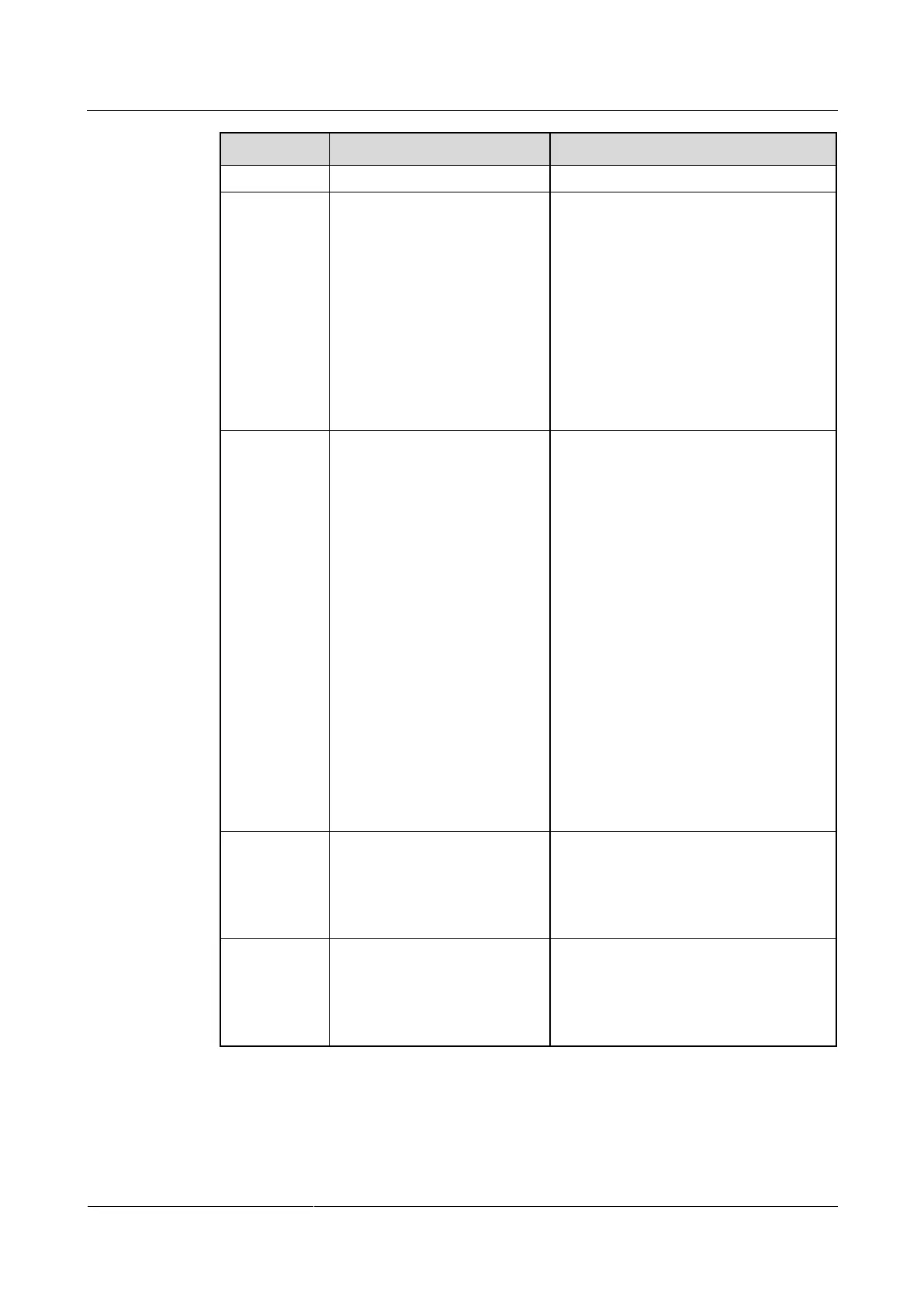
The dehumidification can be
set to Enable, Disable, or
Enabled when active pwr
(for dual-power supply
scenarios).
Enable indicates that the
dehumidification function will be
enabled when the ambient humidity
exceeds the certain humidity range of the
humidity set point. Disable indicates that
the dehumidification function will not be
enabled. Enabled when active pwr
indicates that the dehumidification
function will be enabled when the main
power is active and the ambient
humidity exceeds the certain humidity
range of the humidity set point.
DO associated alarm can be
set to Smoke&water only,
Critical&major ALM, and
None to associate alarms.
When DO associated alarm is set to
Smoke&water only, if a smoke
sensor alarm or water overflow alarm
is generated, port 1 for reporting
common alarms generates a dry
contact close alarm, and port 2 for
reporting common alarms does not
function.
When DO associated alarm is set to
Critical&major ALM, if a critical
alarm is generated, port 1 for
reporting common alarms generates a
dry contact close alarm; if a major
alarm is generated, port 2 for
reporting common alarms generates a
dry contact close alarm.
When DO associated alarm is set to
None, ports 1 and 2 for reporting
common alarms are open and
generate no alarms.
Select the control mode for the
outdoor fan based on the cable
connection of the indoor and
outdoor units (dry contact
cable or RS485 cable).
When the indoor and outdoor units are
connected using the dry contact cable,
select Dry contact; when the indoor and
outdoor units are connected using the
RS485 cable, select Communicate.
Cooling (for
dual-power
supply
scenarios)
The cooling function can be
set to Enable or Enabled
when active pwr
If Enable is selected, the main and
auxiliary power supplies allow the start
of the cooling. If Enabled when active
pwr is selected, only the main power
supply allows the start of the cooling.
----End







 To Next Page