NetCol5000-A 42 kW Air Cooled In-row Precision Air
Conditioner
User Manual
Huawei Proprietary and Confidential
Copyright © Huawei Technologies Co., Ltd.
----End
3.11.3 Teamwork Networking and Monitoring
3.11.3.1 Main Control Module
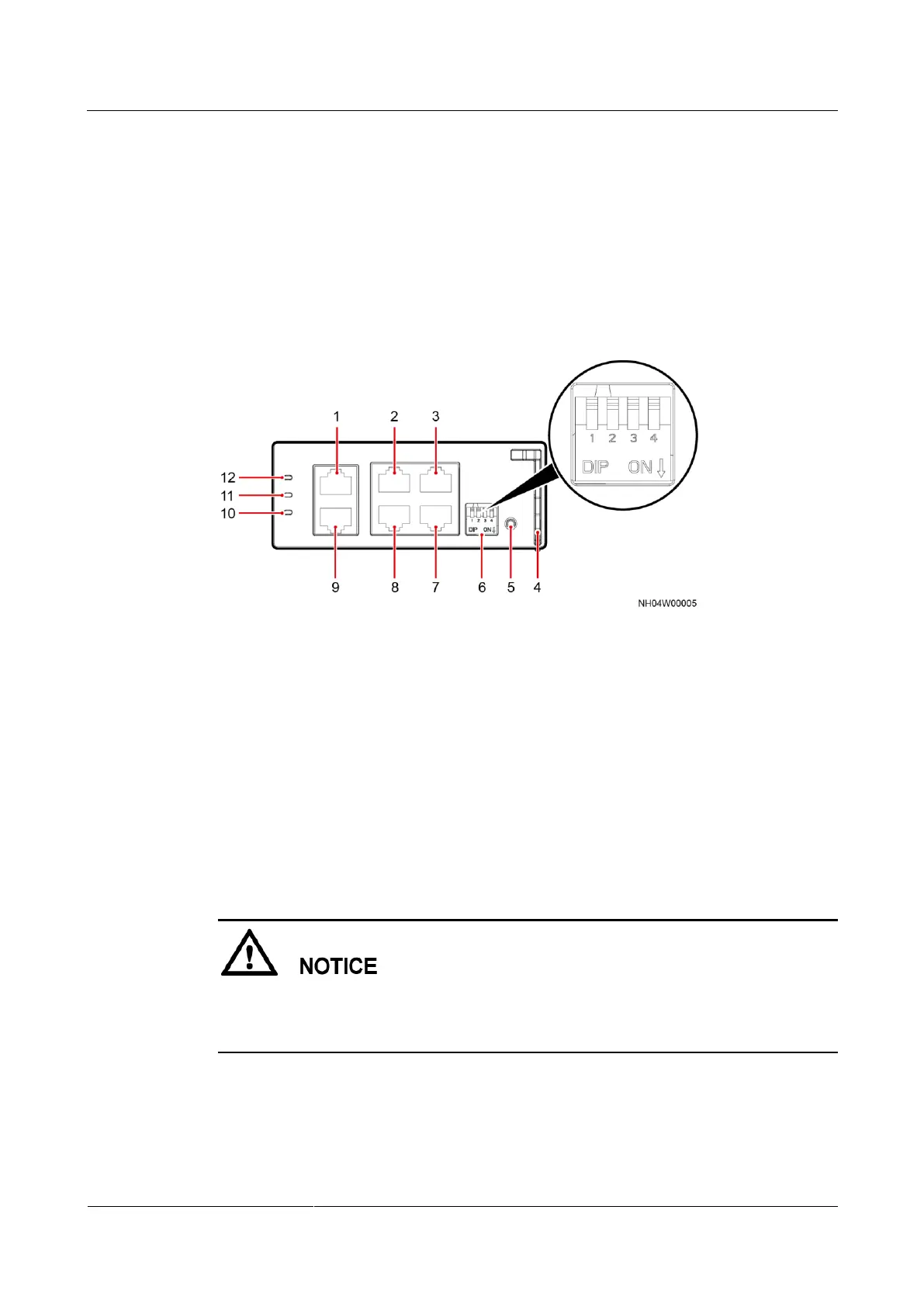
Ports for the teamwork and monitoring network cables are on the main control module at the
rear of the air conditioner. Figure 3-46 shows a main control module.
Figure 3-46 Main control module
(1) FE_1 (FE
monitoring port)
(2) CAN_IN (input port of the teamwork
CAN/northbound RS485 port)
(3) RS485/12 V
(T/H module port)
(4) Main control
board handle
(7) COM (northbound
RS485 port)
(8) CAN_OUT (output port of the
teamwork CAN/northbound RS485 port)
(9) FE_2 (FE
teamwork port)
3.11.3.2 Connecting the Teamwork Network Cable
Air conditioners in a teamwork group must be of the same model.
FE teamwork network applies only to the scenario when air conditioners are monitored by
the ECC800.
Connecting the FE teamwork network cable
Step 1 (Optional) Make FE teamwork network cables by referring to Figure 3-47 if required onsite.







 To Next Page