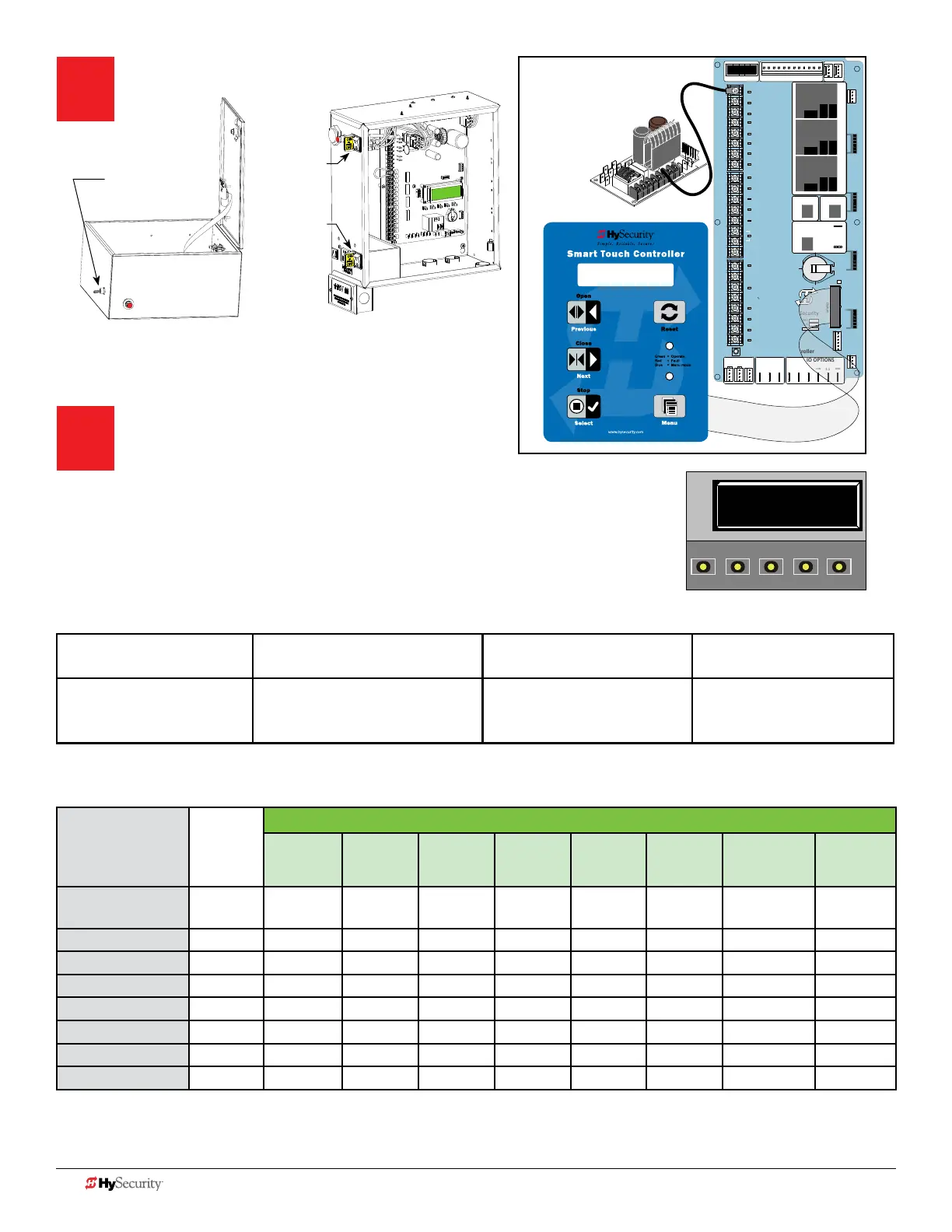
To change data
appearing in the display
To navigate through
the Selections
To choose what appears
on the display
To navigate between
menu items
Press Select.
Two left characters blink.
Press Next or Previous.
Continue pressing Next to view
all selections.
Press Select.
Blinking characters
become static.
Press Next or Previous.
Advance - press Next
Previous - press Previous
Smart Touch and Smart DC Controller: Menu Mode Navigation Buttons
Table 5: Installer Menu Settings for SENSOR Inputs
UL 325
HySecurity Gate
Operator
Build
Year
2016
(BY set)
Installer Menu Settings for STC & SDC Sensors 1, 2, or 3 (solo operators)
#0
DISABLED
#1
NOT USED
#2
EYE CLOSE
#3
EDGE
CLOSE
#4
EYE OPEN
#5
EDGE
OPEN
#6
EDGE BOTH
DIRECTIONS
#7
EYE BOTH
DIRECTIONS
SlideDriver
(xed speed)
2
● ● ● ● ● ● ●
SlideDriver VFD 2
● ● ● ● ● ● ●
SlideSmart DC 15 2
● ● ● ● ● ● ●
SlideSmart DC 10 2
● ● ● ● ● ● ●
SwingRiser * 2
● ● ● ● ● ● ●
SwingSmart DC * 2
● ● ● ● ● ● ●
HydraSwing * 2
● ● ● ● ● ● ●
HydraLift 2
● ● ● ●
NOTE: HySecurity does not update software for SlideWinder models. Refer to Table 2: HySecurity Gate Operators maintaining
Object Detection on page 5 for an overview of HySecurity gate operators not requiring monitoring of external entrapment
protection sensors to meet the 2016 UL 325 Standard of Safety regulations. * For notes on swing gates, refer to page 20.
Turn Power ON.
NOTE: Use PE, Photo Eye Alignment mode to temporarily
power the sensors. Refer to Photo Eye Alignment on page 12.
Answer Initial Setup Prompts.
For slide gates you will be prompted for USAGE CLASS,
GATE HANDING, and SENSOR 1, SENSOR 2, and
SENSOR 3. Each SENSOR input, whether or not it has a contact or non-contact sensor
wired to it, must be programmed to a non-zero setting before the gate will move.
NOTE: The gate operator will not automatically cycle unless an indication is received that the
appropriate number of external entrapment protection sensors are connected and
operational.
STOP BUTTON
OPEN BUTTON
CLOSE BUTTON
REMOTE OPEN AND
RADIO CONTROL
OPEN/CLOSE
1
OPEN PARTIAL
INTERLOCK OPEN
TIME CLOCK OPEN
FREE EXIT DETECTOR
DISABLE EXIT DETECTOR
DISABLE CLOSE TIMER
INSIDE OBSTRUCTION
VEHICLE DETECTOR
OUTSIDE OBSTRUCTION
VEHICLE DETECTOR
SHADOW/RESET
VEHICLE DETECTOR
SENSOR 1
SENSOR COM
DO NOT USE
SENSOR 2
DO NOT USE
SENSOR 3
DO NOT USE
CHARGER
AC LOSS
LOCK INTERLOCK
EMERG CLOSE
FIRE DEPT OPEN
2
3
4
5
6
7
8
9
10
11
12
14
15
16
17
18
19
20
21
22
23
24
Smart Touch Controller
LIMIT DUAL GATE
RADIO OPTIONS
DRIVE
POWER
RS485
MOTOR USER 1
USER 2
USER 3
VEHICLE DETECTORVEHICLE DETECTORVEHICLE DETECTOR
STOP/BUZZER
FREE
EXIT
INSIDE
OBSTR
OUTSIDE
OBSTR
SHADOW
RESET
WIEGAND
HySecurity
COM
NO
MX000585
VERSION
S/N
RS232
DISPLAY
VEHICLE DETECTOR
COM COMA B
RPM
COMOPEN
S 1
+24V +24V
STATU S
LED
2
4
V
A
C
A
c
ce
ss
o
ry
p
ower
+
2
4
V
D
C
COMM
ON
S1 2 (EYE CLOSE)
SENSOR #1 TYPE
I/0 Switch
DC Power
I/0 Switch
AC Power
Electromechanical
SlideSmart DC
Control Box
I/0 Switch
SlideDriver Control Box
Hydraulic
S1 2 (EYE CLOSE)
SENSOR #1 TYPE
OPEN
CLOSE
STOP
MENU
RESET
PREV
NEXT
SELECT
10 D0726 Rev. J UL 325 - 2016 HySecurity Monitored Sensors © 2016 www.hysecurity.com











 To Next Page