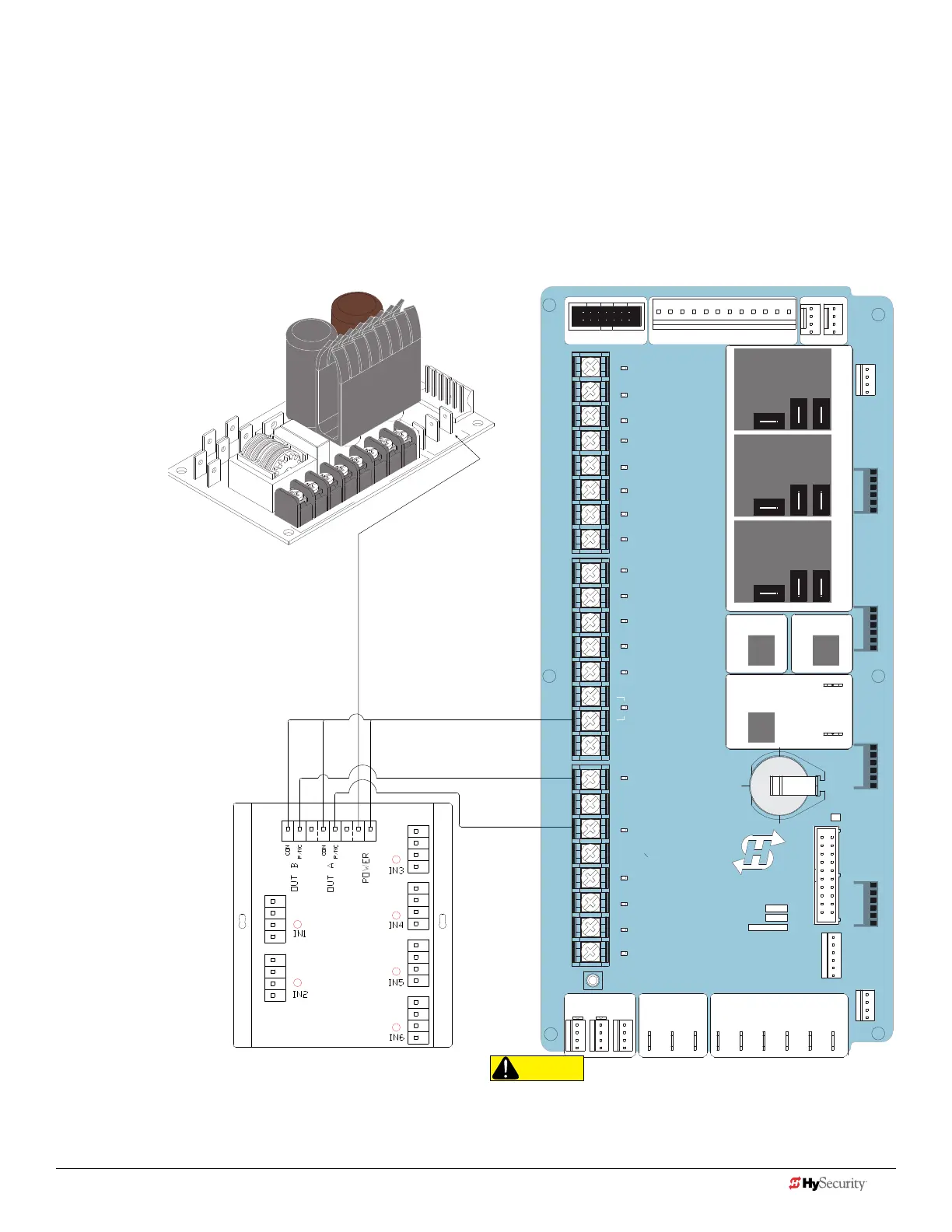
Smart toucH: tHe SoLutIon, mIm-62 (muLtI-Input moduLe)
1. Turn OFF AC power.
2. Input channels 1 and 2 must be used and are always assigned to OUTPUT A.
3. All other input channels may be congured to either A or B.
NOTE: If different sensor types are connected to the same output, then program the Controller SENSOR type
for EDGE options.
4. Turn ON power.
5. Access the Installer Menu. Congure SENSOR
setting according to the types of sensors wired to the Smart Touch Controller..
2
4V AC
Acces
s
ory p
o
w
e
r
+
2
4
V
D
C
C
OMMON
STOP BUTTON
OPEN BUTTON
CLOSE BUTTON
REMOTE OPEN AND
RADIO CONTROL
OPEN/CLOSE
1
OPEN PARTIAL
INTERLOCK OPEN
TIME CLOCK OPEN
FREE EXIT DETECTOR
DISABLE EXIT DETECTOR
DISABLE CLOSE TIMER
INSIDE OBSTRUCTION
VEHICLE DETECTOR
OUTSIDE OBSTRUCTION
VEHICLE DETECTOR
SHADOW/RESET
VEHICLE DETECTOR
SENSOR 1
SENSOR
COM
DO NOT USE
SENSOR 2
DO NOT USE
SENSOR 3
DO NOT USE
CHARGER
AC LOSS
LOCK INTERLOCK
EMERG CLOSE
FIRE DEPT OPEN
2
3
4
5
6
7
8
9
10
11
12
14
15
16
17
18
19
20
21
22
23
24
Smart Touch Controller
LIMIT DUAL GATE
RADIO OPTIONS
DRIVE
POWER
RS485
MOTOR USER 1
USER 2
USER 3
VEHICLE DETECTORVEHICLE DETECTORVEHICLE DETECTOR
STOP/BUZZER
FREE
EXIT
INSIDE
OBSTR
OUTSIDE
OBSTR
SHADOW
RESET
WIEGAND
HySecurity
COM
NO
MX000585
VERSION
S/N
RS232
DISPLAY
VEHICLE DETECTOR
COM COMA B
RPM
COMOPEN
S 1
+24V +24V
STATU S
LED
Connect either output
(P/NC wire) to SENSOR 1,
2, or 3.
Power Supply Board
CAUTION
All external entrapment protection sensors must be NC sensor
outputs and wired to the SENSOR COM terminal for monitoring
and powering purposes. The sensor becomes actively powered
when the gate operator's motor runs.
An example site scenario where The Solution
might be useful is found on page 23.
28 D0726 Rev. J UL 325 - 2016 HySecurity Monitored Sensors © 2016 www.hysecurity.com
www.hysecurity.com © 2016 Quick Start D0726 Rev. J 29











 To Next Page