COM
COM
COM
COM
COM
COM
COM
COM
STOP
OPEN
RADIO
CLOSE
OPEN
OPEN
PARTIAL
OPEN
EYE
EXIT
LOOP
EXIT
LOOP
LOOP
LOOP
EDGE
EYE
COM
+ 24 V
EMERG
OPEN
SHOW
LEDs
S
1
+
24V
OP
EN
C
O
M
D
U
AL
G
A
T
E
C
O
M
A
B
U
S
E
R2
C
O
M
N
O
D
C
USER RELAY 1
Electro-mechanical
24VDC
24VDC
12VDC
12VDC
SENSOR 2
SENSOR 3
SENSOR 1
SENSOR
COM
EXIT
LOOP
BLOCK
EXIT
CENTER
LOOP
IN OBS
LOOP
OUT OBS
LOOP
11
10
9
8
7
6
5
4
3
2
1
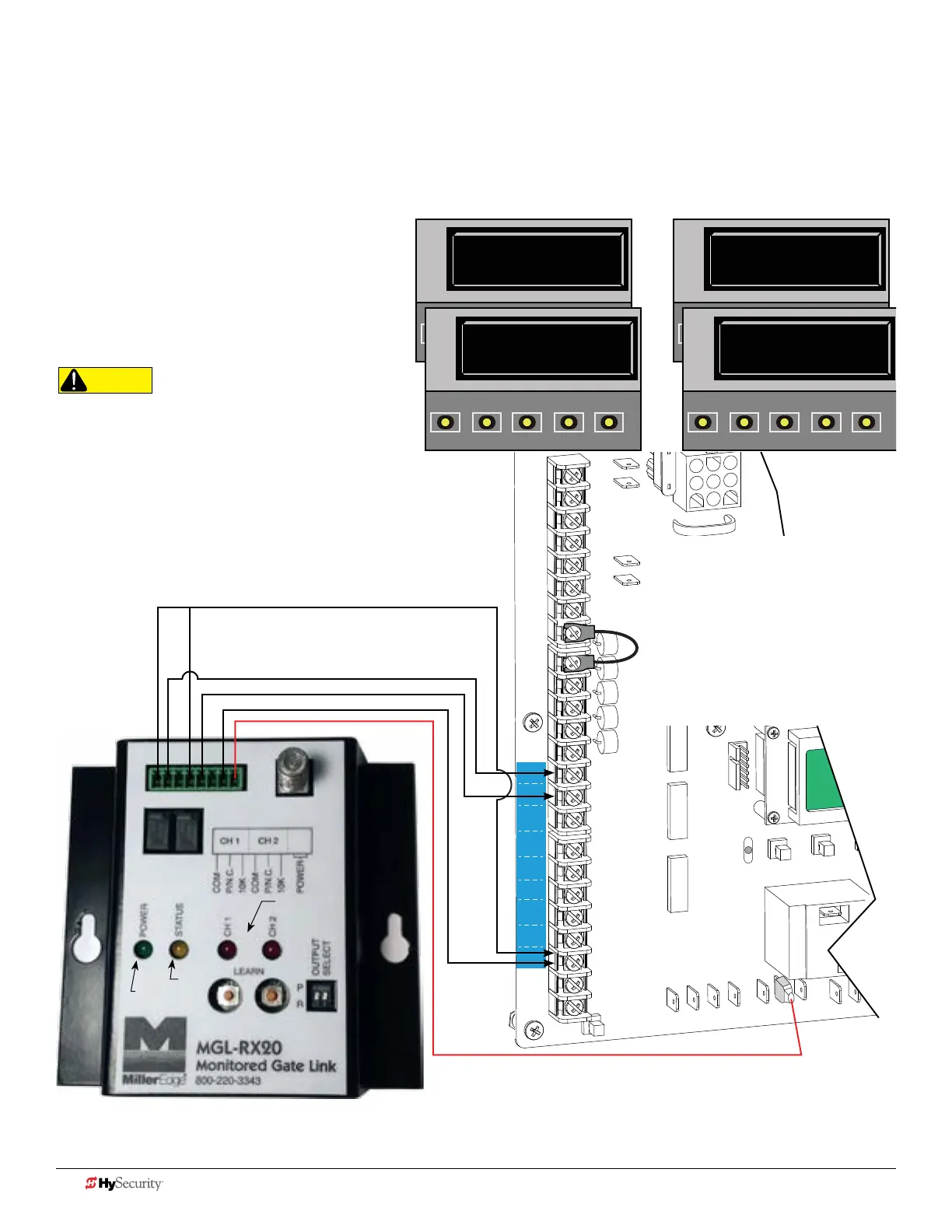
Smart dc: mGL-rX20 wIreLeSS Gate LInK
A transmitter (MGL-TX20) and receiver (MGL-RX20) are required (Version 1.02 or higher).
1. Turn OFF AC power.
2. Connect the wiring per the diagram shown.
3. Turn ON power.
4. Access the Installer Menu. Congure
SENSOR setting accordingly For
example, Edge Open, Edge Close, or
Edge Both.
5. Follow instructions that accompany the
device.
Wireless Edge Link (Receiver) MGL - RX20
Signal received from battery-powered
Transmitter (MGL - TX20)
Connect either
channels output
(P/NC wire) to
SENSOR 1, 2, or 3.
NOTE: One wireless edge receiver
has the NC connections for up to
two wireless edge transmitters. Use
Miller Gate Edges that have a wire
marked with Blue Tape. The Blue Tape
indicates a resistor is built in. To avoid
crosstalk, use receivers & transmitters
Version 1.02 or higher.
CAUTION
All external entrapment protection sensors must be
NC sensor outputs and wired to the SENSOR COM
terminal for monitoring and powering purposes. The
sensor becomes actively powered when the gate
operator receives a run command.
NOTE: In bi-parting swing gates, CH1 and CH2 may be
programmed to the same SENSOR # TYPE on one controller,
but each CH must be connected to separate SENSOR inputs.
Always make sure that a gate edge is installed on each bi-
parting swing gate.
S2 0
SENSOR #2 TYPE
OPEN
CLOSE
STOP
MENU
RESET
PREV
NEXT
SELECT
S2 6 (EDGE BOTH)
SENSOR #2 TYPE
OPEN
CLOSE
STOP
MENU
RESET
PREV
NEXT
SELECT
S3 0
SENSOR #3 TYPE
OPEN
CLOSE
STOP
MENU
RESET
PREV
NEXT
SELECT
S3 6 (EDGE BOTH)
SENSOR #3 TYPE
OPEN
CLOSE
STOP
MENU
RESET
PREV
NEXT
SELECT
Conguring SENSOR 2 Conguring SENSOR 3
Installer Menu Settings
Examples in displays show
bi-parting swing gate site scenario.
Green
Yellow
Red (Channel 1
& Channel 2)
NOTE: Miller Edge LEARN mode. Press the LEARN button on the
Receiver for 2 seconds until the amber light blinks continuously.
Press the Edge or Test button on the Transmitter to complete the
LEARN mode process and sync the receiver and transmitter.
42 D0726 Rev. J UL 325 - 2016 HySecurity Monitored Sensors © 2016 www.hysecurity.com











 To Next Page