Fuse-Filter Card/Power Cord Removal
1.
Position Printer Power switch to
OFF;
unplug printer power
cord from wall outlet and disconnect Parallel Printer Cable.
2.
Remove forms.
3.
Remove forms rack (See page 3-56).
4. Remove access cover (See page 3-32).
5. Remove top cover (See page 3-88).
DANGER:
STATIC
VOLTAGE
MAY BE
PRESENT
ON
THE
FUSE-FILTER
CARD.
USE
CAUTION
IN
THIS
AREA.
6. Remove safety shield from filter-fuse card assembly
(See page 3-87).
7.
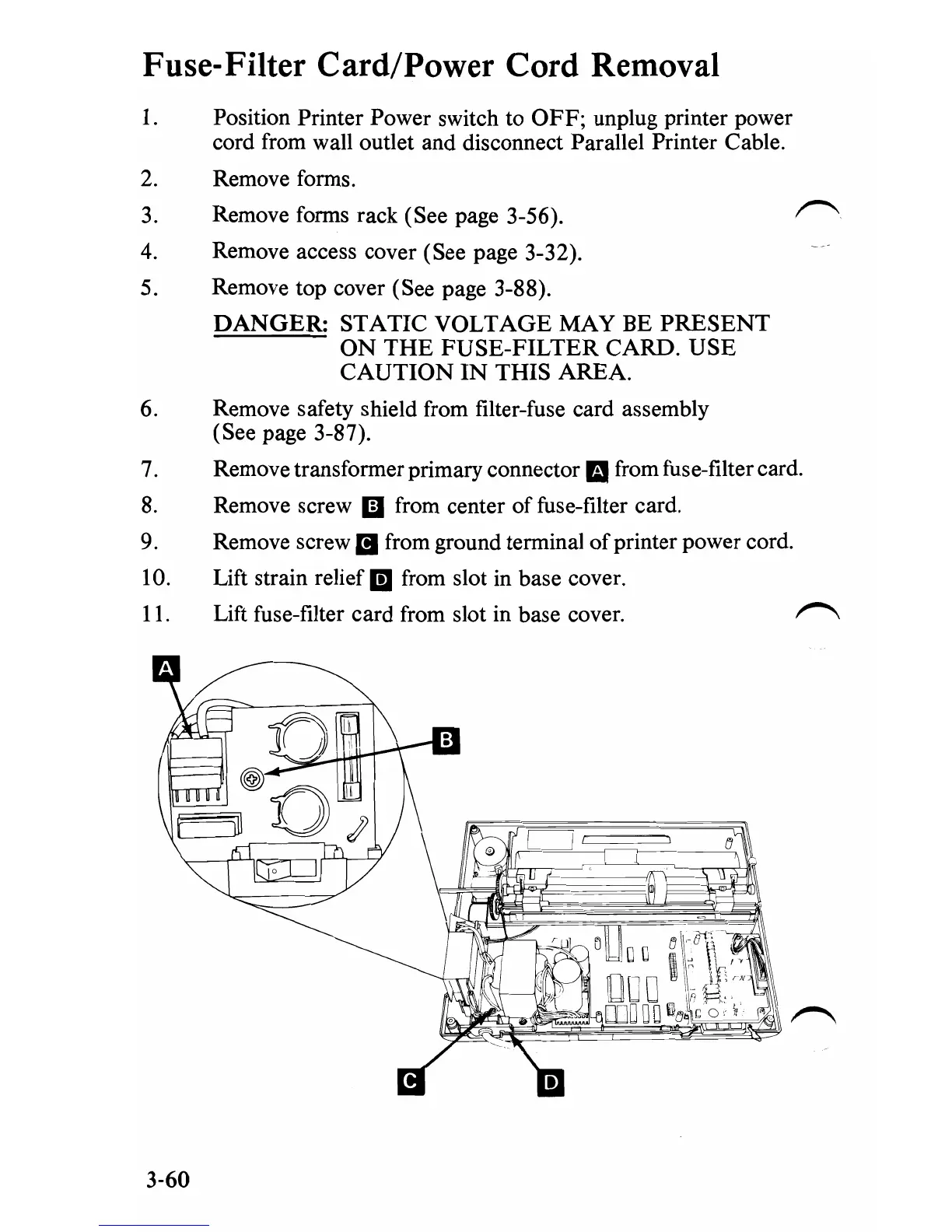
Remove transformer primary connector mfrom fuse-filter card.
8.
Remove screw
iii
from center of fuse-filter card.
9.
Remove screw
II
from ground terminal
of
printer power cord.
10. Lift strain relief
II
from slot in base cover.
11. Lift fuse-filter card from slot in base cover.
3-60


 To Next Page
 Loading...








