Mounting options
The mounting options for the IBM AnyPlace Kiosk are as follows:
VESA-standard mounting holes
The system has 100 mm VESA mounting points for use with standard,
third party VESA mounting options.
Wall mount
This mount minimizes protrusion from the wall, but does not have any tilt
or swivel capability.
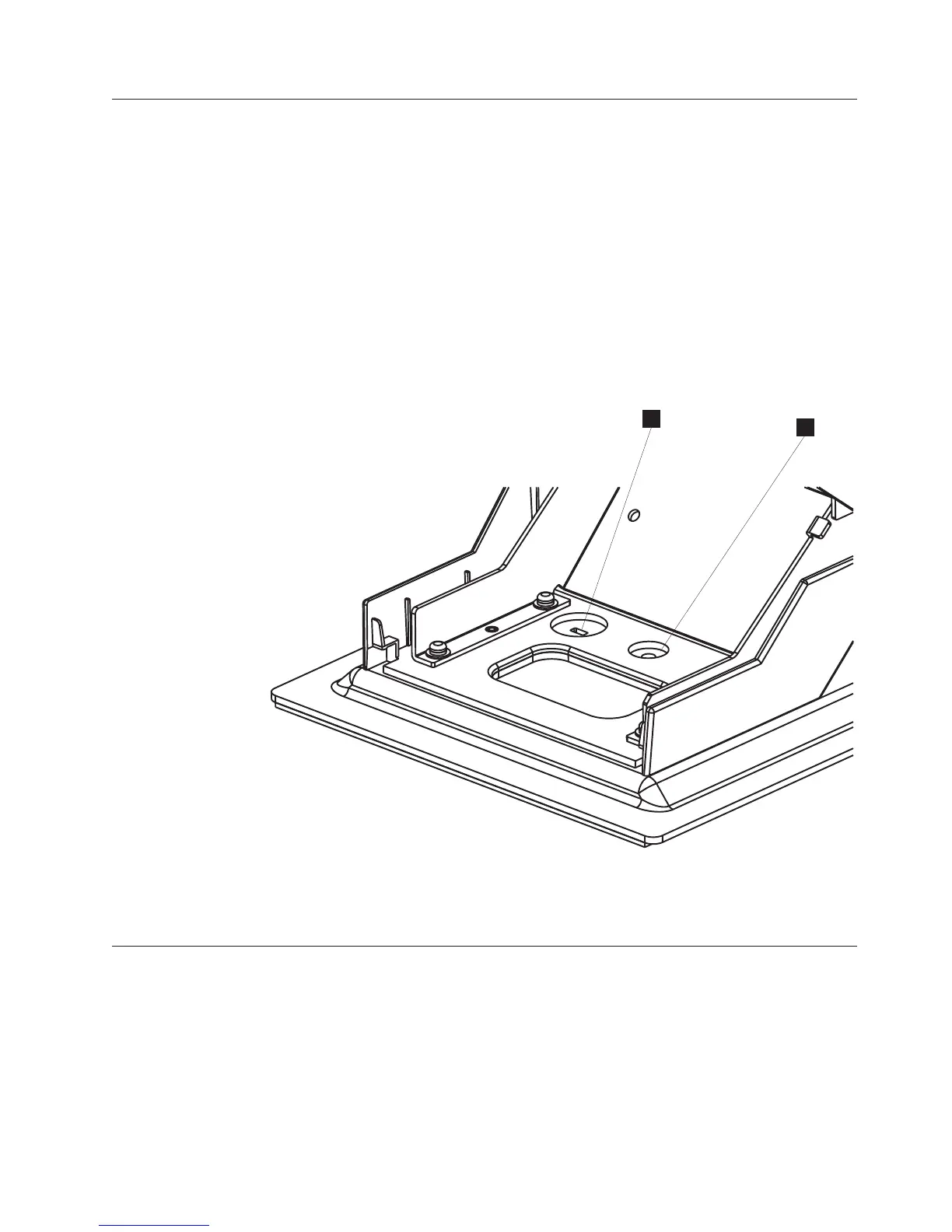
Tabletop mount
This mount tilts the monitor forward and back and rests on a tabletop. For
security, a Kensington security slot is provided (A in Figure 2). Also, a
round 5.5 mm (0.217 in.) hole enables the mount to be secured (B in
Figure 2) with an M5 or 10-24 pan head screw.
Diagnostics
The IBM AnyPlace Kiosk 4838 provides a diagnostic processor with Light-Path
LEDS to easily help isolate a failing component or condition. An LED represents a
specific action to correct the indicated problem. See “Using the diagnostic
processor” on page 64.
You can obtain a USB memory key-based diagnostic package for your IBM
AnyPlace Kiosk from the IBM Retail Store Solutions Web site: www.ibm.com/
solutions/retail/store/support/.
A
B
Figure 2. Security and mounting holes.
A Kensington security slot
B Round mounting hole
Introducing the IBM AnyPlace Kiosk
Chapter 1. Introducing the IBM AnyPlace Kiosk 5



 To Next Page