Rear view
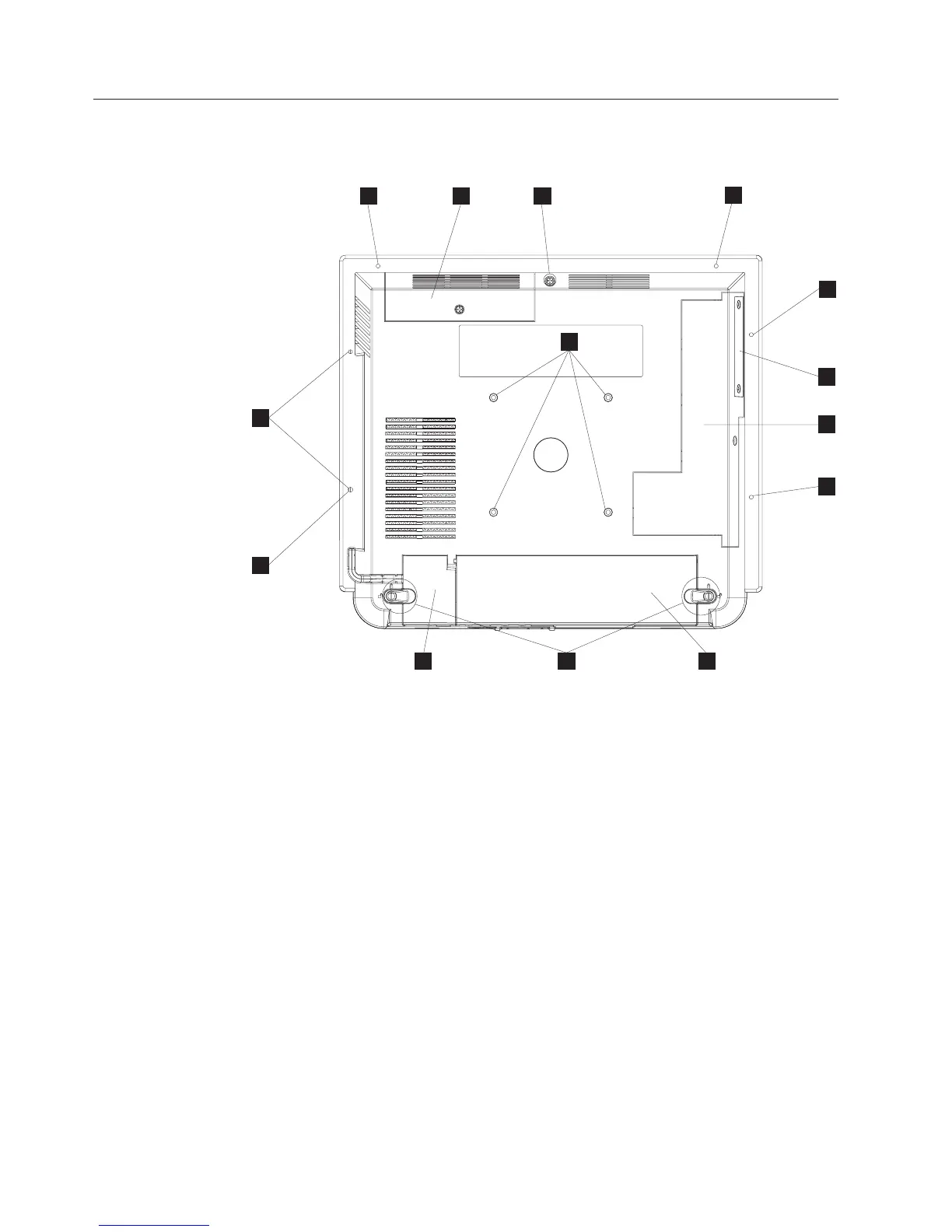
Figure 3 shows the rear view of the AnyPlace Kiosk.
A Hard drive door with captured screw
B Side door allows access to memory slots, flash drive, Light-Path LEDs,
wireless card, and CMOS jumper.
B ExpressCard slot cover
C Main cable cover
D MSR/USB cable cover
E Tapped holes that allow for the 100 mm x 100 mm (3.93 in. x 3.93 in.)
mounting:
Note: These holes allow for the standard M4 X 10 mm screws specified by
the VESA standard.
F MSR mounting hole that is shared with I.
G Quarter-turn latches
H Rear cover captured screw
I Tapped holes that allow the attachment and display of marques,
announcements, sales promotions and other information.
E
I
A
J
J
J
E H D
J
B
J
G
C
Figure 3. Rear view showing access doors, mounting holes, attachment holes
Installing the IBM AnyPlace Kiosk
10
IBM AnyPlace Kiosk 4838



 To Next Page