56
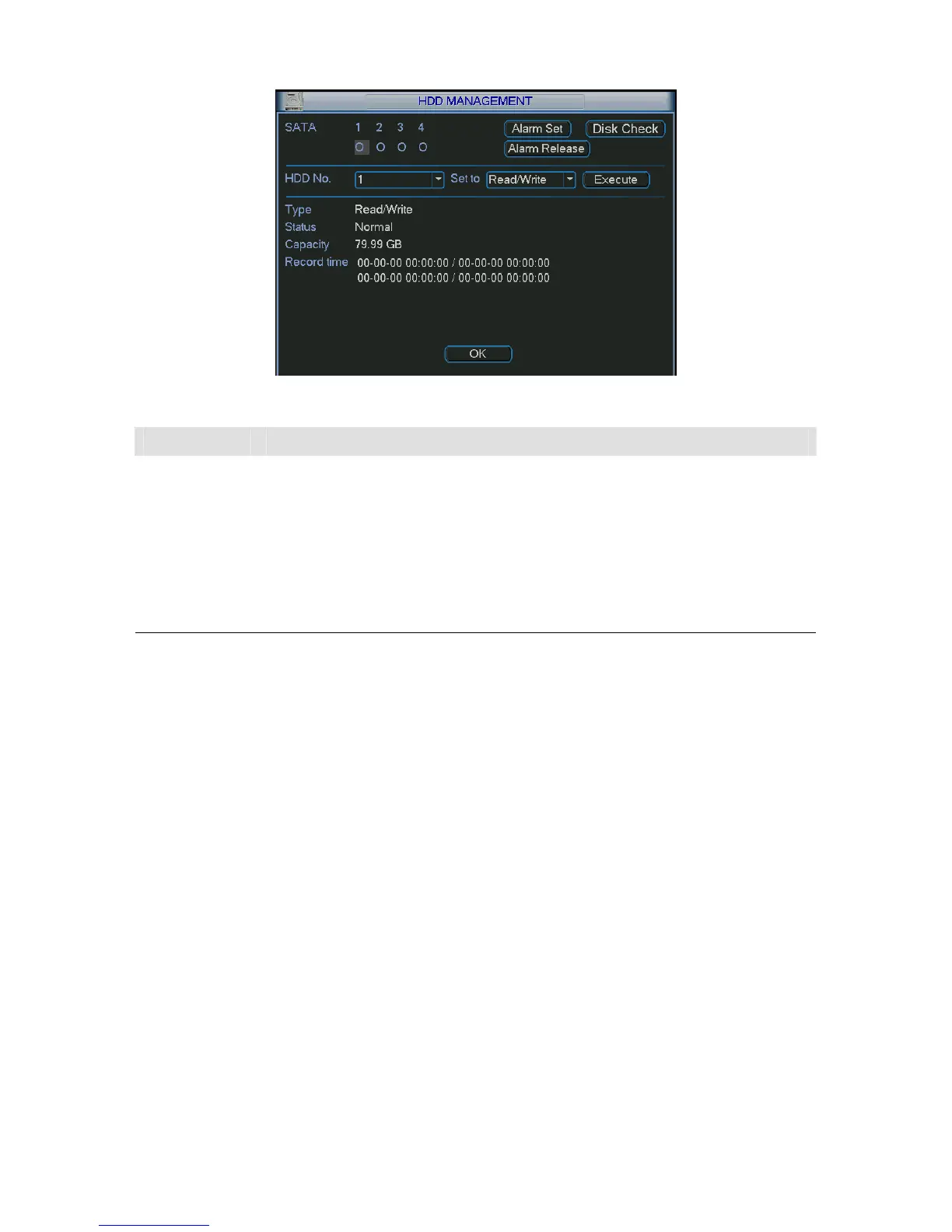
Figure 5-36
Parameter Function
SATA
1-4 here means there are 4 HDDS.
For A series product there are max 2 HDDs. For L series product there are max
4 HDDs. For S series product there are max 8 HDDs.
When HDD is working properly, system is shown as O. When HDD error
occurred, system is shown as X. “_” means there is no HDD.
Alarm set Click it; you can go to the abnormity interface.
Alarm release The device alarms once the HDD is full. You can click this button to disable the
alarm.
Disk check You can click the disk check button to set the HDD check time; The options
include: restart, every day, every week, every month and never.
HDD No You can select the HDD from the dropdown list. There are 11 portions by
default.
Set to
The types include: read-only, read-write, snapshot, clear all data, set sub areas
and etc.
Execute Then you can click execute to set the HDD to the corresponding property.
HDD
information
You can view HDD type, status, total capacity , record time and etc.
5.7.2 Abnormity
Abnormity interface is shown as in 292HFigure 5-37.



 To Next Page