58
Parameter Function
Alarm output
port
There are six alarm output ports. You can highlight All buttons to select all
output channels.
Status It is to display the alarm output is valid or not.
5.7.4 Manual Record
Note:
You need to have proper rights to implement the following operations. Please make sure the
HDD has been properly installed.
There are two ways for you to go to manual record menu.
z Right click mouse or in the main menu, Advanced->Manual Record.
z In live viewing mode, click record button in the front panel or record button in the remote
control.
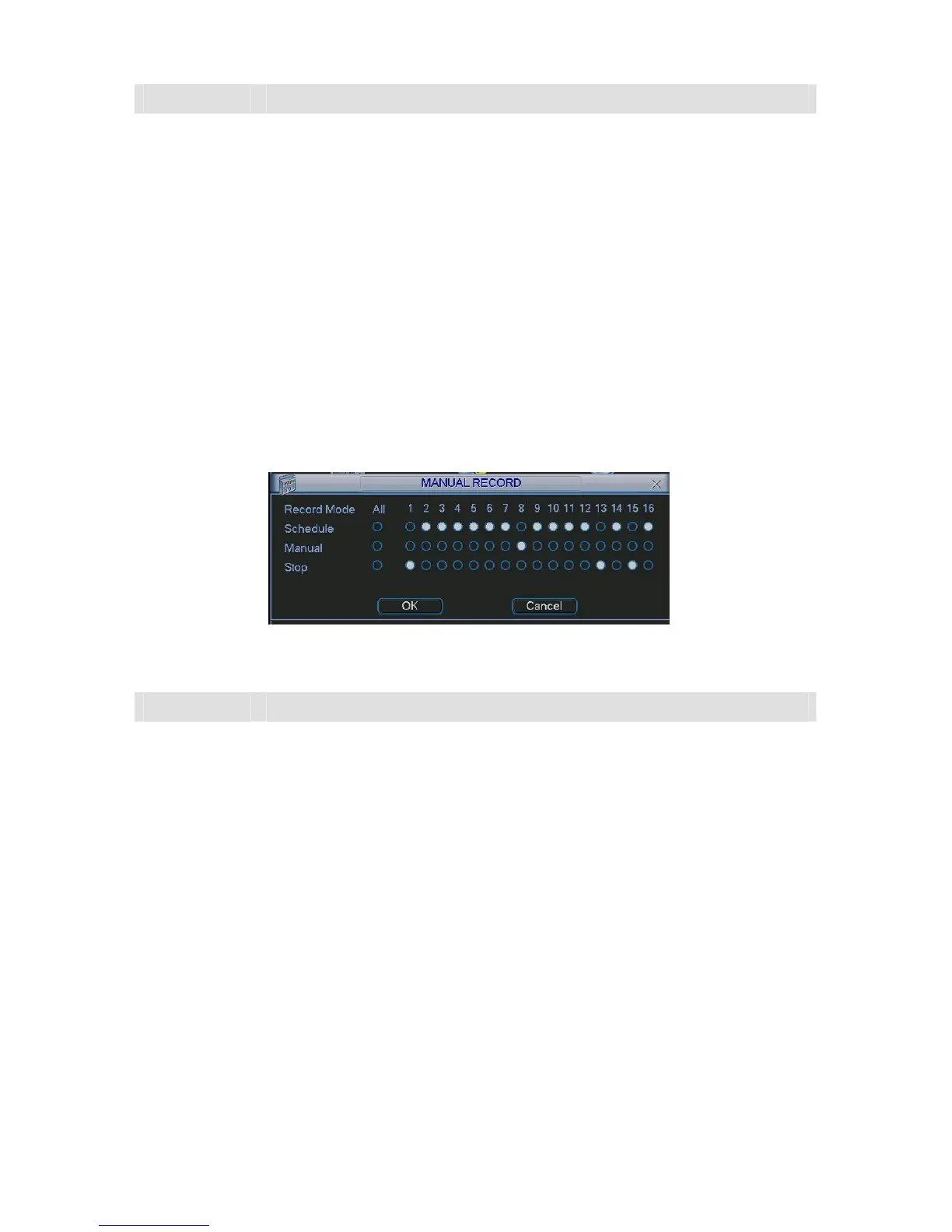
Manual record menu is shown as in
294HFigure 5-39.
There are three statuses: schedule/manual/stop. Please highlight icon “○” to select
corresponding channel.
Figure 5-39
Parameter Function
Record mode There are two record modes: Schedule/manual.
Schedule
The channel records (record period, record type)as you have set in recording
setup (Main Menu->Setting->Schedule)
Manual
The manual record has the highest priority. After manual setup, all selected
channels will begin ordinary recording.
Stop Stop corresponding channel record operation. (Your setup in Schedule is
invalid now.)
5.7.5 Account
Here is for you to implement account management. See 295HFigure 5-40. Here you can:
z Add new user
z Modify user
z Add group
z Modify group
z Modify password.
For account management please note:
z System account adopts two-level management: group and user. No limit to group or user
amount.
z For group or user management, there are two levels: admin and user.



 To Next Page