11-18
11
SET MODE
■ File saving
Memory channel contents, set mode settings, etc. can
be saved into the CF (Compact Flash) memory card or
USB-memory for backup.
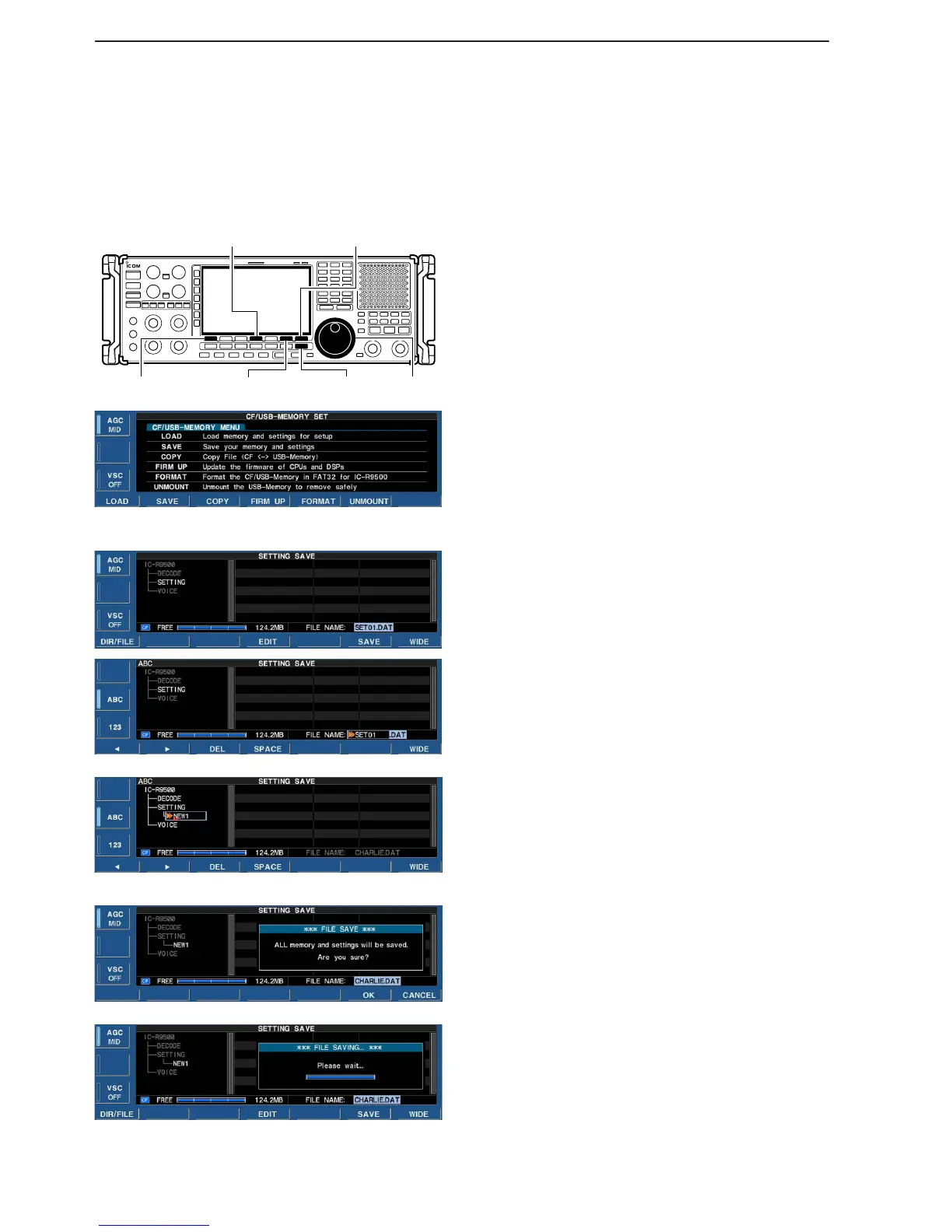
q During set mode menu screen indication, push
[F-7•CF/USB] to select CF/USB-Memory set menu
screen.
w Push [F-2•SAVE] to select setting save screen.
e Change the following conditions if desired.
• File name:
z Push [F-4•EDIT] to select file name edit con-
dition.
• Push [F-1• DIR/FILE] several times to select the
file name, if necessary.
x Push [ABC], [123] or [Symbol] to select the
character group, then rotate the main dial to
select the character.
•Push [123] or [Symbol] to toggle numerals and
symbols.
• [ABC] : A to Z (capital letters); [123]: 0 to 9 (nu-
merals); [Symbol]: ! # $ % & ‘ ` ^ + – = ( ) [ ] { } _ ~
@ can be selected.
• Push [F-1•Ω] to move the cursor left, push [F-2•≈]
to move the cursor right, push [F-3•DEL] to delete
a character and push [F-4•SPACE] to insert a
space.
c Push [EXIT/SET] to set the file name.
• Saving location
z Push [F-1•DIR/FILE] to select tree view
screen.
• Push and hold [F-1•DIR/FILE] for 1 sec. once or
twice to select the CF card or USB-Memory, when
USB memory is Inserted.
x Select the desired directory or folder in the CF
memory card.
• Push [F-4•Ω≈] to select the upper directory.
• Push [F-2•Y] or [F-3•Z] to select folder in the
same directory.
• Push and hold [F-4•Ω≈] for 1 sec. to select a
folder in the directory.
• Push [F-5•REN/DEL] to rename the folder.
• Push and hold [F-5•REN/DEL] for 1 sec. to delete
the folder.
• Push and hold [F-6•MAKE] for 1 sec. to making a
new folder. (Edit the name with the same manner
as the “• File name” above.)
c Push [F-1•DIR/FILE] twice to select the file
name.
r Push [F-6•SAVE].
• Confirmation screen appears.
t Push [F-6•OK] to save.
• After saving is completed, return to CF/USB-Memory set
menu automatically.


 To Next Page