11-19
11
SET MODE
■ File loading
By loading the saved setting file from the CF memory
card or USB-Memory, you can easily set up another
IC-R9500—several operators settings can easily be
applied to one IC-R9500.
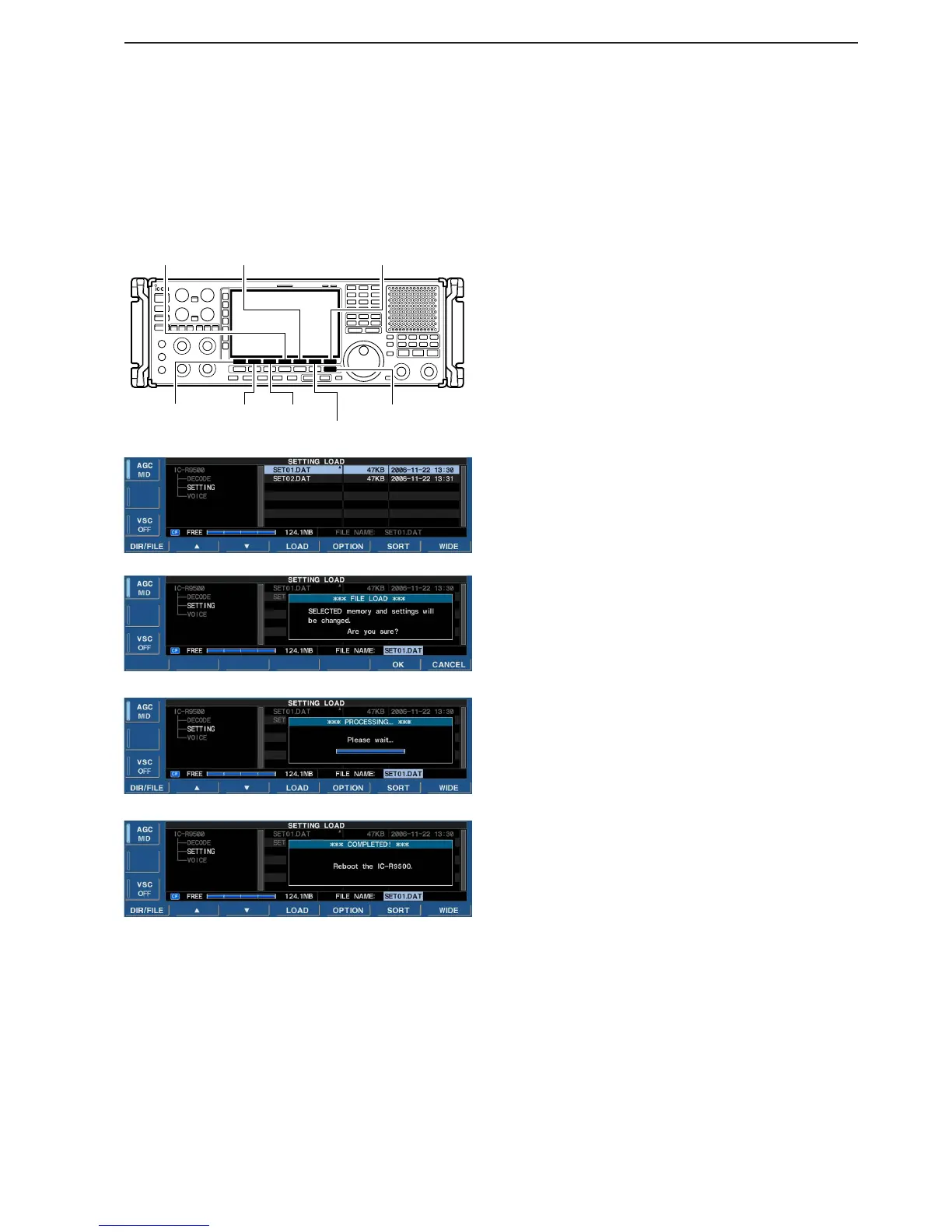
q During set mode menu screen indication, push
[F-7•CF/USB] to select CF/USB-Memory set menu
screen.
w Push [F-1•LOAD] to select setting load screen.
e Push [F-5•OPTION] to select load option set mode,
then set the desired loading conditions, if desired.
• See page 11-17 for details.
r Push and hold [F-1•DIR/FILE] for 1 sec. once or
twice to select the CF card or USB-Memory, when
USB memory is Inserted.
t Push [F-2•Y] or [F-3•Z] to select the desired set-
ting file.
y Push [F-4•LOAD].
• Confirmation screen appears.
u Push [F-6•OK] to starts loading.
• After the loading is completed, the message dialog, “Re-
boot the IC-R9500,” appears.
i Turn the receiver power OFF then ON to make the
setting effective.


 To Next Page