11-22
11
SET MODE
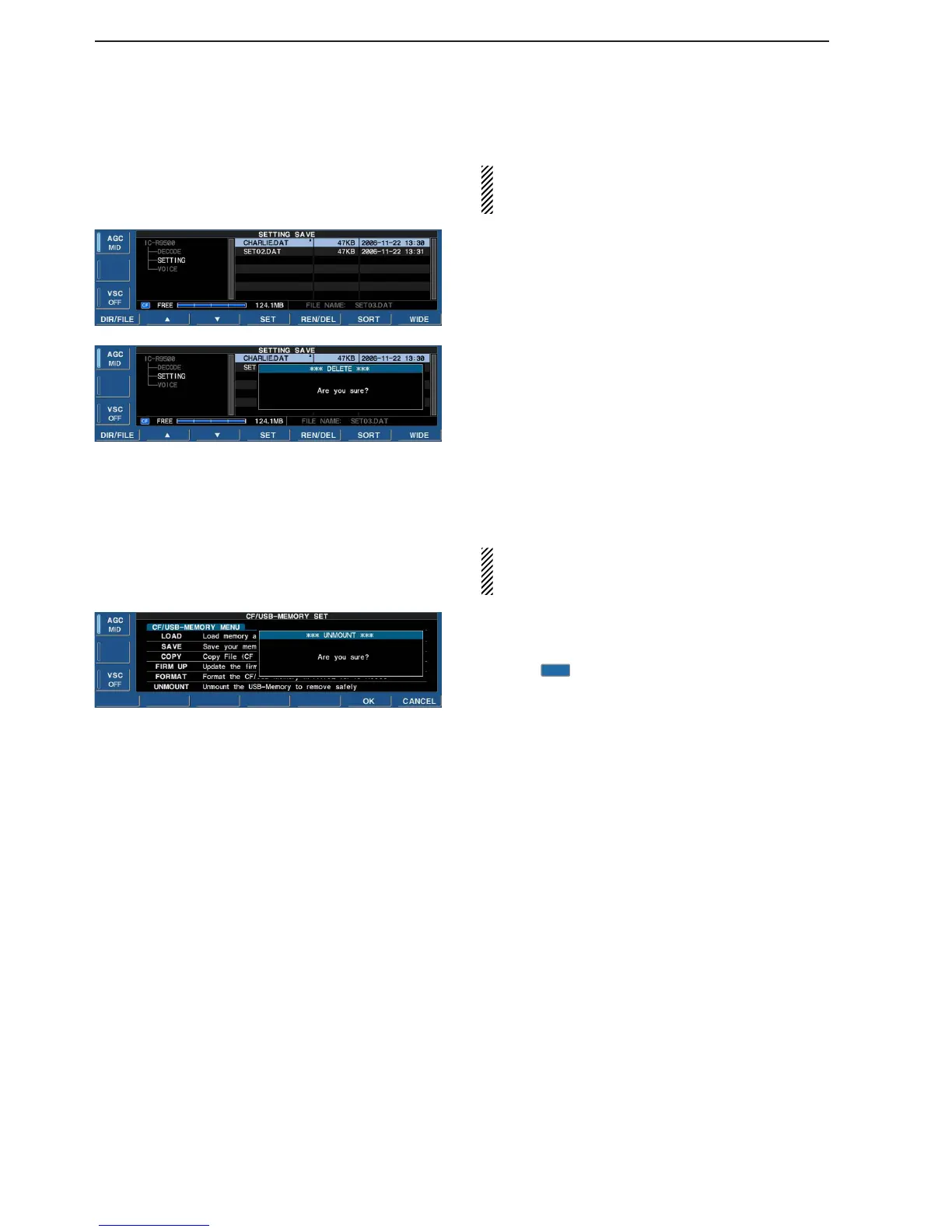
■ Deleting a file
RECOMMENDATION! Deleting the setting file is ir-
reversible. Confirm the contents before deleting a
setting file!
q During setting save screen display, push
[F-1•DIR/FILE] to select tree view screen.
• Push [F-2•Y] or [F-3•Z] to select the desired folder.
• “DECODE,” “SETTING” and “VOICE” folders are avail-
able as the default.
• After the folder is selected, push and hold [F-2•Ω≈] for
1 sec. to display content folder(s), if available.
w Push [F-1•DIR/FILE] to select file list screen.
e Push [F-2•Y] or [F-3•Z] to select the desired file to
be deleted.
r Push and hold [F-5•REN/DEL] for 1 sec.
• Confirmation screen appears.
t Push [F-6•OK] to delete.
• After the deleting, return to setting save screen auto-
matically.
■ Unmount an USB-Memory
CAUTION! When removing the USB-Memory, un-
mount operation is necessary. Unless otherwise in-
side data of USB-Memory may be dameged.
q Push and hold [F-6•UNMOUNT] for 1 sec.
• Confirmation screen appears.
w Push [F-6•OK] to unmount the USB-Memory.
e After “ ” indication disappers, remove the USB-
Memory.


 To Next Page
 Loading...












