12-7
12
MAINTENANCE
■ UT-122 installation
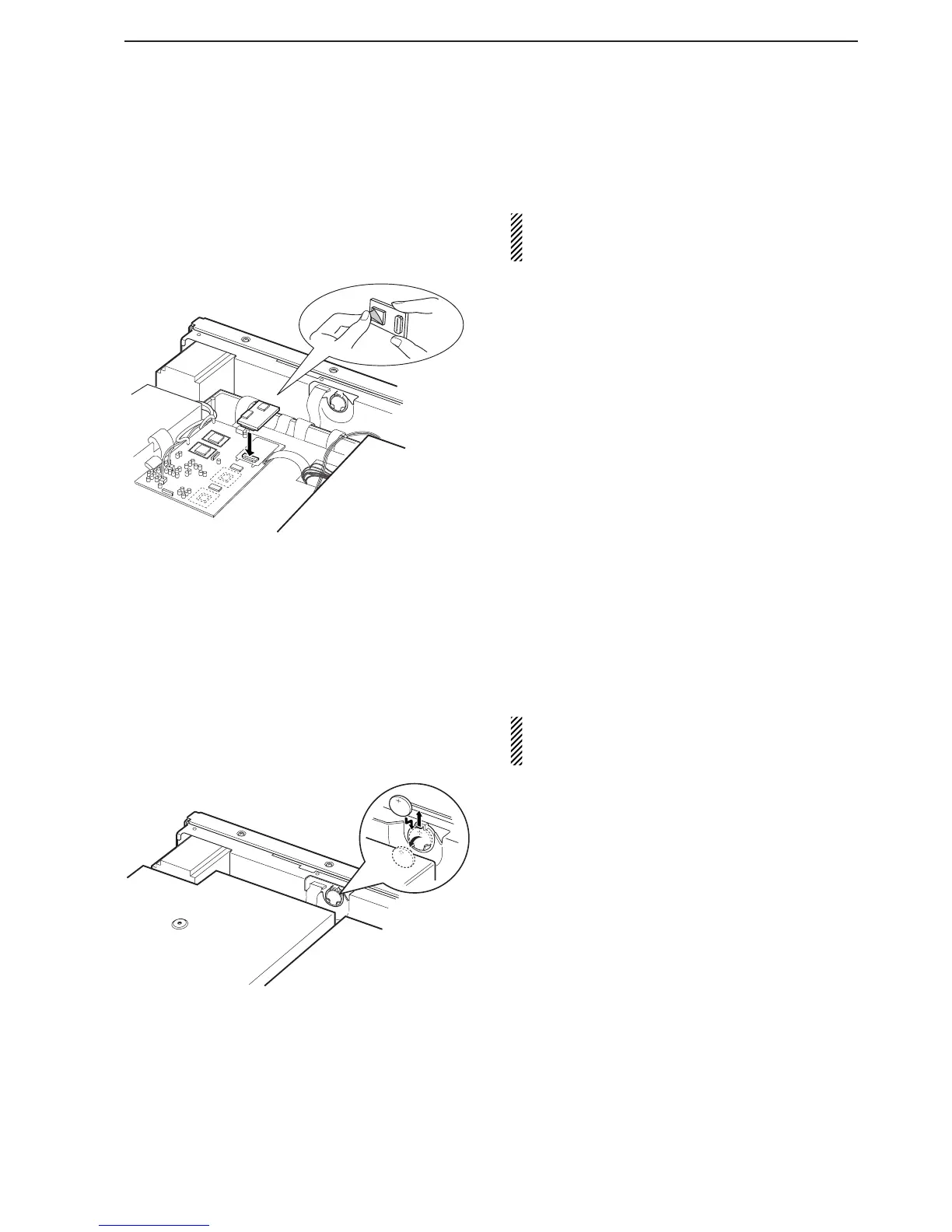
The optional UT-122 DIGITAL UNIT provides P25 (digital)
mode operation.
WARNING: DISCONNECT the AC power cable
from the AC outlet before removing the receiver’s
cover.
q Remove the top cover and inside cover as shown
at left page.
w Connect the UT-122 as shown left.
• Remove the protective paper from the UT-122 in ad-
vance.
e Return the inside cover and top cover and screws
to the original position.
■ Clock backup battery replacement
The IC-R9500 has a lithium backup battery (CR2032)
inside for clock and timer functions. The usual life of
the backup battery is approximately 2 years.
When the backup battery is drained, the receiver re-
ceives normally but cannot retain the current time.
WARNING: DISCONNECT the AC power cable
from the AC outlet before removing the receiver’s
cover.
q Remove the top cover as shown at left page.
w Replace the clock backup battery, located on the
front panel as illustrated at left.
• Make sure the battery polarity is correct.
e Return the top cover to the original position.
r Set the date and time in time set mode. (p. 10-2)


 To Next Page