3.1 Preparation
HDK-99 1803 VER1 (E)
35
3
INSTALLATION and CONNECTION
■
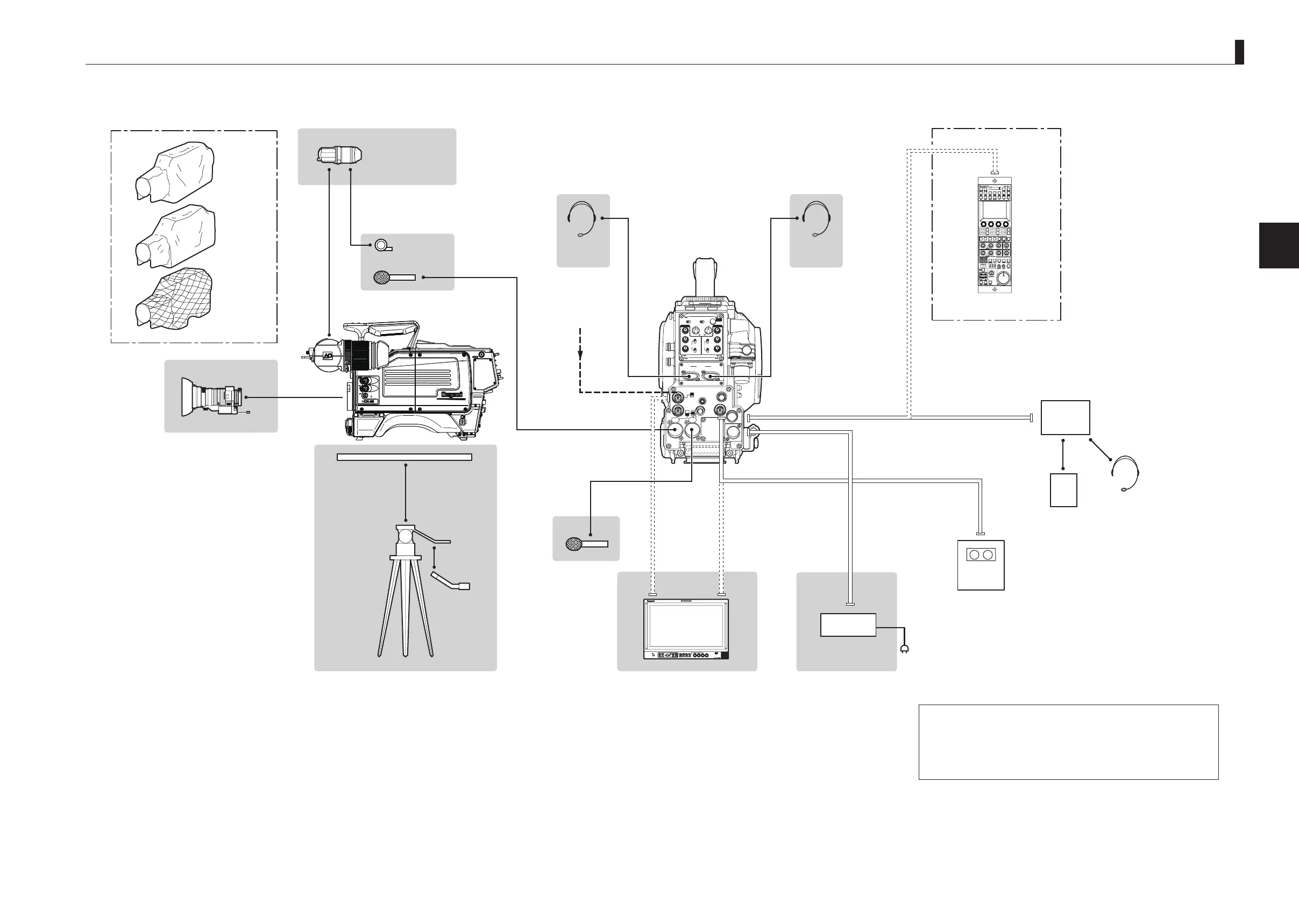
Connection example for Long-Distance Transmission Operation
2
INCOMENG
PROD
INCOMENG
PROD
MIC-1
MIC-2
DC IN
PGM2
PGM1
MIC
ON
OFF
PTT
PROD
BOTH
ENG
MIC
ON
OFF
PTT
PROD
BOTH
ENG
INCOM
PGM2
PGM1
INCOM
REAR TALLYINCOM SEL
CALL
INCOM1 INCOM2
OFFACT
FRONT
REAR
1 RET 2
FRONT
INC1 INC2
1
2
4
3
1
2
4
3
Q-TV/GL
EARPHONE
+12V
OFF
+48V
MON
MON SDI
SDI OUT
I/O
DC OUT
㻻㻲㻲
㻱㼄㼀
㻼㻻㼃㻱㻾
㻭㻯㼀㻵㼂㻱
㻿㼀㻭㻺㻰㻮㼅
㻮㻿㻛㻯㻯㼁
Cover
Dust Proof
Cover
Rain Proof
Cover
Cold Weather
Cover
12Pin
Zoom Lens
Standard VF
2-inch VF (VFL201A)
Mic Holder
MIC-1
Tripod
Headset
(ENG)
Headset
(PROD)
FA-97A
Camera rear
Coaxial Cable
MIC-2
Zoom Remote
Control Box
Tripod Mount Plate
Coaxial Cable
GENLOCK IN
*Note 1
HD RECORDER
Headsets
(PROD/ENG)
RCP-50B
Memory Card
Coaxial Cableto SDI OUT
DC11 to 16V
OCP-300
*Note 4
CP Cable Max. 60m
AC ADAPTER
AC
HDK-99
FA-97A
Note 1 : Only applicable for the self-contained system operation
Note 2 : Selection between Q-TV/GL and MON OUT is made by the switch.
Note 3 : OCP and MCP can be directly connected to the camera only in the
self-contained system operation.
Note 4 : The maximum length of CP cable depends on the OCP. Please
refer to the operation manual of respective OCP.
HD Monitor
(COLOR)
*Note 2
*Note 4
"Mounting and Removing the Viewfinder" (P43)
"Connecting the Headset" (P46)
"Attaching the Microphone" (P45)
"Mounting and Removing the Lens" (P41)
"Mounting/Removing the Camera on/from the Tripod" (P39)
"Connecting Camera and Monitor" (P51)
"Power Supply from AC Adapter" (P47)



 To Next Page