43
HDK-99 1803 VER1 (E)
3
INSTALLATION and CONNECTION
3.2 Camera and Peripheral Installation and Connection
Mounting and Removing the Viewfinder
■
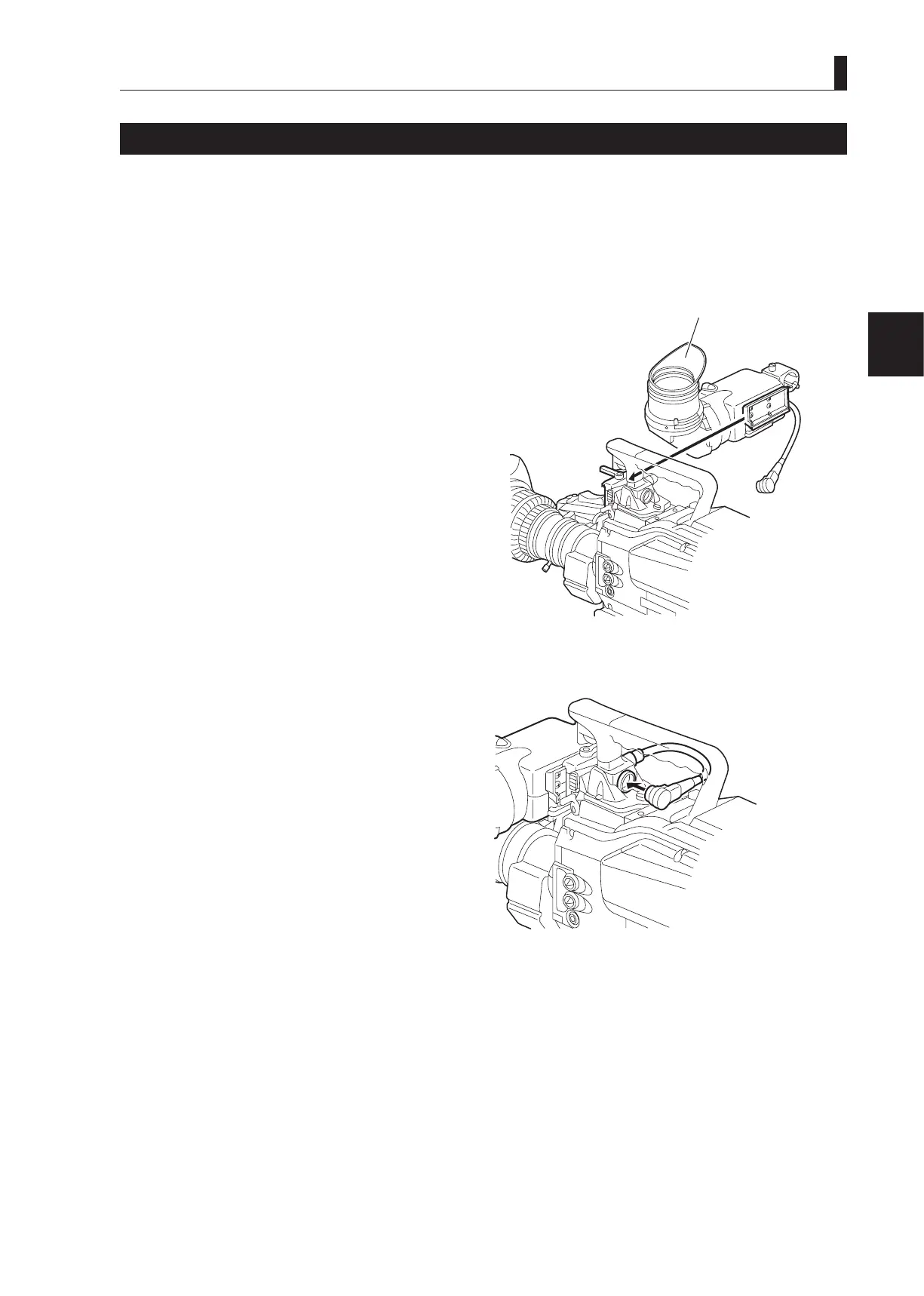
Mounting the Viewfinder
This section explains how to mount the viewnder (VFL201A) to the camera.
1 Make sure the camera power switch is OFF.
If the power switch is set to CCU or EXT, turn it OFF.
2 Tilt the viewfinder eyepiece upward 90 degrees.
3 Set the VF slide lock CCW. Slide the rail on the
rear of the viewfinder into the guide on the front of
the camera from the left-hand side.
Slide the viewnder until it clicks into position. When
the viewnder is locked to the camera by the lock pin,
it clicks.
4 Set the VF slide lock CW to lock the viewfinder in position.
5 Connect the viewfinder cable to the viewfinder
connector on the camera handle.
Align the pins on the viewnder cable with the
viewnder connector and push until the connector lock
button clicks.
CAUTION:
Be careful not to catch your ngers in the lock lever or
guide-rail when attaching the viewnder. Take caution
to avoid injury.
Slide the viewfinder
.
upward 90 degrees.
⑤
Insert the viewfinder cable into
the viewfinder connector.



 To Next Page