46
HDK-99 1803 VER1 (E)
3.2 Camera and Peripheral Installation and Connection
Connecting a Headset
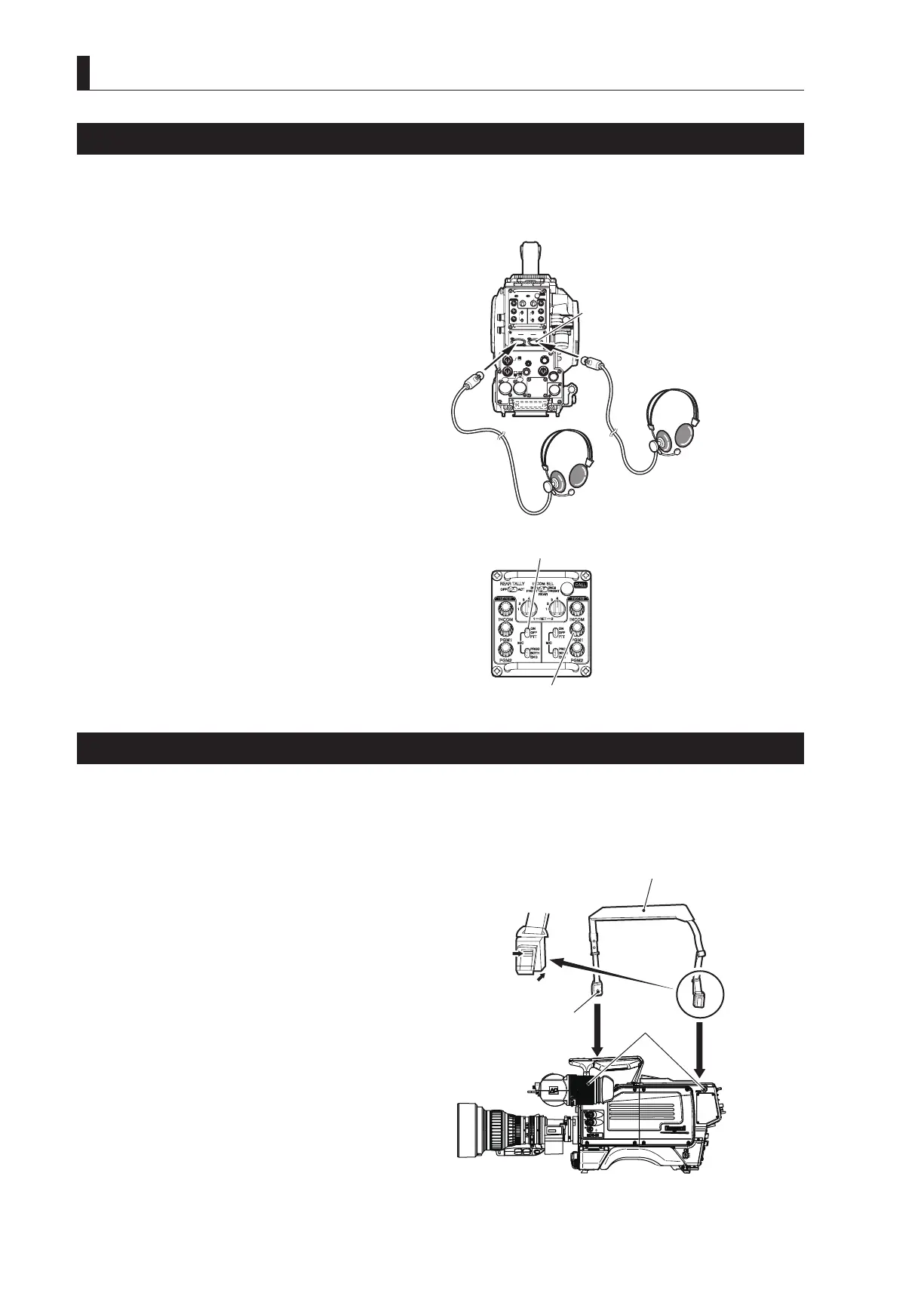
Two intercom headsets (1 and 2) can be connected to the HDK-99. Please select the headset connector depending on the use. This
section explains how to connect using the Intercom 1 headset connector.
1 Plug the headset connector into the INTERCOM-1
connector on the camera.
2 Turn the INTERCOM-1 MIC switch ON.
Note:
The ENG INTERCOM connector and PROD
INTERCOM connector are compatible with the XLR
series connector.
CAUTION:
Do not set the volume of the intercom receiver to
near maximum level from the beginning. Setting the
volume too high with the intercom headset on your ears
may damage your eardrums.
Excessive sound pressure from the headset may cause a
hearing loss.
Reference:
Adjust the volume when the sound from the intercom
receiver is hard to hear or too loud. Refer to
"5.
CAMERA SETTINGS and ADJUSTMENT :
Adjusting Headset Volume" (P75)
for how to
control the intercom volume.
Attaching a Shoulder Belt
■
Attaching a Shoulder Belt
This camera is equipped with the hooks to attach a shoulder belt. Attach or remove the shoulder belt depending on how you use the
camera.
1 Open the attachment by pressing the upper part of
each shoulder belt tab.
2 With the attachment open, align the hole in the
attachment with the hook on the camera and lift
the shoulder belt upward.
Make sure that the shoulder belt attachments are
securely attached to the hooks.
CAUTION:
If the shoulder belt attachments are not securely
attached to the hooks on the camera, the camera may
fall while you are carrying or operating it, resulting in
a damage to the camera or injury to the user.
INCOMENG
PROD
INCOMENG
PROD
MIC-1
MIC-2
DC IN
PGM2
PGM1
MIC
ON
OFF
PTT
PROD
BOTH
ENG
MIC
ON
OFF
PTT
PROD
BOTH
ENG
INCOM
PGM2
PGM1
INCOM
REAR TALLYINCOM SEL
CALL
INCOM1 INCOM2
OFFACT
FRONT
REAR
FRONT
INC1 INC2
1
2
4
3
1
2
4
3
Q-TV/GL
EARPHONE
+12V
OFF
+48V
MON
MON SDI
SDI OUT
I/O
DC OUT
Enlarged figure of
the rear connectors
CAUTION: Ensure that the volume is initially
① Plug the headset connector
INTERCOM connector
② Turn ON
㻻㻲㻲
㻱㼄㼀
㻼㻻㼃㻱㻾
㻭㻯㼀㻵㼂㻱
㻿㼀㻭㻺㻰㻮㼅
㻮㻿㻛㻯㻯㼁
① Open the attachment.
② Attach the shoulder belt.
Attachment will open
Press
Hooks
Hole



 To Next Page