63
HDK-99 1803 VER1 (E)
4
OPERATION
4.5 Output Signal Check
4.5 Output Signal Check
After turning ON the power, ensure that signals are correctly output on the PM and WFM. If the signals are not output for some
reason, check the following before concluding that there is a failure.
- Are the cables properly connected?
- Are the switches correctly set?
- Is the breaker thrown?
- Is the POWER switch set to ON?
Reference:
Refer to
"3. INSTALLATION and CONNECTION" (P31)
for connection of peripheral equipment.
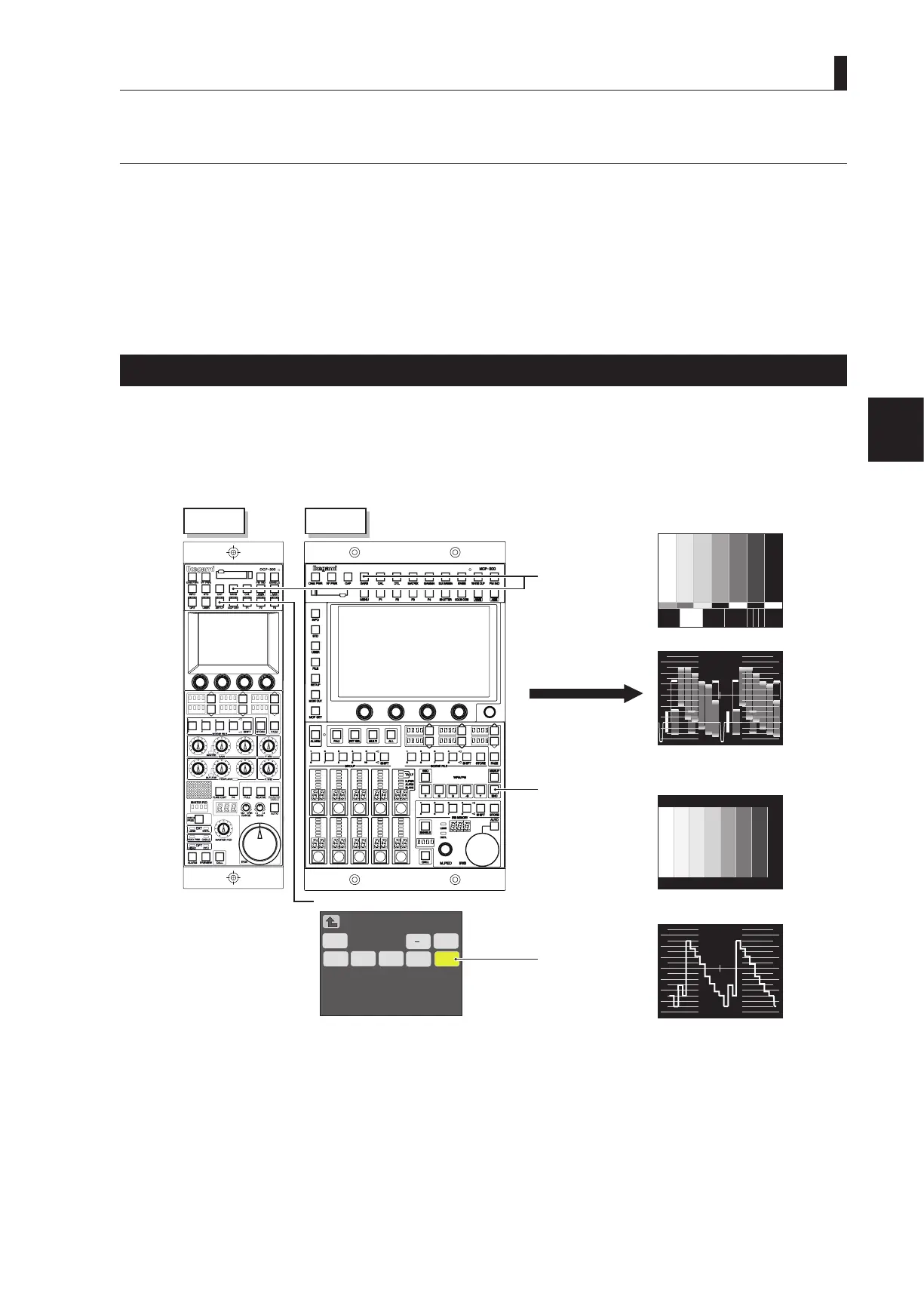
Color-Bar Signal Check
1 Set the BARS button on the OCP or MCP to ON.
Ensure that a normal color-bar signal is output.
To output color-bar signals to the monitor system, operate the MONITOR SELECT button.
2
WFM/PM
SEQ
Super
−G
R
G B
Y
ENC
100%
80%
60%
40%
20%
0%
-20%
100%
80%
60%
40%
20%
0%
-20%
[SDTV]
PM
WFM
[HDTV]
PM
MCP
OCP
MONITOR
SELECT button
"ENC"
"ENC" button
BARS button
"ON"
WFM/PM (Setup 1/2) butto
n
LCD panel



 To Next Page