3.1 Preparation
HDK-99 1803 VER1 (E)
37
3
INSTALLATION and CONNECTION
■
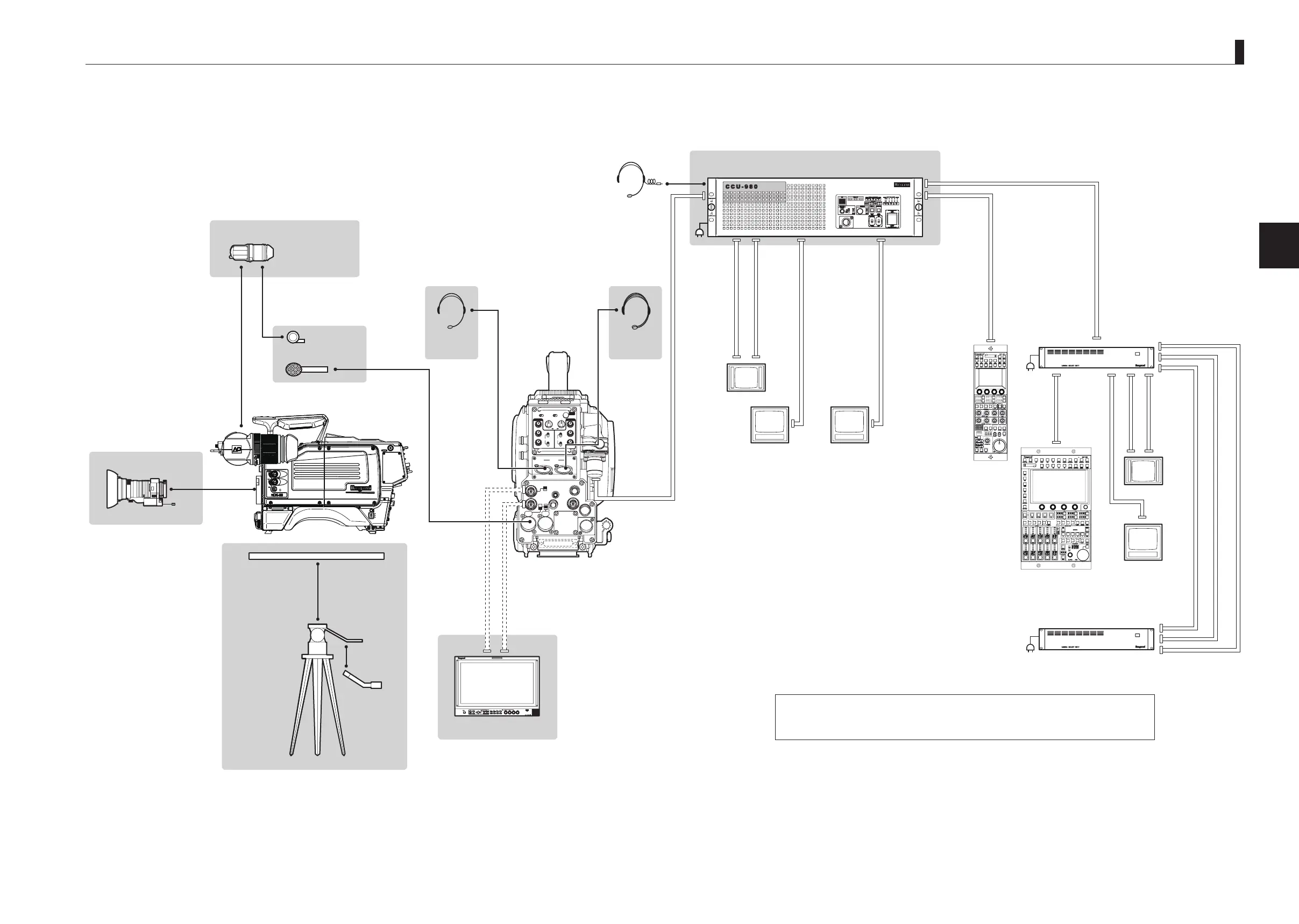
Connection Example for Studio Operation (Using CCU-980)
For how to connect a PM, WFM, OCP, MCP or CSU which is to be connected to CCU-980, refer to the instruction manuals attached to each equipment.
2
㻻㻲㻲
㻱㼄㼀
㻼㻻㼃㻱㻾
㻭㻯㼀㻵㼂㻱
㻿㼀㻭㻺㻰㻮㼅
㻮㻿㻛㻯㻯㼁
INCOMENG
PROD
INCOMENG
PROD
MIC-1
MIC-2
DC IN
PGM2
PGM1
MIC
ON
OFF
PTT
PROD
BOTH
ENG
MIC
ON
OFF
PTT
PROD
BOTH
ENG
INCOM
PGM2
PGM1
INCOM
REAR TALLYINCOM SEL
CALL
INCOM1 INCOM2
OFFACT
FRONT
REAR
1 RET 2
FRONT
INC1 INC2
1
2
4
3
1
2
4
3
Q-TV/GL
EARPHONE
+12V
OFF
+48V
MON
MON SDI
SDI OUT
I/O
DC OUT
Note 1 : Selection between Q-TV/GL and MON OUT is made by the switch.
Note 2 : If OCP-300 is used, the maximum length of CP cable is 80m.
Note 3 : If MCP-300 is used, the maximum length of MCP cable is 10m.
Standard VF
2-inch VF (VFL201A)
Headset
(ENG)
Mic Holder
MIC-1
Headset
(PROD)
FA-97A
Camera rear
Headsets
12Pin
Zoom Lens
Tripod
Tripod Mount Plate
Coaxial Cable
Coaxial Cable
Zoom Remote
Control Box
Fiber Cable Max.3000m
NTSC
HDTV
CCU-980
Camera Control Unit
OCP-300
*Note 2
CP Cable Max. 80m
*Note 2
WFM Cont Cable Max. 5m
Coaxial Cable
Coaxial Cable
CP Cable Max. 300m
Coaxial Cable
PM
WFM
PM
CSU-1
CSU-2
MCP Cable Max. 30m
Coaxial Cable Max. 35m
Coaxial Cable Max. 35m
AC
Coaxial Cable
Coaxial Cable
WFM Cont Cable
MCP Cable
Max. 10m
AC
AC
WFM
NTSC
PM
MCP-300
*Note 3
HDK-99
FA-97A
HD Monitor
(COLOR)
*Note 1
"Connecting Camera and CCU" (P52)
"Power Supply from CCU" (P48)
"Mounting and Removing the Viewfinder" (P43)
"Connecting the Headset" (P46)
"Attaching the Microphone" (P45)
"Mounting and Removing the Lens" (P41)
"Connecting Camera and Monitor" (P51)
"Mounting/Removing the Camera on/from the Tripod" (P39)



 To Next Page