SD1 Series Inverters Fault Tracking
-105-
operated in a critical part of a process, fan replacement is recommended once these
symptoms appear. Replacement fans are available from IMO.
Read and follow the instructions in Chapter 1 "Safety Precautions
".
Ignoring the instructions would cause physical injury or death, or damage
1. Stop the inverter and disconnect it from the AC power source and wait for at least the time
designated on the inverter.
2. Lever the fan holder off the drive frame with a screwdriver and lift the hinged fan holder
slightly upward from its front edge.
3. Disconnect the fan cable. Remove the installation bracket.
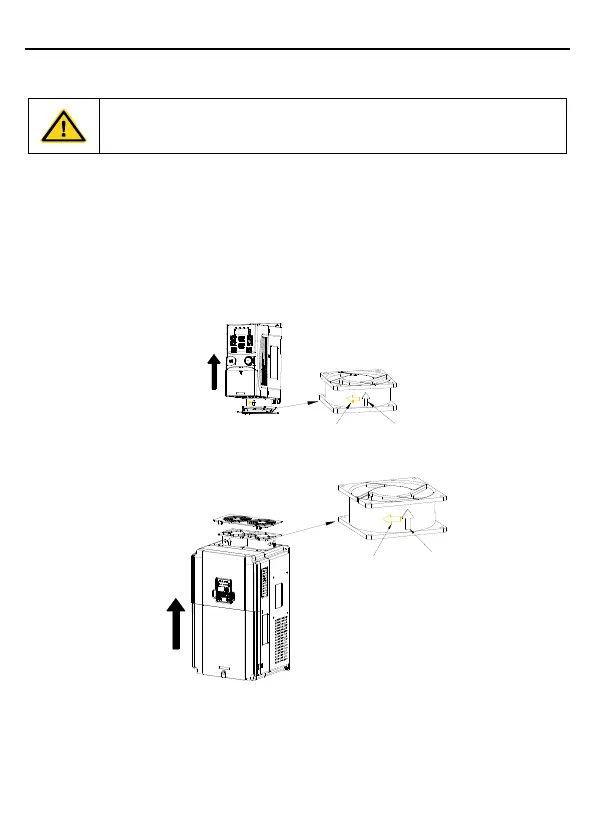
4. Install the bracket to the reversed direction. Pay attention the air direction of the inverter
and the fan as the figure below:
Rotation
direction
Air direction
Air direction
Figure 6-1 Fan installation of the inverters 1PH, 230V, ≤2.2kW
Air direction
Air direction
Rotation
direction
Figure 6-2 Fan installation of the inverters 3PH, 400V, ≥4kW
6.1.3 Capacitor
6.1.3.1 Capacitor reforming
If the inverter has been left unused for a long time, you need to follow the instructions to reform
the DC bus capacitor before using it. The storage time is calculated from the date the inverter



 To Next Page